Toontrack EZmix Bundle 3.2.2 — download for Mac
VST Plugins Updated
Processes any track with one click by loading pre-built chains of EQ, compression, and effects.
Screenshot
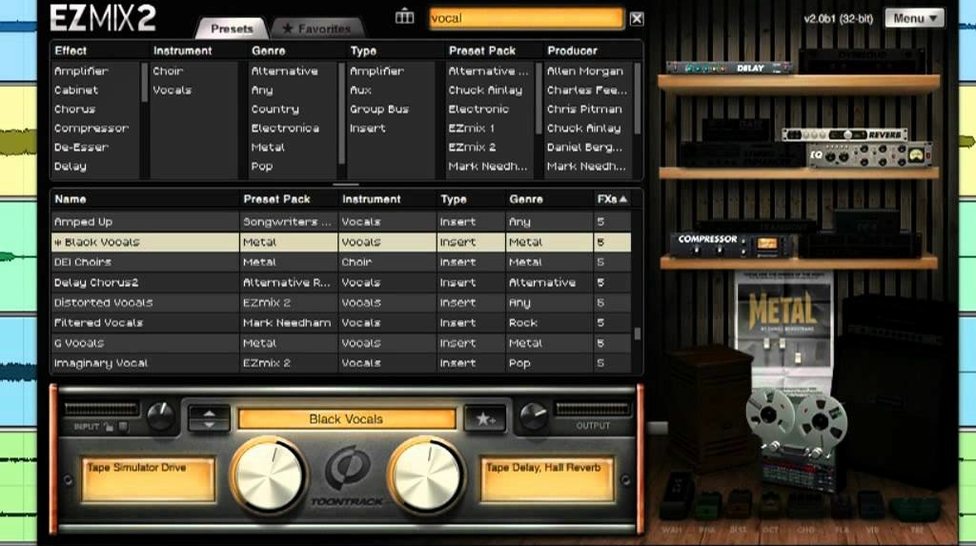
Mixing can eat up your afternoon when every track needs its own chain of EQ, compression, and effects. EZmix cuts that down to one step: insert it on a channel strip, pick a preset, and the audio is processed. The redesigned interface keeps the workflow fast.
- Presets for drums, vocals, guitar, bass, and keyboards
- Professionally designed effect chains based on real recording sessions
- Retains all previous EZmix functionality and content
- Includes an independent host for guitar practice with amp and cabinet simulations
- Adds mastering-based presets, new reverb algorithms, and amp/cab simulations
- Runs on Intel and Apple Silicon Macs
EZmix vs. iZotope Neutron and Waves on Mac
EZmix occupies a specific corner of the mixing world — it is not a full mixer or a DAW, and it does not try to replace your existing plugin collection. The closest alternatives on Mac are iZotope Neutron and Waves PRS SuperModels, each with a different angle.
iZotope Neutron uses an assistant-driven approach. It listens to your track and suggests a starting mix based on what it hears. That is useful when you have no idea where to begin, but it requires you to install an extra app, create an account, and let it scan your session. EZmix skips the scanning and the account — you drop it on the channel, scroll through presets, and move on. Neutron is more surgical; EZmix is more about speed and consistency.
Waves PRS SuperModels focuses entirely on guitar and bass cabinet emulation. It sounds excellent for those two tasks, but it does nothing for drums, vocals, keys, or mastering. EZmix covers those areas in the same window. If you only need guitar tones, SuperModels may be enough. If you manage a full session, EZmix removes the need to open a second plugin for each instrument type.
Toontrack's own Superior Drummer is not a direct competitor, but many users pair it with EZmix. Superior Drummer gives you the raw drum performance; EZmix handles the mix treatment with drum-specific presets. The two complement each other well in a metal or rock workflow.
Solo Producers and Home-Studio Engineers
- Solo producers and home-studio engineers who want a finished mix without spending hours on channel EQ curves. EZmix gives them a starting point that already sounds balanced.
- The independent host works as a standalone practice tool — plug in, select a preset, play.
- Songwriters who write in a DAW but are not confident in mixing. They can focus on the arrangement and let the presets handle tonal balance.
- Mix engineers on deadline who work with templates but need a fast way to audition different mix treatments on a specific track without building a chain from scratch.
Cycle Presets on One Instrument to Learn the Sound
- Start with one instrument type. Open a track with a single instrument — say, a vocal or a snare — and cycle through the full list of presets for that category. Listen for what each preset does to the attack and the body. This builds a mental map of the library faster than jumping between categories.
- Use the independent host for guitar. Before you load EZmix into a DAW session, open the standalone host, plug in your instrument, and test a few amp presets. That gives you a sense of the amp and cabinet simulations without the overhead of a full project file.
- Keep a notes file or a physical notebook. As you find a preset that works on a specific source — for example, a dark vocal track — write down its name and why you chose it. After a few sessions you will have a personal reference guide for future mixes.
- Layer presets cautiously. EZmix is designed to be used one instance per channel. If you stack two instances on the same track, the combined processing can push the sound too far. Adjust the output level on the first instance before adding a second.
Fix Over-Processed Presets with Proper Input Levels
Snag: Presets sound too processed or artificial on my track.
The presets are designed for a wide range of sources, but they assume a balanced input level. If your recording is unusually quiet or clipped, the effect chain reacts differently. Turn down the input gain on the channel strip by 3–6 dB, then re-select the preset. If it still sounds wrong, pick a simpler preset — fewer stages in the chain — and build from there.
Snag: The standalone host does not recognize my interface or my instrument.
Check that your audio interface is selected in the host's audio device settings, not in your system audio preferences. If you are using a USB microphone, the host may not see it; try using a standard audio interface with a ¼-inch instrument input. Also confirm that the input gain on the interface is high enough to register a signal on the host's meter.
Snag: I cannot find a specific preset from an older EZmix pack.
Version 3.2.2 requires the latest EZmix packs to work correctly. If you are using a pack released before Q4 2025, the preset should still appear in the browser — but if it does not, open the Toontrack Product Manager, check that the pack is installed, and verify that it is compatible with EZmix 3. If you have an older pack that only works with EZmix 2, you can keep EZmix 2 installed alongside version 3 to access both libraries.
Snag: The plugin crashes my DAW when I scan for new presets.
This usually happens when a preset file is corrupted or incomplete. Close the DAW, navigate to the preset folder (usually in Documents/Toontrack/EZmix/Presets), and remove or rename any presets you added manually. Then re-scan. If the crash persists, reinstall EZmix 3.2.2 from the disk image — the installation process replaces all stock presets with clean copies.
For a project studio or a guitarist who wants quick tones, EZmix is a practical shortcut.
- Support for EZmix packs released from Q4 2025 onward requires version 3.2.2.
| macOS | macOS 10.13 or later |
|---|---|
| Processor | Apple Silicon, Intel 64-bit |
| Download | 977 MB |
- macOS 10.13 or later
- Apple Silicon or Intel processor
- Interface language: English
Questions about Toontrack EZmix Bundle
Does EZmix work on Apple Silicon Macs?
Yes, the Mac version supports both Intel and Apple Silicon processors.
What instruments does EZmix cover?
It includes presets for drums, vocals, guitar, bass, and keyboards.
How to install, in order
- Mount the downloaded disk image.
- Run the standard installation procedure.
Comments and corrections 0
Sign in or open a free account to leave a comment.
No comments or corrections yet.