UJAM Symphonic Elements STRIIIINGS 1.3.1 — download for Mac
VST Plugins Updated
Layers low basses and high violins for documentary cues.
Screenshot
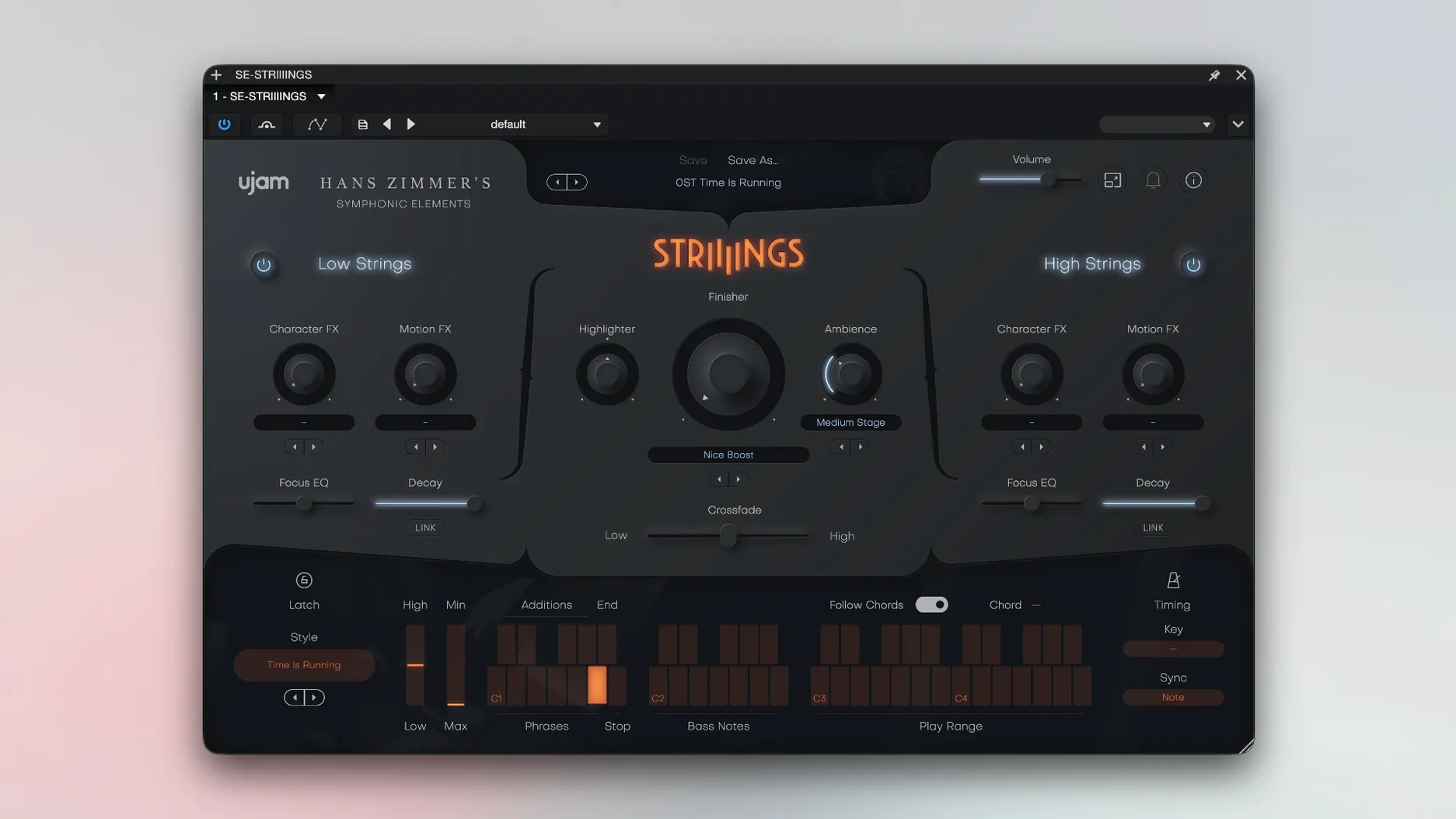
You are layering a cue for a documentary sequence — low basses and celli need weight, and the violins need an airy texture that doesn't overpower the dialogue. UJAM Symphonic Elements STRIIIINGS gives you that out of the box: two distinct sections (Low Strings for basses/celli, High Strings for violins/violas) with a Crossfade control to blend them in real time. The sound comes from recordings of Hans Zimmer’s string library, sampled and shaped into a modern orchestral instrument.
| Detail | Spec |
|---|---|
| Version | 1.3.1 |
| Format | AU, VST (64-bit only) |
| macOS | 10.14 or later |
| RAM | 4 GB minimum |
| Architecture | Intel & Apple Silicon |
| Language | English |
The instrument ships with over 200 sound designer presets, many of which push into abstract, cinematic territory — useful when you need a pad that isn’t just a pad. A single session can move from a conventional sustains to warped textures using the same core samples. STRIIIINGS is a dedicated textural instrument, not a general-purpose string library. In an office where deadlines come from video editors or post houses, it saves time because you don’t spend hours layering and processing to get a usable film-ready tone.
Blend Low and High Strings with Crossfade
Start with the Crossfade control. Many users leave it dead center and never touch it, but the instrument is built around that blend. If you want the Low Strings to carry the weight while the High Strings just color the top end, pull the crossfade toward the low side. The opposite goes for airy textures that need only a hint of body. Set this before you start browsing presets — every style sounds different depending on where the blend sits.
The second adjustment is the Stereo Width. It isn’t labeled as a main control, but the plug-in gives you enough stereo field to push sections apart. Narrow it when the strings sit behind a voiceover. Widen it for a standalone scene cue. Do this early in your session, not after you have already mixed the reverb.
Third, check the velocity sensitivity. The instrument responds to note velocity, and a flat MIDI keyboard can make everything sound uniform. Nudge velocities up on accented notes and drop them on sustained passages. This one step makes Low Strings sound more like a real section and less like a single sample player.
Browse by Mood, Not by Key
The presets are grouped by character rather than by key. That means you can audition a “Stranger Things” style or a “War Drums” style without knowing what key the original recording was in. Browse by mood, not by root note.
- The Low Strings and High Strings sections can be silenced independently. If a cue calls for basses only, you can mute the High Strings layer entirely. This is built into the section controls.
- The 60 styles include a mix of sustains and rhythmic patterns. Some styles are designed to be looped, and the instrument handles the transition cleanly. You do not need to edit the sample end.
- Presets load quickly. There is no long sample preload when switching between styles in the same session.
- The plug-in’s interface shows the current style name clearly. When you find one that works, write it down — there is no search function inside the browser, so a notepad or a clipboard helps during long sessions.
Workflow: Building a Documentary Cue From Scratch
This is a repeatable process for a two-minute scene that needs weight and a slow build.
- Start with a low drone. Load a Low Strings preset from the “Sustain” category. Keep the Crossfade control pulled all the way into Low Strings. Play a single note in the lower octave — C2 or D2 works. Hold it for the first 16 bars.
- Introduce High Strings at bar 17. Bring the Crossfade toward the center slowly. Do not jump it. The High Strings layer adds a thin, airy texture if you use a “Texture” or “Air” style. Let the blend move over four bars.
- Add a rhythmic element at bar 25. Switch the Low Strings style to a rhythmic pattern. The 60 styles include several that pulse or bow in short strokes. Keep the High Strings on a long sustain. The two layers now contrast without clashing.
- Reduce High Strings for the peak. At the scene’s climax, pull the Crossfade back into Low Strings. The high texture drops out and the low section sounds bigger by comparison. This creates a dynamic arc without any MIDI volume automation.
- End with a fade-out. Drop the mod wheel or expression controller gradually over the last eight bars. The release tails from the samples are long enough to sound natural.
This entire cue can be programmed in under ten minutes. The hard part is choosing the right style pair.
Avoid Seasick Mixes from Overusing Crossfade
Overusing the Crossfade. The blend is powerful, but moving it constantly makes the mix sound seasick. Decide on one or two blend positions per cue and commit to them.
Ignoring the Low Strings section. The high layer is more immediately interesting — it has the textures and the unusual timbres. But the real body of the instrument comes from the basses and celli. If the cue sounds thin, the Low Strings are probably muted or set too quiet.
Loading too many presets. With 200 presets, it is easy to cycle through them and never finish a cue. Pick one style per section, adjust the blend, and write the part. Preset surfing is the fastest way to an empty timeline.
Forgetting to double-click. The plug-in requires you to open it twice the first time you launch it. If the interface does not appear on the first attempt, close it and open it again. This is not a bug — it is part of the activation handshake. After that, it opens normally.
Treating it like a general-purpose string library. STRIIIINGS is designed for cinematic textures and sound design. It is not a replacement for a detailed solo string instrument or a standard orchestral section. If you try to write fast, articulate runs, the results will feel sample-based. Use it for sustained layers, pads, and rhythmic sweeps, and it works as intended.
No release notes filed for 1.3.1. They are added here when a build changes how the program behaves.
| macOS | macOS 10.14 or later |
|---|---|
| Processor | Apple Silicon, Intel 64-bit |
| Download | 4.4 GB |
- macOS 10.14 or later
- Intel or Apple Silicon
- 4 GB RAM
- 64-bit software only
- AU or VST host
Questions about UJAM Symphonic Elements STRIIIINGS
What are the minimum system requirements for UJAM Symphonic Elements STRIIIINGS?
It requires macOS 10.14 or later, 4 GB of RAM, and works with 64-bit software only. It runs on both Intel and Apple Silicon Macs.
How to install, in order
- Install the plug-in following the instructions included in the package.
- Open the plug-in twice the first time you launch it to complete activation.
Comments and corrections 0
Sign in or open a free account to leave a comment.
No comments or corrections yet.