T-RackS 6.3.2 — download for Mac
VST Plugins Updated
Processes audio as a standalone mastering console or inside a DAW.
Screenshot
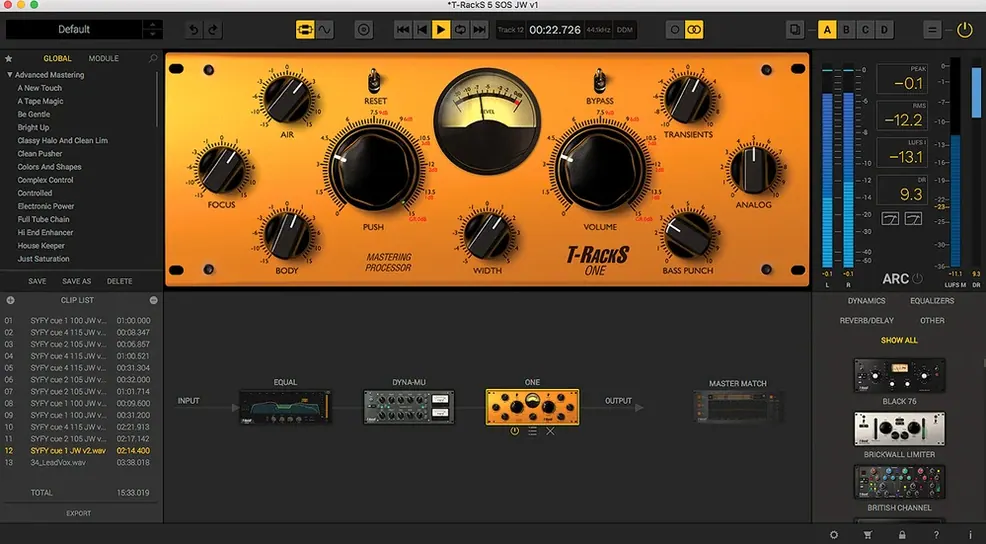
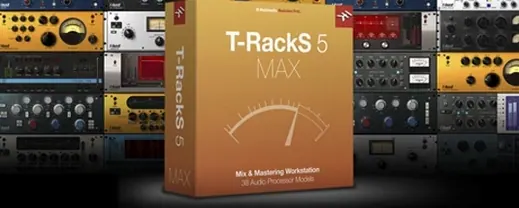
The current version, 6.3.2, brings four new processors — Master Match, Dyna-Mu, EQual, and ONE — plus a redesigned interface and a new Module Manager. T-RackS works as a standalone Mastering Console or as plug-ins inside your DAW, so it fits both quick mixes and full mastering sessions.
- Runs on macOS 10.15 and later, supports Apple Silicon and Intel 64-bit Macs
- 64-bit only; floating-point processing up to 192 kHz and 32-bit
- Includes 9 processors total; can export in multiple file formats
- Standard installation — download and run the installer
- Interface language: English
If you work with mixing or mastering in a DAW and want a modular toolchain that can also run standalone, T-RackS covers both without forcing you into one mode. The new processors address common finishing tasks directly.
Module Manager Finds and Loads Processors Fast
The new Module Manager is one of those features you might skip at first glance, but it saves time once you have a handful of plug-ins loaded. It lets you browse, load, and organize processors without digging through folder menus each time. If you often swap compressors or EQs between sessions, this cuts a few clicks per change.
Master Match X, one of the four new processors, does more than its name suggests. It can analyze a reference track and apply its spectral balance to your mix. This is useful when you are matching a client's reference or trying to get a consistent tonal profile across an album. It is not a "set and forget" tool, but it gives you a starting point that would otherwise take several rounds of EQ adjustment.
The redesigned graphical interface is worth mentioning. It is not just a visual update — the layout groups controls more logically, so you spend less time hunting for parameters. The metering is clearer too, which matters when you are making small gain or EQ moves.
Album assembly with sequencing and metadata embedding is a convenience that mastering engineers will notice. Instead of arranging tracks in a separate audio editor, you can order them, set gaps, and write metadata directly in T-RackS. When you export, the files come out ready for distribution platforms or CD burning.
Works in Any DAW or as Standalone Console
Do I need a specific DAW to use T-RackS?
No. T-RackS works as individual plug-ins in any DAW that supports Audio Units, VST 3, or AAX formats. It also runs as a standalone Mastering Console, so you can use it without a DAW at all. If your DAW accepts one of those three formats, you are covered.
Can I run T-RackS alongside other plug-in suites?
Yes. The plug-ins install as separate formats, so they appear in your DAW's plug-in list like any other processor. There is no conflict with other IK Multimedia products or third-party plug-ins. The Module Manager only handles T-RackS processors, so it stays separate from your DAW's own browser.
Will it work on a Mac with Apple Silicon?
Yes. T-RackS 6.3.2 supports both Intel 64-bit and Apple Silicon Macs. The installer includes the appropriate binary, so there is no extra step. macOS 10.15 Catalina is the minimum, but it runs on newer versions too.
How many processors can I chain in one session?
The modular chain offers 16 serial or parallel slots. That is more than enough for a full mastering chain — EQ, compression, limiting, dithering — with room for parallel processing on specific bands or mixes.
Is there a dithering option?
Yes. T-RackS includes four dithering options that you select manually. This lets you choose the noise shaping and bit-depth reduction that fits your delivery format, whether it is 16-bit for CD or 24-bit for streaming.
Runs on macOS 10.15 or Later, Intel and Apple Silicon
Based on the requirements, T-RackS 6.3.2 needs a 64-bit CPU and a 64-bit operating system. It runs on macOS 10.15 Catalina or later on both Apple Silicon and Intel Macs. The software is 64-bit only, so it will use your system's memory and processing resources as needed for floating-point calculations up to 192 kHz and 32-bit.
Floating-point processing at higher sample rates means the plug-ins can handle detailed audio without rounding errors, but it also means your Mac will work harder at 192 kHz than at 44.1 kHz. If you are running a full mastering chain with several processors, expect the CPU load to scale with the sample rate and the number of active modules.
The standalone Mastering Console runs as its own application, so it does not depend on a DAW. This is useful for final mastering sessions where you want to avoid DAW overhead. When used as plug-ins inside a DAW, the load depends on your session size and the number of instances.
The installer is a standard application — download the file, run it, and follow the prompts. No special configuration is needed beyond a typical software install.
Start with Standalone Console and the Four New Processors
Start with the standalone Mastering Console before loading plug-ins in your DAW. Open it, load a mix, and try the four new processors — Master Match, Dyna-Mu, EQual, and ONE — one at a time. This gives you a feel for each processor's character without the distraction of your DAW's interface.
Use the Module Manager to create a few presets for common tasks. For example, set up a chain for bus compression, a separate chain for EQ shaping, and another for final limiting. Save each as a module preset. Later, you can load them into your DAW sessions with one click.
Experiment with the 16 serial and parallel slots early. Parallel processing is useful for adding punch without crushing the dynamic range. Insert a compressor in parallel on a drum bus or a vocal bus and adjust the mix percentage until it sits right.
When exporting, use the multi-format file export to create multiple versions of the same master in one pass. This saves time if you need a 16-bit WAV for CD, a 24-bit WAV for streaming, and a high-res version for archiving. The album assembly feature also lets you set track order and metadata before export, so you do not have to tag files afterward.
If you work with reference tracks, open Master Match X early in the session. Load your reference, let it analyze, and then adjust the match strength to taste. The result is often close enough that only minor EQ and level tweaks remain — much faster than matching by ear from scratch.
No release notes filed for 6.3.2. They are added here when a build changes how the program behaves.
| macOS | macOS 10.15 or later |
|---|---|
| Processor | Apple Silicon, Intel 64-bit |
| Download | 2.3 GB |
- macOS 10.15 Catalina or later
- 64-bit CPU
- 64-bit operating system
- Apple Silicon or Intel processor
Questions about T-RackS
Can T-RackS run as a standalone application?
Yes. You can use it as a standalone Mastering Console or as plug-ins inside a DAW.
Does it support Apple Silicon Macs?
Yes, version 6.3.2 supports both Apple Silicon and Intel 64-bit Macs running macOS 10.15 or later.
How to install, in order
- Download the file.
- Run the standard installation procedure.
Comments and corrections 0
Sign in or open a free account to leave a comment.
No comments or corrections yet.