UJAM Beatmaker VICE 2.4.0 — download for Mac
VST Plugins Updated
Plays retro drum sounds from Linn, Roland, Simmons, and Korg machines.
Screenshot
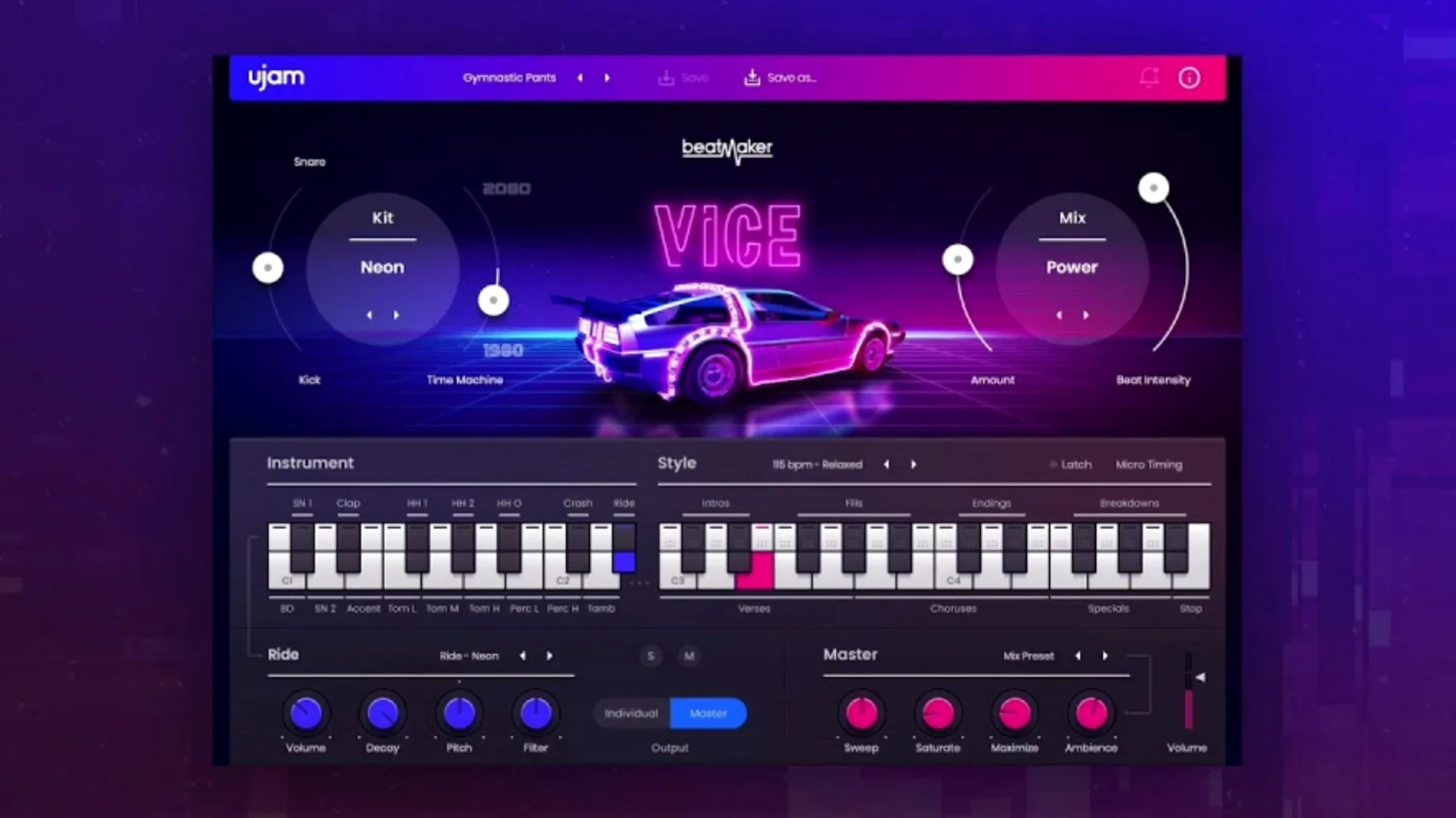
A producer building a retro synthwave or 1980s-inspired track reaches for UJAM Beatmaker VICE. This drum plugin covers the Linn, Roland, Simmons, and Korg machines that defined that decade, with sounds processed through modern production methods. It runs as a VST 2, VST 3, AAX, or AU 2 plugin in any major DAW — Logic Pro, Ableton Live, Pro Tools, FL Studio, Cubase, Studio One, Bitwig, Reaper, or Reason.
First Thing: Dial in the Time Machine
The Time Machine control is the quickest way to shift the character of a beat. Turn it left for a drier, more authentic 1980s tape feel; turn it right for a polished, modern punch. Start a pattern, move the knob, and hear the difference in under ten seconds. That one control tells you whether the preset works for your track or needs swapping.
Second Thing: Resize the Interface and Browse Kits
Resize the plugin window to fit your screen — it scales cleanly without clipping. Then click through the kit presets. Each one loads a different vintage drum machine sound, from the Linn LM-1 to the Roland TR-808. Pick a preset that matches your tempo and style, then adjust the mix. The rest of the controls become intuitive once you hear what each kit does.
Plugin-Only: No Standalone Mode
People often ask whether Beatmaker VICE works as a standalone application or strictly as a plugin. It is a plugin — it loads inside a DAW and does not run on its own. If you use Ableton Live, Logic Pro, Cubase, or any of the other listed DAWs, you are set. The plugin installs through the UJAM App, which manages authorization and updates. The initial installation also places the Beatmaker plugin that hosts all titles in the series.
Another question concerns the 8 GB RAM requirement. That figure covers the plugin running inside a typical DAW session with other tracks, effects, and virtual instruments active. The actual disk footprint for the plugin itself is 0.96 GB. If your Mac meets the macOS 10.15 minimum and has at least 8 GB of RAM, it will run on both Intel and Apple Silicon machines. The compatibility spans from macOS Monterey 12 through macOS Tahoe 26, so recent and upcoming macOS versions are covered.
Some users wonder whether Beatmaker VICE works with patterns they already own from other UJAM Beatmaker titles. Each Beatmaker plugin in the series shares the same hosting plugin, but the pattern and kit content is specific to VICE. You cannot load 1980s drum machine sounds from another Beatmaker title into VICE, and vice versa. The 460 patterns and 20 styles are native to this edition.
MIDI Drag & Drop Finally Reliable
The update to version 2.4.0 addressed a few points that matter in a session. The MIDI drag and drop function now works more reliably across the listed DAWs. Dragging a pattern from the plugin onto a MIDI track used to cause occasional alignment offsets in some hosts — that has been cleaned up. Producers who lay down drum parts by dragging patterns into the timeline will notice the difference within a few bars.
Interface resizing also received attention. Earlier builds sometimes lagged when the window was scaled rapidly. Version 2.4.0 handles resizing without the stutter that could break flow when switching between the plugin and the DAW mixer. It is a small change, but it keeps the screen responsive during arrangement work.
The Time Machine control did not change its behavior in this update, but the overall preset loading speed improved slightly. Switching between the ten kits now completes faster, which helps when comparing the Linn sound against the Simmons sound in quick succession.
Pattern Memory After Session Reload
One detail that does not stand out in the feature list is the way Beatmaker VICE handles pattern playback after a project is reopened. The plugin remembers the last selected kit and style when you save the DAW session. You do not need to re-browse the 460 patterns each time you come back to a track. That is a time saver for the second and third sessions on the same song.
The 20 styles cover specific subgenres within the synthwave and 1980s pop range. A few styles include fills and breakdowns that are not obvious from the preset name. Dragging those into the MIDI track and glancing at the note arrangement reveals the structure faster than scrolling through every pattern.
Another convenience is that the plugin does not force a specific output routing. Each kit runs through the plugin channel, and you can process the drum sound with your own effects chain directly in the DAW. That gives you the vintage source sound without locking you into an internal mixer. For producers who prefer to blend the 1980s character with modern compression and reverb, that freedom is the point.
- Updated to version 2.4.0.
| macOS | macOS 10.15 or later |
|---|---|
| Download | 262 MB |
- macOS 10.15 or later
- 8 GB RAM
- Intel or Apple Silicon processor
Questions about UJAM Beatmaker VICE
Which DAWs does UJAM Beatmaker VICE work with?
It works with Ableton Live, Logic Pro, Pro Tools, FL Studio, Cubase, Studio One, Bitwig, Reaper, and Reason, in VST 2, VST 3, AAX, and AU 2 formats.
What hardware does it require on a Mac?
It requires macOS 10.15 or later, 8 GB of RAM, and supports both Intel Macs and Apple Silicon Macs.
How to install, in order
- Download the installer package.
- Run the installer and follow the on-screen prompts.
- Open your DAW and scan for new plugins to load Beatmaker VICE.
Comments and corrections 0
Sign in or open a free account to leave a comment.
No comments or corrections yet.