uJAM Cinedream 1.0.1 — download for Mac
VST Plugins Updated
Plays evolving guitar parts from a single chord trigger.
Screenshot
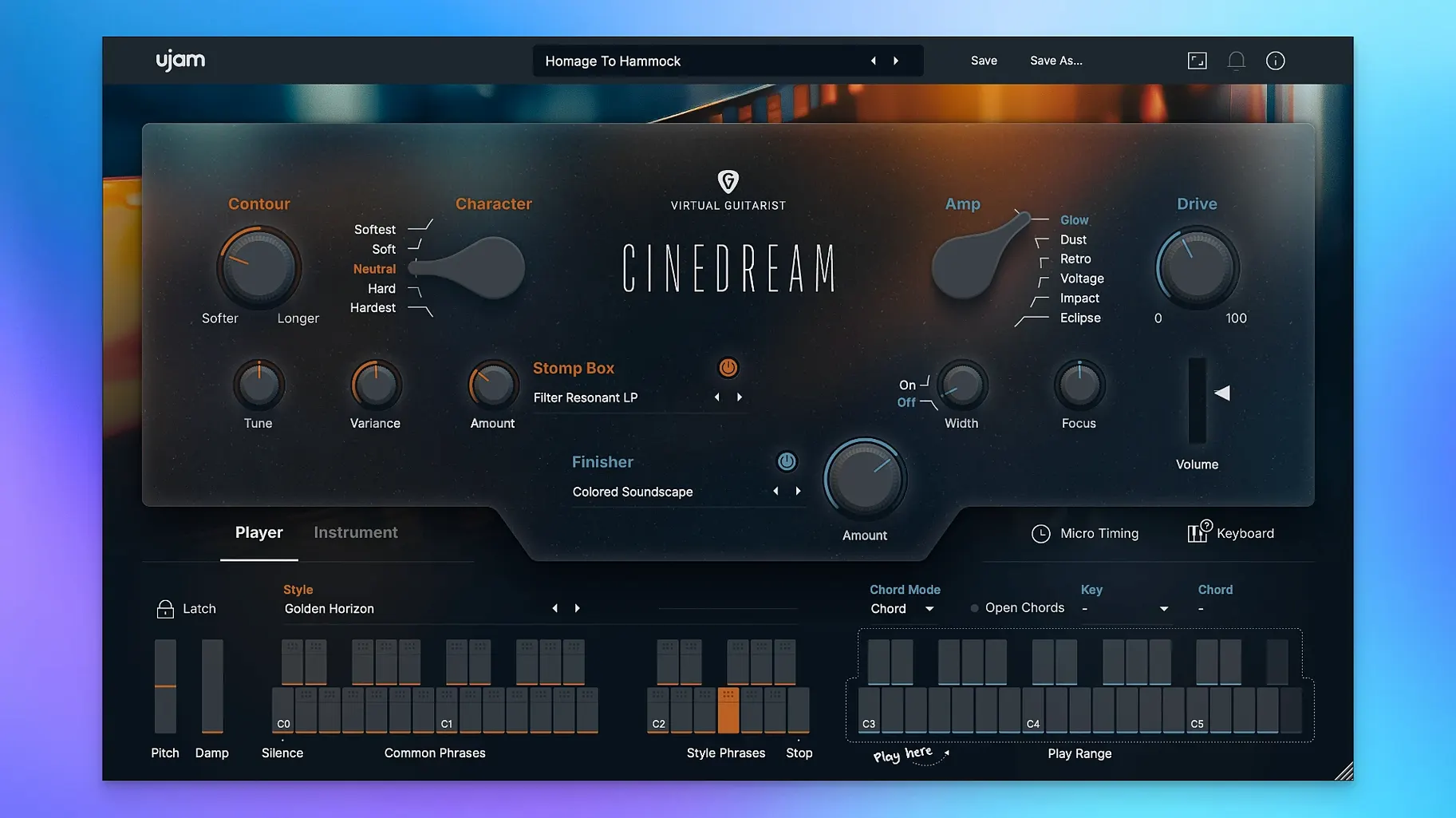
The Chord Trigger is the fastest way into Cinedream. Press one key and the plugin starts playing an evolving guitar part that shifts between open chords, harmonics, and soft arpeggios. No MIDI sequencing, no note-by-note programming — just hold a chord and let the instrument breathe.
What controls shape the sound?
The main panel gives you a Style selector and a Mix knob. Styles lock in a mood — sparse, dense, glassy, dark — and the Mix knob blends the dry guitar signal with the built-in reverb and delay. A separate Effects section adds modulation, filtering, and stereo width for movement and space.
Background layer under dialogue
Cinedream sits well as a background layer under dialogue or lead instruments. The low end stays controlled, and the high frequencies roll off naturally, so you can place it behind strings or pads without competing. It also works as a solo texture in ambient or drone sections.
What music uses this?
Soundtrack work, ambient albums, and any project that needs emotional depth without a distinct melodic line. Cinedream is not a rhythm guitar tool — it is a pad instrument that happens to sound like a processed electric guitar.
First days with Cinedream
After installing and authorizing the plugin, spend the first session just playing single notes and two-note intervals across the keyboard. The Chord Trigger responds differently to different voicings — a major third sounds warmer than a perfect fourth, and clusters create more tension. Try holding one chord for thirty seconds to hear how the part evolves naturally. The plugin does not loop; it builds phrases that shift over time.
Load each of the preset styles one by one and play the same chord across all of them. This shows you how the same input produces very different moods — from the bright, airy textures in one style to the darker, saturated layers in another. Note down which styles suit pads versus sparse, delicate backgrounds. This mapping saves time later when you are scoring to picture and need a specific feel quickly.
Adjust the Mix knob while playing. The right balance depends on how dense the rest of the mix is.
Trim output 3–6 dB for layering
The default output level is fine for solo work, but you will want to trim it when layering into a session. Open your DAW’s track fader and pull Cinedream down by 3–6 dB before writing any automation. The built-in reverb and delay are useful, but do not rely on them as your only spatial effects — route the plugin to a bus with your own reverb for a sound that fits the rest of your mix better.
If you work in a template with many instrument tracks, disable the plugin’s internal effects when you are using your own. This reduces CPU load and keeps the sound consistent across your session. Cinedream does not need a high sample buffer — 128 or 256 samples works well, even with several instances open, because the parts are not latency-critical pads.
Check that your DAW sees the correct plugin format. Cinedream installs VST2, VST3, AU2, and AAX versions. Use AU2 in Logic Pro for native performance, and VST3 in most other DAWs. Remove unused formats from your plugin folders to keep the scan quick.
Don't strum fast chord changes
The most common error is treating Cinedream like a standard guitar instrument. It is not meant for strumming chords in a mix that needs percussive attack. If you try to play fast chord changes, the evolving parts do not have time to develop, and the result sounds disjointed. Let chords ring for at least four beats before moving to the next one.
Another mistake is overusing the Chord Trigger. It is a powerful feature, but using it on every track can make a composition feel repetitive. Manually playing sparse single notes or slow melodic lines with the sustain pedal engaged creates different textures that break up the predictability.
This masks the natural guitar character and makes the part sit behind everything else. Save full wet for special moments — a breakdown, a bridge, or a transition. For the main body of a piece, keep some dry signal in the blend.
Ignoring the display resolution requirement is another issue. If your screen runs below 1280 x 768 pixels, parts of the interface may not display fully. Check your display settings before you start a session. The plugin also needs an internet connection for authorization, so verify that your studio machine is online when you first launch it.
Runs on 8 GB Macs from 2017
With 8 GB of RAM and 4 GB of free disk space, Cinedream runs on most Macs from 2017 onward. The plugin works on both Intel and Apple Silicon machines, supporting Rosetta and native modes. On a machine that meets the minimum specs, expect the plugin to load quickly and respond without delay during playback. No special tuning or extra drivers are required.
If you plan to run multiple instances in one session — for example, layering several Cinedream parts with different styles — keep an eye on your total RAM usage. Each instance loads its own sample data, so a session with five or six Cinedream tracks plus other virtual instruments may push an 8 GB machine. Closing unused plugins and freezing tracks helps stay within the limit.
The plugin formats are standard across Mac DAWs. Whether you use Logic Pro, Ableton Live, Cubase, Pro Tools, or Studio One, one of the supported formats (AU2, VST2, VST3, AAX) will be available. No additional wrappers or converters are needed.
No release notes filed for 1.0.1. They are added here when a build changes how the program behaves.
| macOS | macOS 10.13 or later |
|---|---|
| Processor | Apple Silicon, Intel 64-bit |
| Download | 3.5 GB |
- macOS 10.13 or later
- Intel or Apple Silicon (native and Rosetta)
- 8 GB RAM
- 4 GB free disk space
- 1280 x 768 minimum display resolution
- Internet connection
Questions about uJAM Cinedream
Does Cinedream run on both Intel and Apple Silicon Macs?
Yes. It supports Intel Macs via Rosetta and Apple Silicon Macs natively on ARM architecture.
What are the minimum system requirements?
macOS 10.13 or later, 8 GB RAM, 4 GB free disk space, 1280 x 768 display, and an internet connection for installation.
Can I use Cinedream without an internet connection after installation?
The official requirement lists an internet connection. After the initial setup and authorization, some users report offline operation, but UJAM recommends keeping a connection available.
How to install, in order
- Open the Go to Folder dialog with Command-Shift-G.
- Enter /Library/Application Support/UJAM/VG-CINEDREAM and delete the data in that folder.
- Repeat for /Library/Audio/Plug-Ins/Components/VG-CINEDREAM.component.
- Repeat for /Users/your user/Library/Application Support/UJAM/VG-CINEDREAM.
- Repeat for /Users/your user/Library/Audio/Presets/UJAM/VG-CINEDREAM.
Comments and corrections 0
Sign in or open a free account to leave a comment.
No comments or corrections yet.