SoundSource 6.1.5 — download for Mac
Utilities Updated
Controls per-app audio output and input routing from the menu bar.
Screenshots
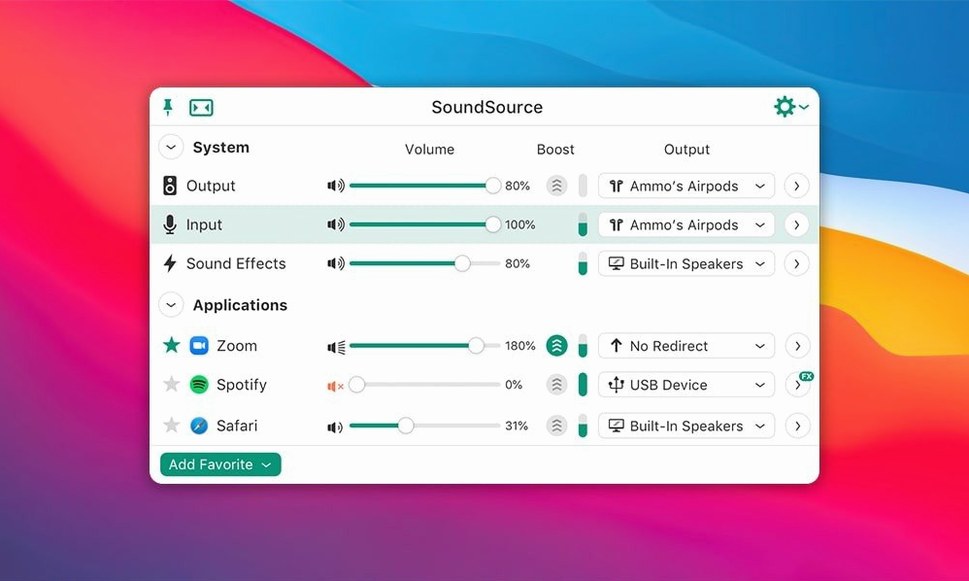
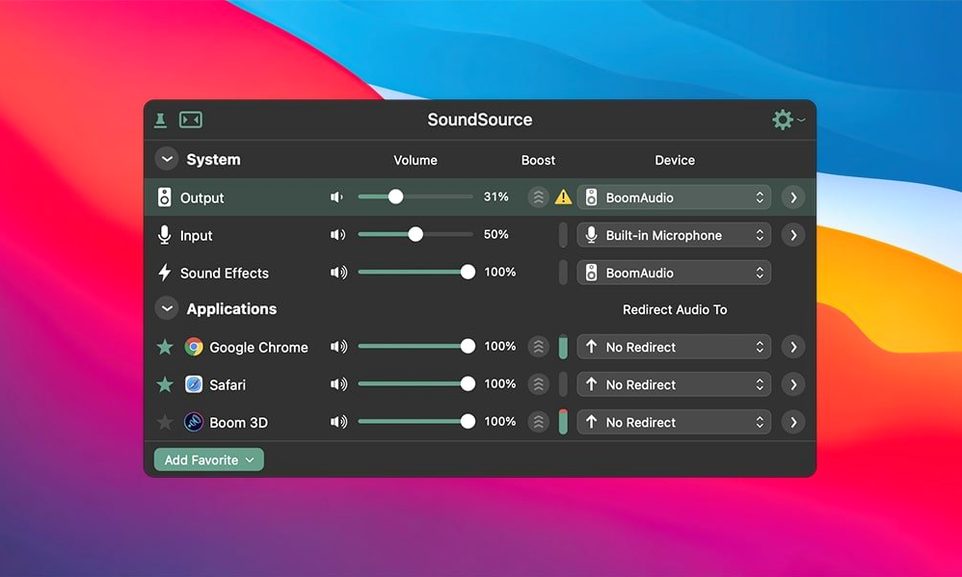
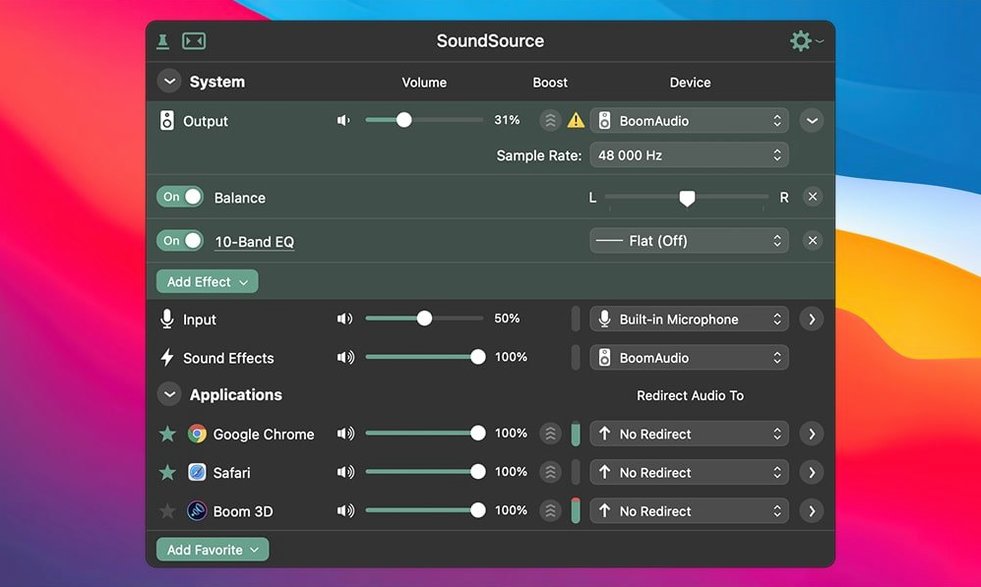
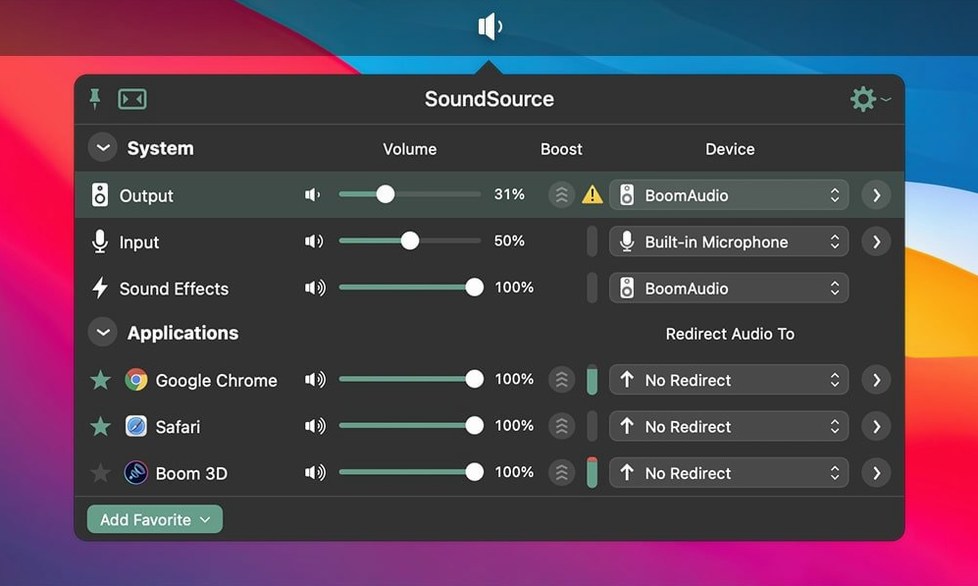
Version 6.1.4 of SoundSource, released September 17, 2026, fixes a crash specific to Bluetooth devices that don't honor requested buffer sizes on macOS 27, alongside updated ARK plugin 13.5.4 and improved Bluetooth output performance on the same OS version. Everything else — the menu-bar controls for input, output, effects, and volume per app; AirPlay streaming; and quick access to system sound settings — works as it did before. Rogue Amoeba's utility remains a straightforward way to route and adjust audio across your Mac without opening System Settings.
- Per-app volume, balance, and output device assignment from the menu bar.
- Global system EQ and effects (10-band equalizer, FFT analyzer, audio unit effects) applied to any app or system-wide.
- AirPlay output support for streaming to compatible speakers and receivers.
- Quick toggle between input and output devices without digging into macOS sound settings.
- ARK plugin updated to 13.5.4, improving stability with audio units.
- Bluetooth crash and performance fixes for macOS 27 users.
The same app that let you silence a noisy tab or boost a quiet mic now handles Bluetooth quirks on the latest macOS. For anyone managing multiple audio sources — conferencing, podcasting, or just switching between headphones and speakers — SoundSource saves a few clicks every day.
Running SoundSource 6.1.4 on Your Mac
SoundSource 6.1.4 is a 64-bit application that runs on macOS 15 and later, supporting both ARM and Intel architectures. If your Mac is on macOS 15, 16, or up to the current release, it will run. The interface is English only, which suits its purpose: the menu bar controls are labelled clearly enough that language isn't a barrier for basic use. Installation involves mounting the disk image, running Open Gatekeeper friendly, entering a Terminal command to bypass Gatekeeper, and dragging the app to your Applications folder. After that, it sits in the menu bar and stays out of the way until you need it.
Workflow: Routing One App to a Specific Output
A common task I handle with SoundSource is sending a podcast recording app to my USB microphone while keeping system sounds on the laptop speakers. Here's how it works from start to finish.
- Launch SoundSource from the Applications folder. It appears as an icon in the menu bar.
- Open the per-app audio list by clicking the SoundSource icon. Every running application with audio output is listed.
- Select the podcast app from the list. Click its name to expand options.
- Assign the USB microphone as the output device for that app. The change takes effect immediately.
- Leave system defaults alone so other apps — browser, notifications, music player — still route through the built-in speakers.
- Verify by playing a test tone or speaking into the mic. The podcast app outputs to the USB device; everything else stays on the laptop.
That's it. The whole process takes a few seconds and doesn't require opening System Settings or disconnecting devices. If I later want the podcast app to use the laptop speakers, I switch it back the same way.
Tuesday Morning Video Call Audio Fix
Tuesday morning, I plug in my headphones and start a late-morning video call. The call app opens, and I notice the system audio is still routing through the external speakers. I click the SoundSource icon in the menu bar, find the call app in the per-app list, and switch its output to the headphones. The change is instant — no audio dropouts, no need to restart the app.
After the call, I want to listen to a podcast while reviewing project documents. I open the podcast app, and SoundSource already lists it. I set its output to the headphones as well, but I also adjust the system volume for the browser so notifications don't blast through. The global volume slider in the menu bar lets me do that without hunting for the browser's own volume control.
Later that afternoon, I need to check a recording I made earlier. The recording app is set to use the USB microphone by default, but I've already switched the system to headphones. SoundSource shows the recording app's output still pointing to the headphones — no issue there — and I leave it as is. I play the recording, hear it through the headphones, and go back to work.
Between calls, I don't think about SoundSource. It stays in the menu bar, and the only time I notice it is when I need to change something. That's the point: it does one job — audio routing and volume control — and does it without adding overhead to the working day. For anyone managing multiple audio sources on a Mac, it's a tool you use when you need it and ignore when you don't.
If you're looking to download SoundSource, a torrent or a direct file from a site like mctorrent.com gets you the same version 6.1.4 with the same fixes and features. A SoundSource torrent or SoundSource Mac torrent will give you the K'ed by TNT team release that installs cleanly on macOS 15 or later. The same applies if you search for a SoundSource Mac crack — the version you find should be 6.1.4 with the Bluetooth and ARK updates included.
SoundSource 6.1.5 is now available. The full list of changes is published alongside the release.
| macOS | macOS 15 or later |
|---|---|
| Processor | Apple Silicon, Intel 64-bit |
| Download | 47 MB |
- macOS 15 or later
- Apple Silicon or Intel 64-bit processor
How to install, in order
- Mount the disk image and run Open Gatekeeper Friendly.
- Press Enter in the Terminal window that appears to bypass Gatekeeper.
- Drag SoundSource to your Applications folder.
- Launch the app from Applications once copying finishes.
Comments and corrections 0
Sign in or open a free account to leave a comment.
No comments or corrections yet.