Plugin Alliance Shadow Hills OptoMax 1.0.0 — download for Mac
VST Plugins Updated
Compresses audio optically on vocals, instruments, or the master bus.
Screenshot
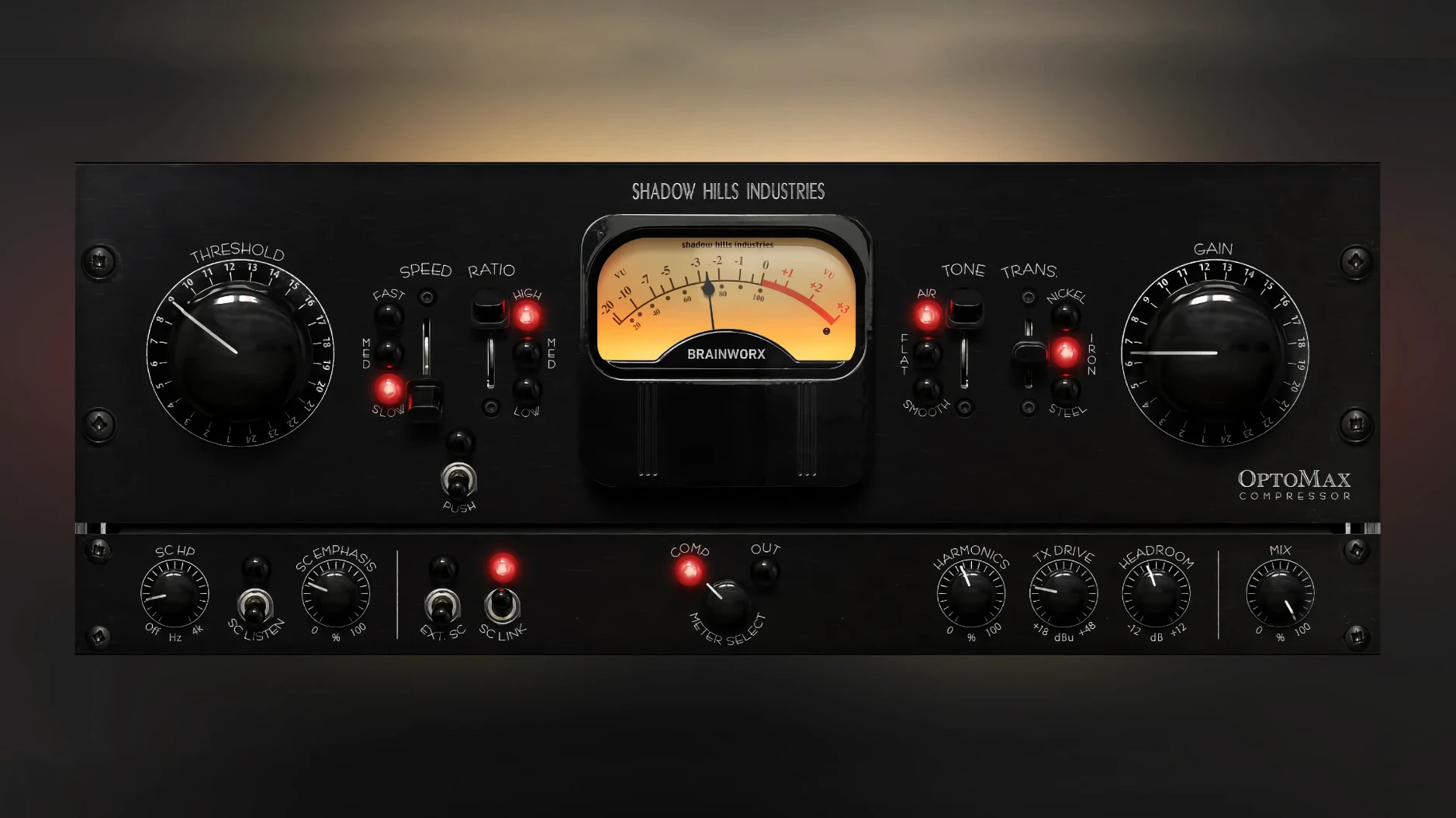
Version 1.0.0 of the Plugin Alliance Shadow Hills OptoMax is an optical compressor plugin that debuted on September 18, 2025. The angle here is formats and hosts first, then the sound.
Load on Vocal, Instrument, Bus, or Master
- Load the plugin on a vocal, instrument, track group, or the full mix bus.
- Choose a response speed — slow, medium, or fast — to match the material's dynamic range.
- Use the advanced sidechain filter to focus compression on specific frequencies.
- Adjust the threshold and ratio to apply gentle leveling or stronger peak control as needed.
The plugin preserves natural dynamics while evening levels, making it suitable for both subtle bus compression and more assertive track control. It runs on macOS 12 and later, with support for both Intel and Apple Silicon architectures. Interface language is English.
Works in Logic, Pro Tools, Cubase, and More
The Shadow Hills OptoMax works as a standard AU, VST3, or AAX plugin, so it shows up in any modern DAW that supports those formats — Logic Pro, Cubase, Pro Tools, Ableton Live, Studio One, and Reaper among them. On macOS, the plugin's installer places the files in the usual system-wide plugin folders, and the DAW picks them up on next launch. No extra utility or license manager runs in the background; what you see is the plugin panel itself.
If you have the Shadow Hills Mastering Compressor as well, the OptoMax is not a replacement — it is the optical stage taken out and tuned for individual tracks or groups. The two can sit in the same session without conflict, each handling different duties. The OptoMax also follows macOS dark mode and window management conventions; its resizable GUI stays within the DAW's window boundaries, and you can pull it to a second monitor if your workflow calls for it.
For sidechain routing, the plugin listens to the key input of your DAW track. You feed it an external signal — a kick drum triggering vocal compression, for instance — and the sidechain filter inside the plugin lets you narrow the frequency range that responds. That part is handled inside the plugin itself, not through your DAW's EQ.
Scenario: A Mix Engineer Tightening a Pop Vocal
Rita works on a pop mix with a lead vocal that varies from breathy verses to loud choruses. She inserts the Shadow Hills OptoMax on the vocal channel, sets the response to medium to catch the peaks without pumping, and selects the nickel transformer for a slightly warm tone. She uses the advanced sidechain filter to bypass the low-mid area where the vocal's chest resonance lives, so the compression acts mostly on the upper mids and presence range. The result is a more even level across the entire performance without flattening the natural dynamics. Rita keeps the parallel mix at about 20% to blend a dry layer underneath, giving the vocal weight without losing clarity.
Switch Response Speed and Transformer Type First
- Response speed — Defaults may be set to medium, but slow works well for bus compression and fast for peak control on drums or aggressive vocals. Try each on the same loop before moving on.
- Transformer type — Nickel is the warmest, iron is balanced, steel is the cleanest. A-B them on your source while listening to how the low end and attack change.
- Shine and Softness — These two high-frequency modes sit near the top of the panel. Shine boosts presence, Softness rounds off harshness. Starting with both off and engaging them one at a time lets you hear exactly what each does in your mix.
- Parallel mix — Even at low percentages, this knob adds back unprocessed signal and keeps transients intact.
- Sidechain filter — If the compressor pumps on the kick drum, engage the sidechain filter and sweep the frequency range until the pumping subsides. This is often the first fix when the plugin feels too reactive on a full mix bus.
Runs on Intel and Apple Silicon Macs with macOS 12+
Will this work on my older Mac with an Intel chip?
Yes. The plugin ships as a universal binary and runs on both Intel and Apple Silicon Macs as long as the system is on macOS 12 or later. No special configuration is needed.
Do I need to install a separate license manager or iLok?
No. The release you find here is pre-activated. You run the installer, open your DAW, and the plugin appears in your list. No hardware key, no cloud account, no background service.
Does it work with Pro Tools HDX or HD Native?
It is available in AAX format, so it loads on Pro Tools systems including HDX and HD Native. Version 1.0.1 addressed a specific gain reduction meter issue in Pro Tools; the version here is 1.0.0, which is stable in all other DAWs.
How does the sidechain filter differ from my DAW's built-in EQ sidechain?
The sidechain filter inside the OptoMax is a dedicated filter that modifies only what the compressor "hears" from the sidechain input. Your DAW's EQ sidechain would affect the signal before it reaches the compressor, which can change the timing. Using the plugin's own filter keeps the processing in one place and is often simpler to dial in.
Can I use the OptoMax on a mastering bus alongside other compressors?
Yes, and it is one of its intended uses. Set the response to slow and the ratio to a low value for gentle leveling, then stack it before or after a more aggressive compressor for a two-stage chain. The transformer selection and parallel mix give you enough control to avoid over-compression.
- Initial release of the optical compressor plugin.
| macOS | macOS 12 or later |
|---|---|
| Processor | Apple Silicon, Intel 64-bit |
| Download | 73 MB |
- macOS 12 or later
- Intel or Apple Silicon processor
- Interface language: English
Questions about Plugin Alliance Shadow Hills OptoMax
What is the current version of Shadow Hills OptoMax?
Version 1.0.0 is the initial release; a later 1.0.1 update fixed a Pro Tools gain reduction meter issue.
What are the response settings available?
The plugin offers slow, medium, and fast response settings to control compression attack and release behavior.
Can the sidechain be filtered?
Yes, it includes advanced sidechain filtering to target specific frequency ranges for compression.
How to install, in order
- Open the downloaded disk image.
- Run the standard installer.
- Follow the normal installation prompts.
Comments and corrections 0
Sign in or open a free account to leave a comment.
No comments or corrections yet.