

Pulsar Audio IPA 1.0.9 — download for Mac
VST Plugins Updated
Delivers three VCA compression characters from clean punch to gritty clip.
Screenshot
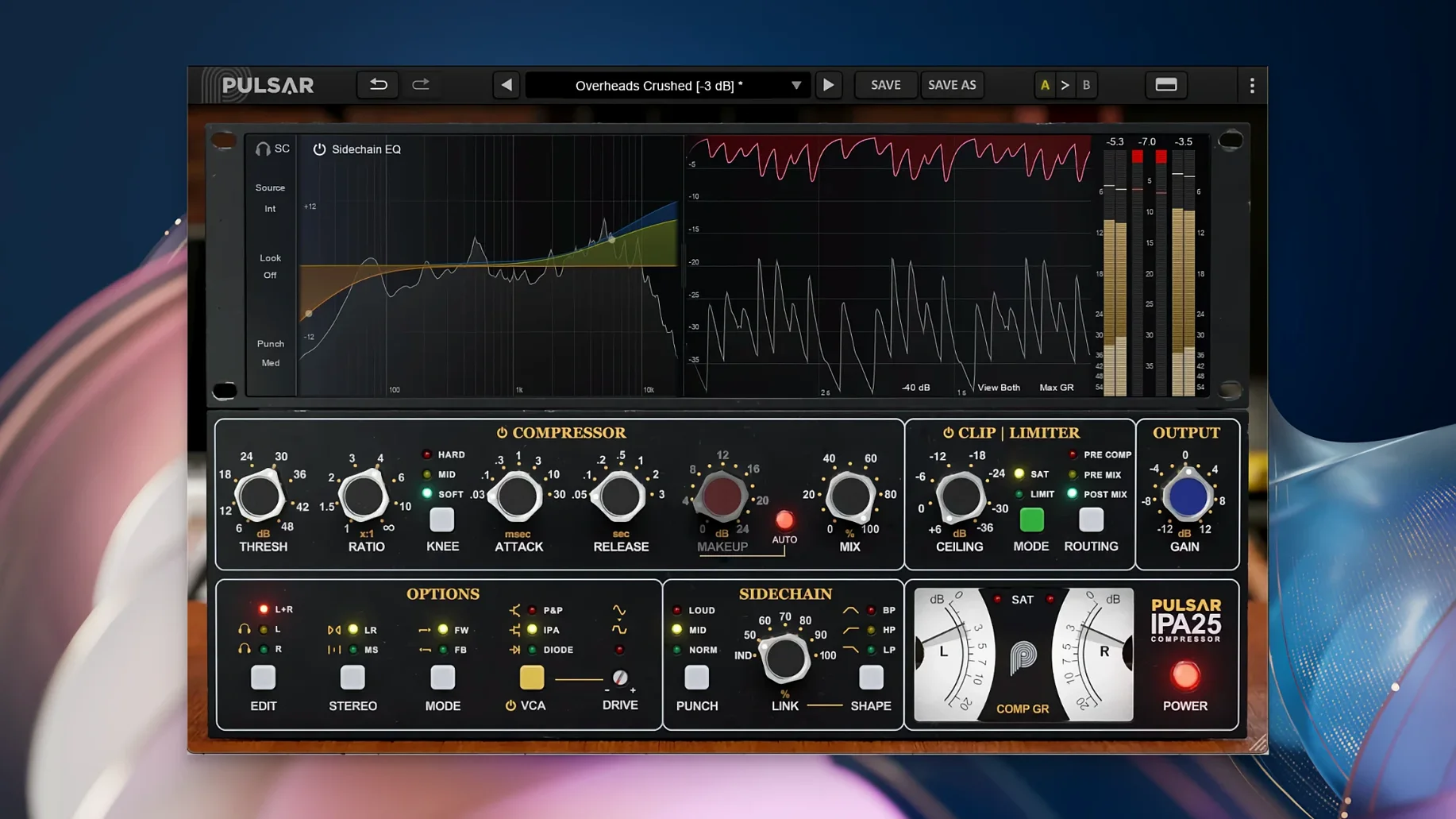
Three VCA modes — IPA, P&P/Mu, and Diode — give you distinct compression characters from a single plugin. The IPA mode delivers the clean, punchy response you expect from a classic VCA bus compressor, while P&P/Mu adds tube-style saturation and Diode introduces a grittier, more aggressive clip.
Runs in VST 2.4, VST 3, AAX, and AU
Pulsar Audio IPA runs in VST 2.4, VST 3, AAX Native, and Audio Unit formats. It requires a 64-bit DAW on macOS 11 or later with Apple Silicon support. No standalone version is available.
vocals, drums, and mixes
This multi-VCA processor works on vocals, drums, bass lines, and full mixes. The three modes let you dial in everything from subtle leveling to aggressive bus compression without switching plugins.
mac workflow
On a MacBook Air M2 running Logic or Reaper, the plugin loads quickly and uses minimal resources. The interface is clear and direct — adjust threshold, ratio, attack, release, and makeup gain the same way you would on the hardware unit.
Hear Three VCA Modes on a Drum Loop
Out of the box, Pulsar Audio IPA defaults to the IPA VCA mode with moderate threshold and ratio settings. Before you start a mix, switch through all three VCA modes on a short drum loop to hear how the character changes. IPA is the cleanest starting point for bus work. P&P/Mu adds harmonic weight that works well on vocals or bass. Diode is best saved for parallel processing where you want aggressive color.
Set the sidechain EQ early. The visual sidechain EQ lets you filter which frequencies trigger the compressor. For full mixes, a high-pass filter around 80–100 Hz keeps the kick and bass from pumping the whole mix. For vocals, a slight dip around the sibilance range prevents excessive de-essing from the compressor itself.
Enable Mid/Side processing if your mix needs width control. On a stereo bus, mid compression tightens center elements while side compression can soften or harden the stereo field. This is one feature worth testing before you commit to a chain — it changes how the plugin interacts with your mix.
Rock, Pop, and Electronic Mix Engineers
Mix engineers working on rock, pop, and electronic genres get the most out of IPA because its three VCA modes cover the tonal range those styles demand. Rock and pop benefit from the punch of IPA mode on drum buses and the saturation of P&P/Mu on bass. Electronic producers can use Diode mode to glue synthesizers and samples with a harder edge.
Sound engineers who track and mix in the same session will appreciate the built-in clipper and limiter. You can clip peaks on individual tracks before they hit the DAW's master bus, reducing the need for extra processing stages. For producers who work fast, having three compressors in one plugin saves session CPU and plugin slot count.
Home studio operators on MacBook Air or MacBook Pro models will find the plugin light enough to run multiple instances. The interface scales well on laptop screens — no cramped faders or tiny knobs. If you mix primarily in the box and want hardware-style control without the hardware cost, IPA is a practical fit.
Fix Subtle or Harsh Compression with VCA Switches
- Compression feels too subtle or too aggressive. Switch VCA modes. If IPA mode is too clean, try P&P/Mu for more saturation. If Diode mode is too harsh, go back to IPA and adjust the ratio instead.
- Sidechain EQ is not responding. Make sure the sidechain filter is engaged. The visual EQ shows the curve but does not apply it until you toggle it on. Check your DAW's routing — some hosts require the sidechain input to be assigned separately.
- Mid/Side processing sounds lopsided. IPA processes mid and side channels independently. If your mix has heavy panning, adjust the side channel compression ratio and threshold separately from the mid. Start with the same settings, then fine-tune the side channel to avoid pumping in stereo elements.
- Plugin does not appear in your DAW. Confirm you installed the correct format for your host (VST 3 for most modern DAWs, AAX for Pro Tools). Rescan plugins in your DAW's preferences. If it still does not show, reinstall and ensure the plugin folder is in the right location for your DAW.
- Latency issues during tracking. IPA is a dynamics processor with moderate latency. For live monitoring, disable the plugin on the track or use your DAW's low-latency mode. It is best suited for mixing, not tracking.
how IPA compares to similar plugins
Compared to the Waves SSL G-Master Buss Compressor, IPA offers more tonal variety through its three VCA modes. The SSL compressor is a single-mode workhorse that excels on stereo buses but lacks the built-in clipper, limiter, and sidechain EQ that IPA provides. For mix engineers who want one plugin that can handle bus compression, saturation, and peak limiting, IPA covers more ground.
Against the UAD API 2500 Bus Compressor, IPA is a direct alternative with the same inspiration but added flexibility. The UAD version requires UAD hardware or the LUNA DAW for native use, while IPA runs on any Apple Silicon Mac without extra hardware. IPA's Diode mode and visual sidechain EQ are features the UAD plugin does not include. If you already use UAD, the API 2500 is familiar — but IPA gives you more options in one interface.
The FabFilter Pro-C 2 is a transparent, surgical compressor with extensive visual feedback and sidechain options. It excels at clean leveling and precise control. IPA is less surgical and more character-driven. If your work is about tonal shaping and bus glue rather than transparent dynamics, IPA's VCA modes and saturation give you a faster path to color. Many engineers run both — Pro-C 2 for individual tracks and IPA for buses and masters.
No release notes filed for 1.0.9. They are added here when a build changes how the program behaves.
| macOS | macOS 11 or later |
|---|---|
| Processor | Apple Silicon |
| Download | 75 MB |
- macOS 11 or later
- Apple Silicon or Intel processor
- 64-bit plugin host (DAW)
Questions about Pulsar Audio IPA
What DAW versions does Pulsar Audio IPA support?
It supports VST 2.4, VST 3, AAX Native, and Audio Unit formats, so it works with most major DAWs on macOS and Windows.
What can IPA be used for?
It is designed for vocals, drums, bass lines, and full mixes, offering three VCA modes for different compression characters.
How to install, in order
- Run the installer package.
- Follow the on-screen prompts to complete the standard installation.
Comments and corrections 0
Sign in or open a free account to leave a comment.
No comments or corrections yet.
More picks from VST Plugins
Complete VST Plugins catalog Plugin Alliance Shadow Hills OptoMax
1.0.0
73 MB
 reFX Nexus
5.5.21
72 MB
 Plugin Alliance Brainworx Bundle
2025.06.16
2.1 GB
 Revoice Pro
5.1.30
39 MB
 RipX DAW Pro
8.0.3
1.6 GB
 Roland Cloud Legendary Series
2025.06.29
1.3 GB
 Roland ZENOLOGY Pro
2.0.7
1.8 GB
 Safari Pedals Everything Bundle
2026.05
628 MB