

Output Portal 1.2.1 — download for Mac
VST Plugins Updated
Routes audio through a granular engine to create evolving textures and effects.
Screenshot
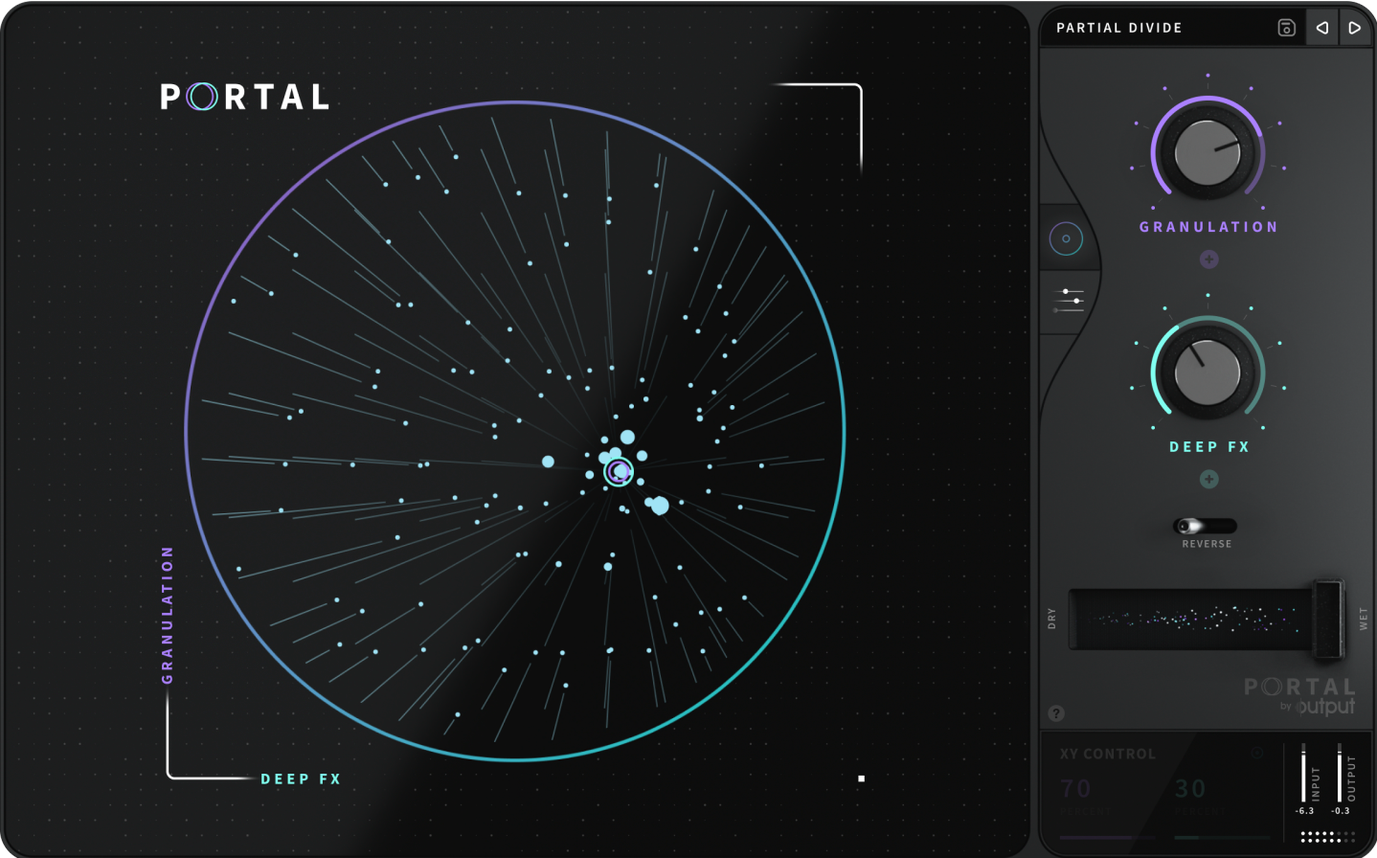
Output Portal supports VST3, AU, and AAX formats in both Intel and Apple Silicon hosts. The plugin is an effects processor, not an instrument, so you route audio through it and let the granular engine work.
- Route audio into Portal — any monophonic or polyphonic source works. The plugin takes the input and breaks it into grains.
- Set pitch behavior — lock pitch to a scale to keep it musical, or let it drift. Pitch can shift without changing duration, useful for remapping a vocal line without timing artifacts.
- Adjust time and sync — slow sounds down and stretch them. Running synchronized to the main tempo keeps grains in the beat; unsynced mode adds a freeform feel.
- Add envelope variation — introduce natural movement to grain shapes so the output doesn't stay static. Small changes in envelope timing keep loops from sounding mechanical.
The workflow is straightforward: load Portal on an audio track, tweak pitch and time parameters, and let the granular engine reshape what it receives. No sample loading, no complex routing — just the effect applied to whatever you send in.
Is Portal a Synth or an Effect?
That is the question I hear most often. Portal is not a synthesizer. It does not generate sound on its own. You feed it audio — a VST, a drum loop, a vocal take, a guitar line — and it processes that audio into grains. The result is a transformed version of your original signal. If you need an instrument that produces sound from scratch, look elsewhere. If you want to reshape what you already have, Portal is the right tool.
Covers VST3, AU, AAX on Intel and Apple Silicon
Portal comes as VST3, AU, and AAX. That covers Logic Pro, Ableton Live, Cubase, Pro Tools, Studio One, and most other modern DAWs on Mac. The plugin runs on both Intel and Apple Silicon machines, so no compatibility concerns if you moved to an M-series Mac. Installation is standard: mount the disk image, run the installer, and pick your plugin folder.
Can Portal Handle Live Input?
Yes. Route a microphone or instrument input through Portal in your DAW, and the granular engine processes it in real time. Vocalists and guitar players use it to add texture during recording or live performance. The envelope variation feature keeps the grain movement natural, so a sustained note doesn't sound like a broken CD player.
A Scenario: The Electronic Music Producer
Ana produces techno in Ableton Live. She has a clean kick-loop she wants to stretch into a ten-second atmospheric pad without losing the original punch. She drops Portal on the track, sets it to unsynchronized mode, and slows the time parameter. The kick loop turns into a breathing texture. She locks pitch to C minor, so the stretched sound stays inside the key of her track. The whole process takes under a minute. She does not touch a sampler or a synth — Portal does the work.
Workflow: Turning a Vocal Phrase into a Drone
Let me walk through a common task: taking a short vocal phrase and turning it into a sustained drone. This works in any DAW that supports Portal.
- Insert Portal on the vocal track. Place it as an insert effect, not a send. The plugin needs the full signal to grain it properly.
- Set time to maximum stretch. Drag the time parameter to its slowest setting. The vocal should now sound elongated, almost frozen.
- Switch to unsynchronized mode. Synced mode locks grains to the tempo grid, which can make a drone feel rhythmic. Unsynced mode lets the grains flow freely, giving you a smooth bed of sound.
- Lock pitch to a scale. Choose a scale that fits your project. The vocal now sustains at a consistent pitch, no matter how far you stretched it.
- Add envelope variation. Dial in a small amount of movement so the drone does not sound static. The grain envelopes shift subtly, keeping the texture alive.
What you end up with is a tonal pad that retains the original vocal's character — the breathiness, the formants, the slight imperfections — but behaves like a synthesizer drone. You can layer it under other elements or process it further with reverb and delay.
This is the kind of use case that makes Portal a staple for sound designers working on films, games, or ambient music. It saves the time you would otherwise spend sampling, slicing, and resampling your own audio to get a similar result.
No release notes filed for 1.2.1. They are added here when a build changes how the program behaves.
| Processor | Apple Silicon, Intel 64-bit |
|---|---|
| Download | 319 MB |
- macOS version not specified by developer
- Intel or Apple Silicon
- VST3, AU, or AAX host
- Interface language: English
Questions about Output Portal
Can Output Portal change pitch without affecting the speed of the audio?
Yes. Portal can shift pitch independently of duration, so you can alter the tonality while keeping the original timing intact.
Does the plugin work with Apple Silicon Macs natively?
Yes. Output Portal runs on both Intel and Apple Silicon architectures in VST3, AU, and AAX formats.
How to install, in order
- Mount the downloaded disk image.
- Run the standard installer.
- Choose the installation location to finish setup.
Comments and corrections 0
Sign in or open a free account to leave a comment.
No comments or corrections yet.
More picks from VST Plugins
Complete VST Plugins catalog noteGRABBER
2.0.0
35 MB
 Neural DSP Soldano SLO-100 X
1.0.0
340 MB
 Neural DSP Parallax X
1.0.0
179 MB
 Neural DSP Archetype Tim Henson X
1.0.1
575 MB
 Neural DSP Archetype Rabea X
1.0.1
742 MB
 Plugin Alliance Brainworx Bundle
2025.06.16
2.1 GB
 Neural DSP Archetype Petrucci
1.0.0
745 MB
 Plugin Alliance Shadow Hills OptoMax
1.0.0
73 MB