Revoice Pro 5.1.30 — download for Mac
VST Plugins Updated
Aligns vocal timing and pitch with dedicated SmartAlign and SmartPitch tools.
Screenshot
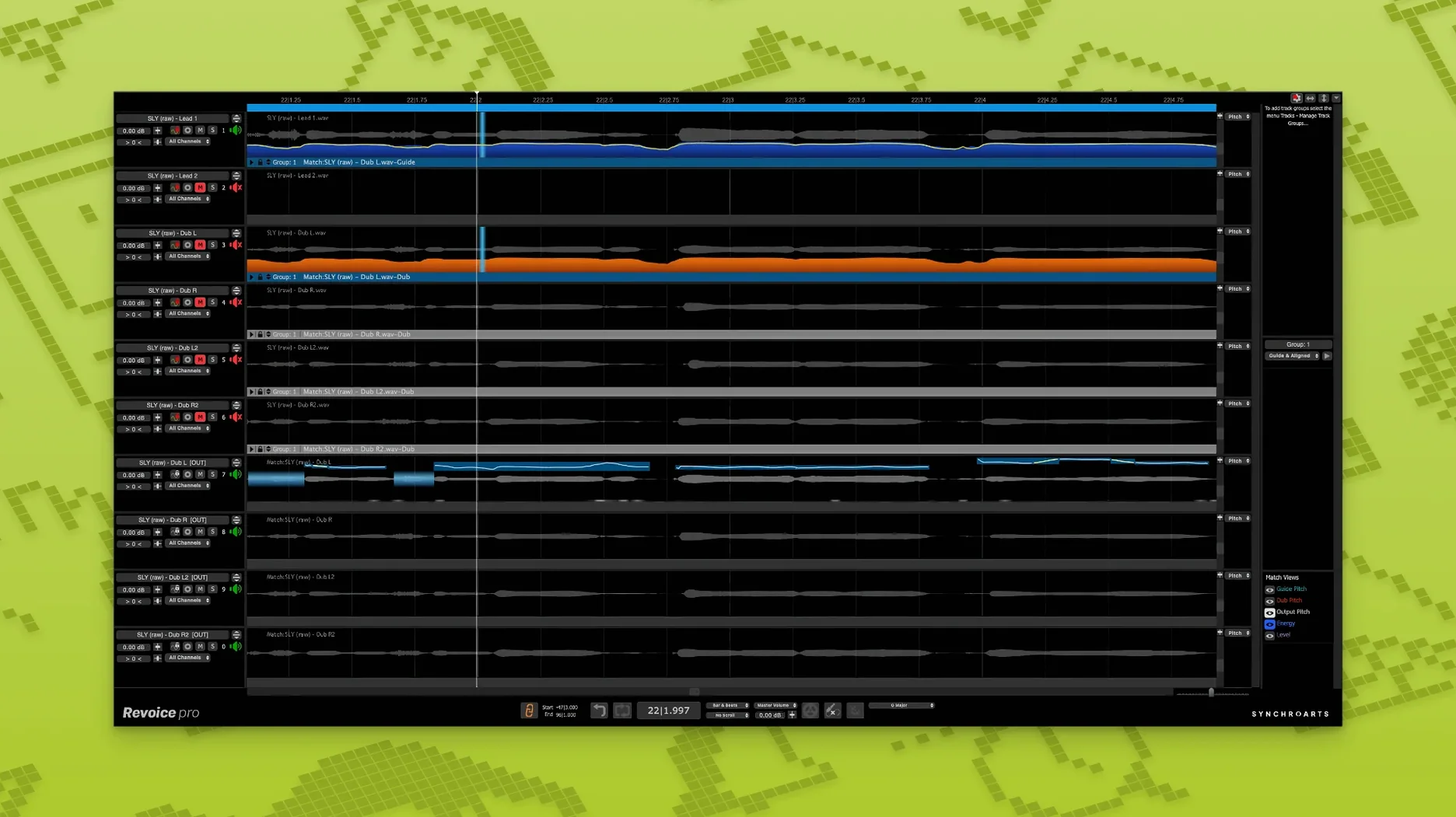
If you have worked with vocal takes in any DAW, you know the gap between a good take and a great mix is often timing and pitch. Revoice Pro closes that gap with three dedicated controls: SmartAlign, SmartPitch, and the Shaper Tool. SmartAlign synchronizes a double or harmony track to a guide part — even if the takes start or end at different positions — so you stop nudging regions. SmartPitch matches the pitch of doubles and harmonies, making layered vocals sound like one performance. The Shaper Tool gives you direct pitch adjustment for fine corrections. The result is a vocal sound that sits tight in the mix without phase artifacts or unnatural stretching.
| Detail | Specification |
|---|---|
| Developer | Synchro Arts |
| Current Version | 5.1.30 |
| Mac Host Formats | AU, VST3, AAX 64-bit |
| Min. macOS | 10.14 |
| Architecture | Intel & Apple Silicon |
| Interface Language | English |
Revoice Pro is built for voice and monophonic instruments. The vocal doubler creates layered-sounding doubles without manual editing. In a studio workflow, this plugin replaces hours of comping and tuning with three core tools — no external editor needed.
SmartAlign Handles Irregular Starts
The obvious tools — SmartAlign, SmartPitch, Shaper Tool — get the attention. But Revoice Pro has a few details that matter more once you're past the first session.
- SmartAlign handles irregular starts. If your double track begins a bar later than the guide, or ends early, the alignment still works. You do not have to trim region edges to match first, which saves time when comping from different takes.
- SmartPitch works on harmonies, not just doubles. If you have a harmony part that is close but drifts in pitch, SmartPitch matches it to the guide while keeping the harmonic interval intact. It is not a simple pitch shifter — it tracks the contour.
- Shaper Tool is for surgical adjustments. When a note is almost right but a little flat on the tail, the Shaper Tool lets you draw the correction without affecting the rest of the phrase. It sits alongside SmartPitch rather than replacing it.
- The vocal doubler is a single process. You do not layer multiple tracks manually. The doubler creates the layered sound from one source, which is useful when you only have one usable take but want a thicker chorus.
Shaper Tool Upgraded to Pitch Tool
The 5.1.30 update did not add a new module or redesign the interface. The changes are small but practical.
- Shaper Tool is now listed as a pitch-adjustment tool. Before, it was present but not clearly called out. Now it is documented alongside SmartPitch, which means you are more likely to try it for quick fixes instead of reaching for a separate editor.
- SmartPitch is described as a tool for matching pitch of doubles and harmonies. This clarification matters when you have multiple harmony layers — the tool handles each part against its own guide, not just one guide for everything.
- SmartAlign now explicitly handles takes with different start or end positions. This was already possible in earlier versions, but the documentation change means fewer people will waste time trimming regions first.
These are not headline features. They are the kind of clarifications that come from user feedback — making existing behavior easier to find and understand.
Fixing a Late Double Track in 3 Takes
You have a verse vocal recorded in three takes. The second take has the best performance, but the timing is loose and the double track you recorded later starts half a beat behind. Here is how a session runs with Revoice Pro.
- Import the guide and the double. In your DAW, you route the guide vocal to one track and the double to another. Both go into Revoice Pro as separate inputs.
- Run SmartAlign. Select the double track as the part to align, the guide as the reference. The process synchronizes the timing, even though the double started at a different position. The result is a double that matches the guide's phrasing without manual slicing.
- Apply SmartPitch. The double's pitch is now close but not identical. SmartPitch adjusts the pitch contour to match the guide. The double still sounds like a separate take — it is not copied pitch — but the small differences that cause a flamming effect disappear.
- Check for stray notes. One word in the second verse sounds slightly sharp. Open the Shaper Tool, select that note, and pull the pitch down a few cents. The rest of the phrase stays untouched.
- Create a doubler layer. You want a thicker chorus. Run the vocal doubler on the guide track, set the amount, and blend it underneath. No second recording needed.
The whole process takes a few minutes. Without Revoice Pro, you would be nudging regions, drawing pitch curves, and layering manually — likely across two or three different plugins.
Plugin Missing From Your DAW List
Revoice Pro is straightforward, but a few things trip people up on the first use.
- The plugin does not appear in the DAW's plugin list. Make sure you installed the correct format for your DAW. Revoice Pro supports AU, VST3, and AAX 64-bit. If your DAW uses VST2, you need the VST3 version or check that your DAW supports VST3. Re-scan plugins in your DAW after installation.
- SmartAlign does not sync the whole track. Check that the guide and the part to align are both routed as monophonic signals. Revoice Pro is designed for voice and monophonic instruments — stereo files can cause unexpected behavior. If you have a stereo vocal track, split it to mono first.
- Pitch correction sounds unnatural. This usually means the correction amount is too high. SmartPitch and Shaper Tool both allow you to set how much correction is applied.
- The vocal doubler sounds too thick or hollow. The doubler has a control for the amount of processing. Reduce it until the layer sits behind the main vocal without overwhelming it. A little goes a long way.
- Latency during playback. Revoice Pro processes audio in real time. If you are running multiple instances, your DAW's buffer size may need to be higher for stable playback. Increase the buffer during tracking and lower it when mixing.
These are small issues that do not break the workflow. Once you have run a few sessions, they become second nature.
| macOS | macOS 10.14 or later |
|---|---|
| Processor | Apple Silicon, Intel 64-bit |
| Download | 39 MB |
- macOS 10.14 or higher
- Intel or Apple Silicon Mac
- AU, VST3, or AAX 64-bit host
- Interface language: English
How to install, in order
1. Open the downloaded disk image. 2. Run the standard installation procedure.Comments and corrections 0
Sign in or open a free account to leave a comment.
No comments or corrections yet.