reFX Nexus 5.5.21 — download for Mac
VST Plugins Updated
Shapes sounds with a 16-voice unison engine and two new oscillator wrap modes.
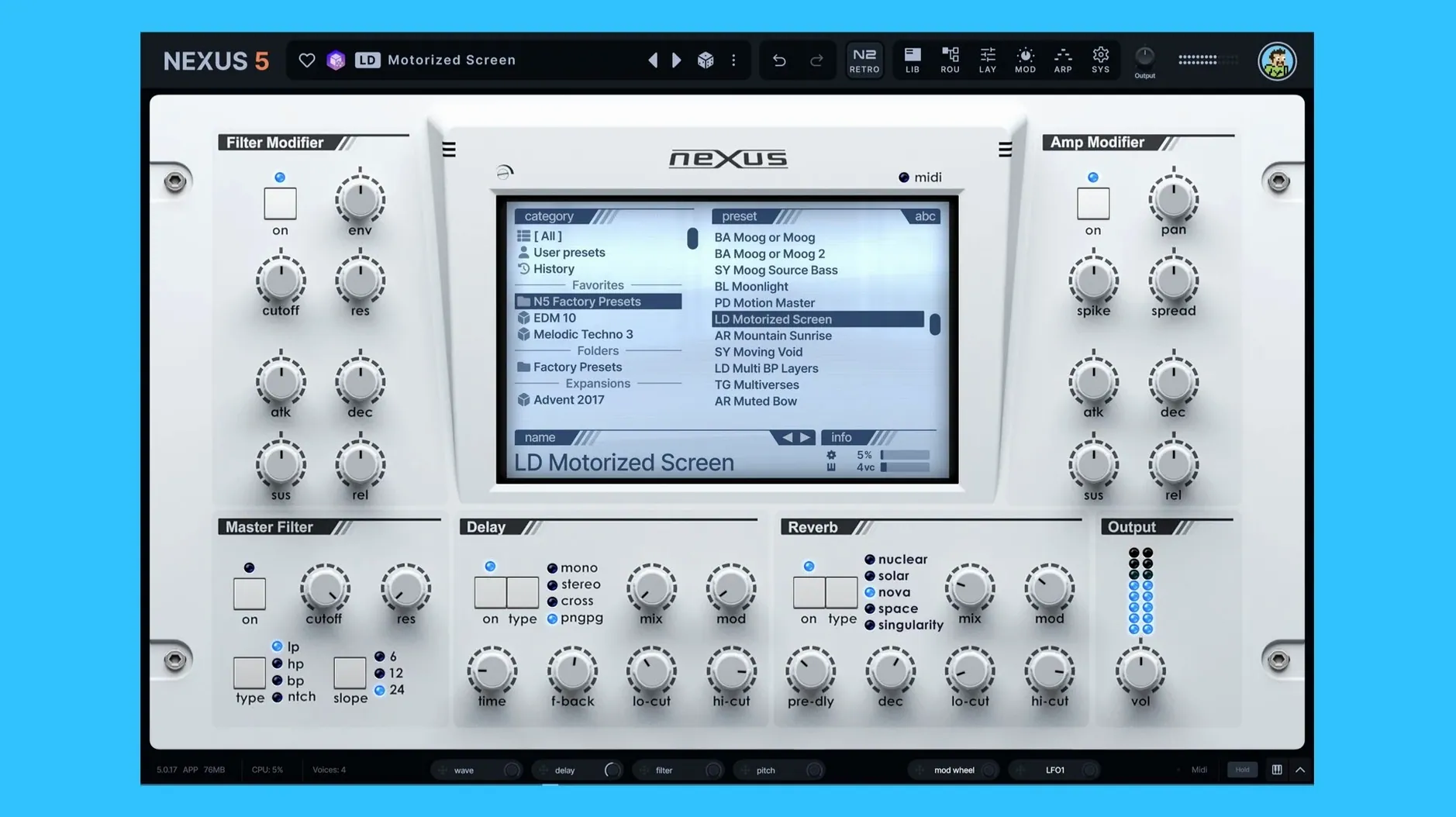
Screenshot
Version 5.5.12 of reFX Nexus puts more of the sound-shaping process under your fingers. The unison engine now goes up to 16 voices, so a single chord can fill a mix without touching a mixer. Two new oscillator wrap modes change how waveforms behave at the edges, useful for taming harsh digital tops or pushing a lead into saturation. The SYS page gains a BPM readout and an override field, letting you sync the instrument to a project tempo without digging into host settings.
Nexus works as a plugin rather than a fixed rompler. You can load your own samples, then edit, slice, loop, and crossfade them inside the instrument. It imports samples, multisamples, and sample packs, and you can build custom expansions from the results. The built-in effects section handles the usual polish — EQ, compression, delay, reverb — and the new Clipper FX adds a quick way to control peaks before they hit the master bus. Existing NEXUS projects and libraries load as-is, which matters when you have years of presets already organized.
For a project manager who also produces, the appeal is control without clutter. The skin editor lets you adjust the interface to your working style, and the arp pattern can now serve as the initial seq pattern, so your rhythmic ideas carry straight into a new session.
How Nexus Compares With Similar Mac Plugins
Three plugins sit in the same space: Kontakt, Falcon, and HALion. All four let you build instruments from samples, but the approach differs.
Kontakt is the industry standard for sample libraries. Its scripting language gives developers deep control, but for a producer who just wants to load a multi-sample, edit a few zones, and get back to writing, the learning curve is steeper. Nexus skips the scripting layer and puts the editing tools — slice, loop, crossfade — directly in the main window.
Falcon by UVI leans into modular sound design with oscillators, effects, and modulation that rival hardware workstations. Nexus matches that flexibility with its virtual analog, wavetable, granular, and FM oscillators, but Falcon requires you to build patches from the ground up. Nexus ships with presets you can tweak, which suits a producer working against a deadline.
HALion from Steinberg blends sample playback with synthesis in a way that resembles Nexus. Both let you layer samples and synthetic waveforms. The difference is the unison overhaul in Nexus — 16 voices per note means one triggered chord can carry the weight of a full arrangement without layering multiple instances.
Turn Factory Floor Field Recordings Into Keyboard-Mapped Hits
You have a folder of field recordings from a factory floor — drills, hydraulic hiss, metal impacts. You import them into Nexus as a multisample. After slicing each file into usable hits, you map them across the keyboard. Then you layer a wavetable oscillator underneath to give the hits a pitched tail. The new Clipper FX catches the transient peaks so the mix engineer does not have to ride the faders. You save the whole thing as a custom preset, export it as an expansion, and hand the file to the composer. They load it in their session, and the BPM readout on the SYS page tells them the tempo matches. No back-and-forth about sync.
Slice, Loop, and Crossfade to Avoid Flat Unprocessed Samples
- Importing samples without editing. Loading a raw sample into Nexus works, but the result sounds like an unprocessed recording. Taking two minutes to slice, loop, and crossfade inside the plugin turns a flat sample into a playable instrument.
- Ignoring the modulation section. The modulation routing panel looks like something you skip during first sessions. That is where Nexus becomes more than a sample player. Routing an LFO to filter cutoff or velocity to oscillator pitch turns static presets into evolving sounds.
- Overlooking the skin editor. Beginners open it once, decide it is cosmetic, and close it. For a project manager who shares templates with a team, resizing or recoloring the interface saves the half-hour it takes to find parameters in a crowded layout.
- Treating the unison as a mono feature. Sixteen voices of unison in version 5.5.12 let you stack detuned copies of the same sample. Beginners often layer separate instances of Nexus to get thickness, which eats CPU. One instance with high unison count does the same job.
Fitting Nexus Into A Broader Mac Workflow
Nexus loads as a plugin inside any DAW that supports VST3, AU, or AAX — Logic Pro, Cubase, Ableton Live, Studio One. If you manage a template for your production team, you can set each Nexus instance to pull from the same user-created expansions, keeping everyone on the same library without copying files manually.
The reFX Cloud app handles updates and expansion downloads in the background, so you do not need to chase installer links between project phases. On the Mac side, Nexus respects macOS audio routing: if you use the built-in Audio MIDI Setup to route MIDI from a hardware controller, Nexus picks it up without extra configuration. The plugin also follows your DAW's track colors and naming conventions, which saves a few seconds per session when you are scanning a busy mixer window.
For producers who bounce stems to disk for collaboration, Nexus tempo matching means your preset previews align to the host tempo before you press record. That cuts the time spent aligning loops and arpeggios after the fact. It is a small thing, but over a 40-hour week, small things add up to finishing a project by Friday instead of Monday.
- Unison overhaul with up to 16 voices.
- Added Clipper FX.
- Added a skin editor.
- BPM readout and BPM override on the SYS page.
- Two new oscillator wrap modes.
- Arp pattern can be used as the initial seq pattern.
| macOS | macOS 10.15 or later |
|---|---|
| Processor | Apple Silicon, Intel 64-bit |
| Download | 72 MB |
- macOS 10.15 or later
- Intel or Apple Silicon
- English interface
Questions about reFX Nexus
Can reFX Nexus load custom samples?
Yes, Nexus can load custom samples, multisamples, and sample packs, and it lets you edit, slice, loop, and crossfade them inside the plugin.
How to install, in order
- Run the update first.
- Follow the standard installation procedure.
- Use the installation and activation instructions included in the package.
- Open the VR.nfo file for instructions.
Comments and corrections 0
Sign in or open a free account to leave a comment.
No comments or corrections yet.