XLN Audio XO 1.8.10 — download for Mac
VST Plugins Updated
Sorts your drum library by similarity so related kicks, snares, and hats appear grouped on a visual map.
Screenshot
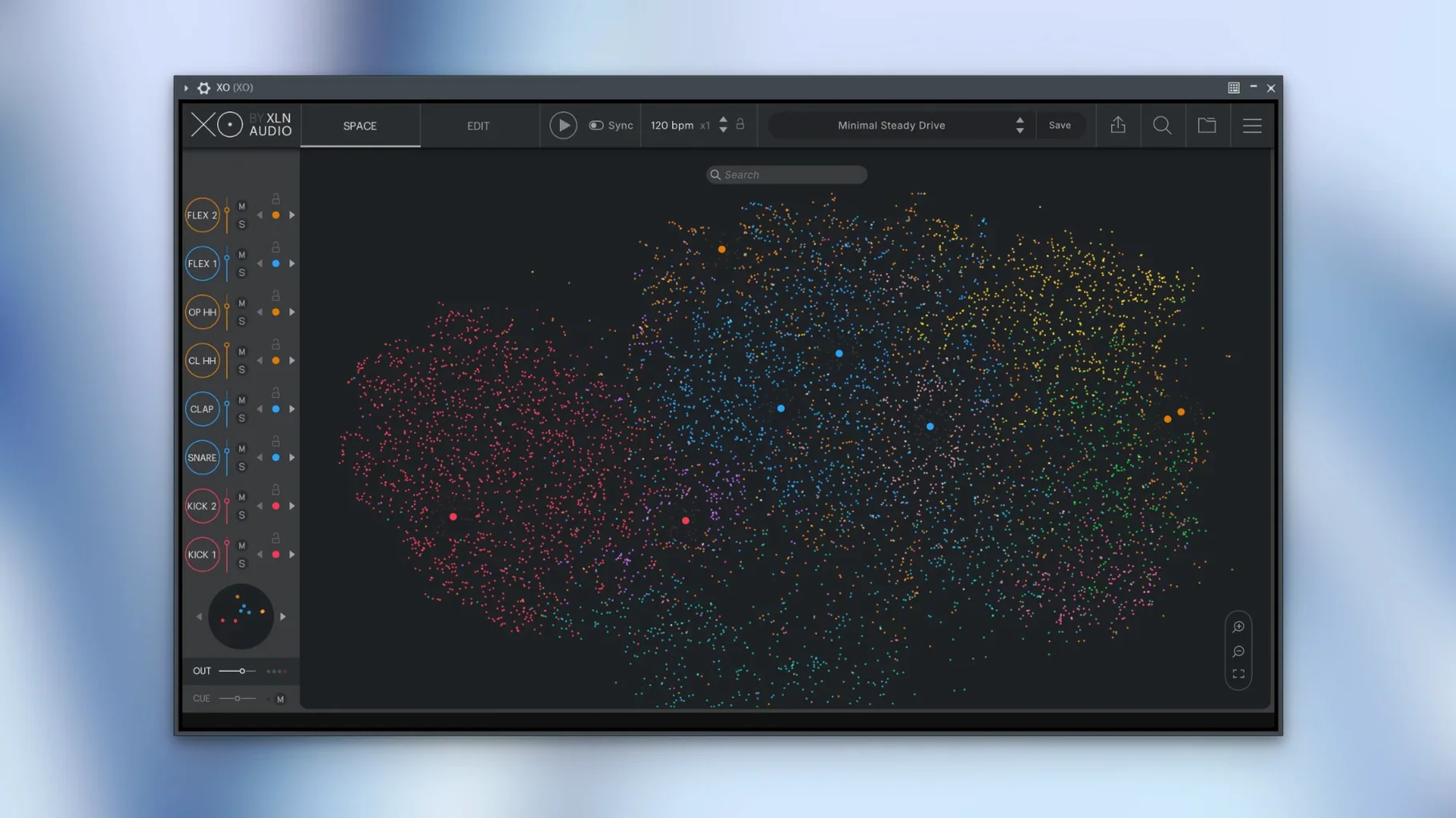
Drum programming usually starts with the same chore: digging through folders of one-shot samples, guessing which ones fit together. XO removes most of that guesswork by sorting your drum library by similarity, so related kicks, snares, and hats end up grouped on a visual map. You explore by ear, not by filename.
Where XO sits in a session
- Track level: Use XO as a plugin on a drum track to browse and audition samples without leaving the host.
- Bus level: Route the XO output to a drum bus for parallel compression or group processing, just like any instrument plugin.
- Standalone mode: Sketch beats outside the DAW, then export audio or MIDI to bring the idea into your project.
- Arrangement: The built-in sequencer and Groove Templates let you lay down patterns quickly, then drag the MIDI into your timeline for further editing.
Practical jobs in a session
For a project manager who also produces, XO saves the time you would otherwise spend organizing samples. It works as a sample browser and beat maker in one window. The current version, 1.8.10, fixes MIDI export with muted lanes and a rare slow start-up issue — small things that keep a session moving. With more than 240 editable presets, you can start from a familiar sound and tweak from there. It runs on macOS 10.13 or later on both Intel and Apple Silicon.
Recent changes that matter in daily use
Version 1.8.10 brought a few fixes that affect how the plugin behaves inside a host. The MIDI export with muted lanes now works correctly — earlier you might have dragged a beat into your timeline only to find muted lanes missing. That fix alone saves a re-export or manual MIDI editing. Audio export while the host is playing was also patched. If you work with XO running in a DAW and export audio on the fly, that process no longer interrupts playback. A rare slow start-up issue was resolved too; on some machines the plugin would hang for a moment before loading. That is gone now. The rest of the changes are minor fixes that keep the interface stable.
What this means for your workflow
The MIDI export fix is the one you notice most. When you mute a hi-hat lane in the sequencer and export the pattern, the MIDI file arrives in your timeline exactly as you heard it. No need to mute notes again inside the DAW. The audio export fix matters for producers who bounce stems while the track is still rolling — it no longer stutters or drops out. And the start-up fix is simply one less reason to wait.
DAW and format compatibility
Do I need a specific DAW version for XO to work? XO is available as VST, AU, and AAX, covering most Mac hosts. If your DAW accepts these plugin formats, it will see XO. No special version required beyond macOS 10.13.
Can I use XO without a DAW? Yes. It runs standalone, so you can load samples, build beats, and export audio or MIDI. That is useful for sketching ideas on the move or auditioning sounds without opening a project.
How does the sample sorting actually work? XO analyzes the sonic character of each one-shot and places similar sounds close together in the XO Space grid. You navigate the map visually and audition samples by clicking. The same logic applies to any of the 8,700+ included samples or your own library if you load it.
Does the sequencer replace a full drum machine? It is a built-in pattern sequencer with editable presets and Groove Templates, intended for quick beat sketching. For complex workflows, you can export the MIDI into your DAW and continue editing there.
How XO compares with similar tools
If you look at other drum sample browsers, a few stand out. Sononym organizes samples by similarity too, but it does not include a sequencer or presets — it is a browser only. XO gives you both the browser and a beat-making layer in one plugin. XLN Audio XO is also different from Addictive Drums (another XLN product). Addictive Drums models acoustic kits with multi-velocities and round-robin; XO is built for one-shot samples and beat construction, not kit emulation. Atlas by Algonaut offers a similar similarity-based browser and integrates with a DAW, but it focuses on sample management without a sequencer. XO combines the visual browsing and the pattern creation step, so you can find a snare and have it in a beat within the same session. For someone who moves between sample hunting and arrangement quickly, that is the main difference.
- Fixed a MIDI export error that occurred when tracks were muted.
- Fixed audio export during DAW playback.
- Fixed a rare issue that caused slow application startup.
- Other minor fixes applied.
| macOS | macOS 10.13 or later |
|---|---|
| Processor | Apple Silicon, Intel 64-bit |
| Download | 2.4 GB |
- macOS 10.13 or later
- Apple Silicon or Intel 64-bit
Questions about XLN Audio XO
Can XO export my beats to a DAW?
Yes, XO can export both audio and MIDI. The latest version also fixed an issue with MIDI export when lanes are muted.
How to install, in order
- Open the downloaded disk image.
- Run the standard installation procedure.
Comments and corrections 0
Sign in or open a free account to leave a comment.
No comments or corrections yet.