Xpand!2 2.3.1 — download for Mac
VST Plugins Updated
Holds four independent parts per patch with separate note ranges, arpeggiators, and effects in one slot.
Screenshot
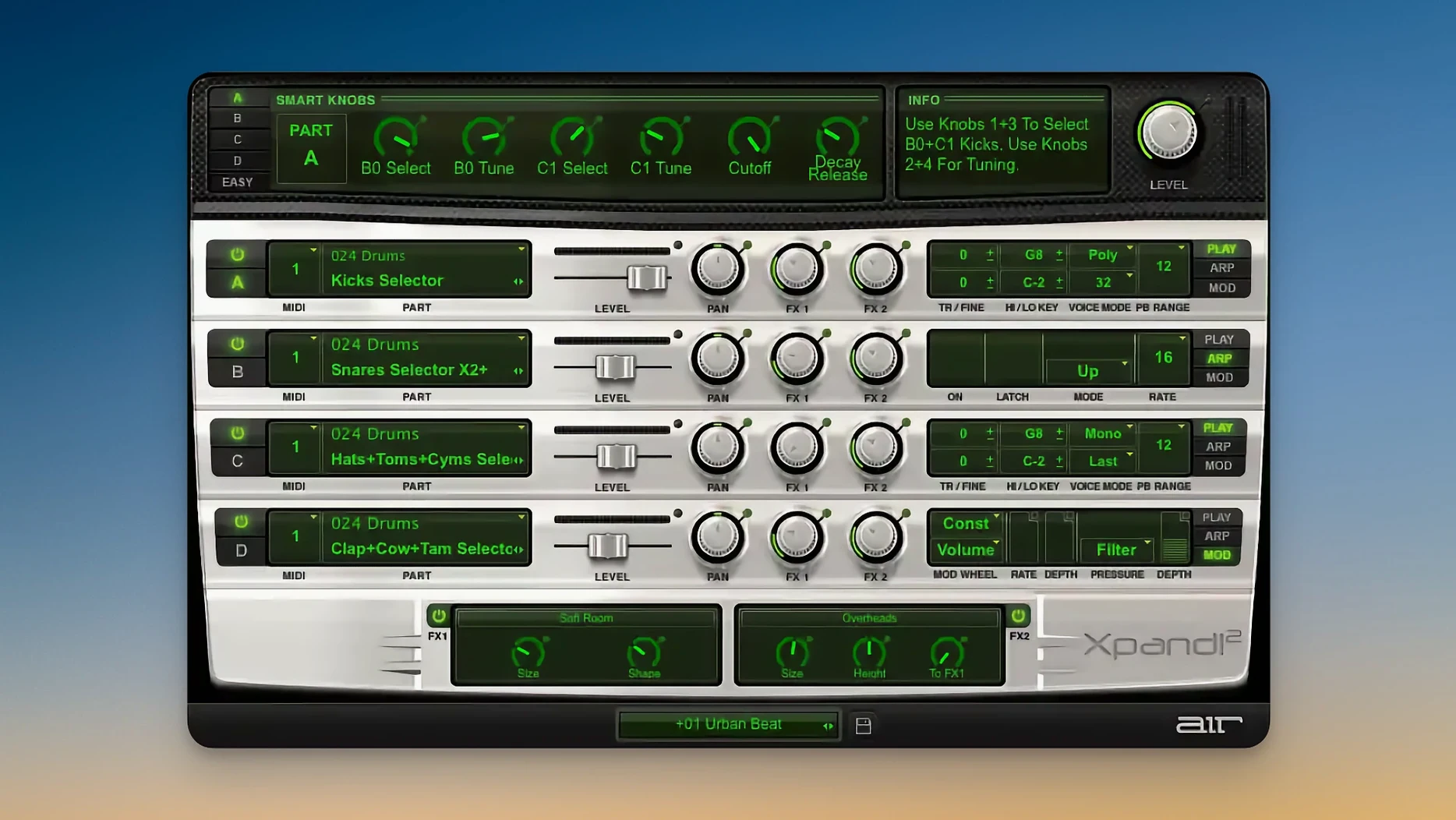
Producers who need a dense mix without stacking ten instances of the same plugin reach for Xpand!2. It’s a multitimbral instrument: each patch holds four independent parts, and each part gets its own note range, arpeggiator, modulation, effects chain, and mix level. That’s a lot of sound in one slot.
What You Can Shape in One Patch
- Four sound slots per patch, each with its own MIDI range and voice priority (First, Last, Highest, Lowest for monophonic parts; polyphonic goes up to 64 voices)
- Two effect processors per part, drawing from 50 effects — reverb, delay, chorus, Chaos Delay, and more
- Six smart controls that map to the most useful parameters for quick edits without diving into submenus
- Layer subtractive, FM, wavetable, or sample-based engines in the same patch
Four Slots Per Plugin Window
The real utility is in the routing. You can have a bass on slot one, a pad on slot two, a pluck on slot three, and a noise swell on slot four — all playing from the same plugin window. The arpeggiator per slot means rhythmic layers stay tight. The Chaos Delay effect adds movement without eating CPU because it runs inside one instance. On a MacBook Air M2, you can stack a few of these before the meter even twitches. Originally part of the Avid Pro Tools Creative Collection, it has settled into a reliable workhorse for anyone who needs layered sounds fast.
Recurring macOS Frustrations Fixed
A few recurring frustrations show up when people first run Xpand!2 on macOS. None are hard to fix, but knowing them saves a detour.
MIDI Routing Confusion
The four slots each listen on their own MIDI channel by default. If you hear nothing from slots two, three, or four, check that your DAW is sending MIDI on separate channels. Many users leave everything on channel 1, then wonder why only the first part plays. Assign slot two to channel 2 in the plugin, then route your MIDI tracks accordingly.
Voices Dropping Out
A part set to monophonic with "First" priority will cut off the previous note as soon as a new one arrives. That is the expected behavior, but it can sound like a bug if you expected a sustained pad. Switch the voice mode to polyphonic if you need overlapping notes, or change the priority to "Last" if you want the newest note to ring while the old one fades.
Presets Sound Different After Loading
Some presets use modulation wheel data or aftertouch to control filter sweeps, LFO speed, or effect mix. If your MIDI controller does not send those messages, the patch may sound static or thin. Use the six smart controls to dial in the missing expression, or assign the parameter via MIDI Learn.
Interface Size on High-Resolution Screens
The UI is scalable and supports Retina displays, but the default zoom level might be small on a 4K monitor. Look for the scaling option in the plugin menu — it is not hidden, but it is easy to overlook on first launch. Set it to a comfortable percentage and the controls will read clearly.
Learn Mapped Parameters Via Six Knobs
Spend the first session browsing presets with the smart controls in mind. Grab a patch you like, then twist each of the six knobs. You will learn fast which parameters the developer mapped for that category — often filter cutoff, envelope attack, reverb send, and LFO speed. This is faster than memorizing sub-menus.
Next, build one layered patch from scratch. Pick a sound for slot one, then add a complementary texture on slot two. Set different MIDI ranges so they do not fight: bass notes on slot one, mid-range on slot two. Turn on the arpeggiator on slot three for a rhythmic element. Save the patch. You now have a custom instrument that would have taken four separate plugin instances before.
Finally, set up a template session in your DAW with one Xpand!2 loaded on a track. Route four MIDI channels to it and label each lane (Bass, Pad, Arp, FX). This template alone cuts setup time by ten minutes every time you start a new project.
Tense Underscore in 24 Hours
Wednesday afternoon, a cue needs a tense underscore. The deadline is tomorrow morning. I open the template with Xpand!2 already on a track.
Slot one gets a low cello sample — monophonic, Last priority, range C2 to C3. I add a slow LFO on filter cutoff from the smart controls. Slot two takes a glassy pad from the wavetable bank, polyphonic, range C4 to C6, with a long reverb. Slot three gets a plucked synth, monophonic, First priority, arpeggiator set to a sixteenth-note pattern on the root chord. Slot four holds a noise swell that fades in slowly using the amplitude envelope.
I record the cello line first, then the pad. The arpeggiator runs live while I play the chord changes — no need to program the pattern note by note. The noise swell sits behind it all, triggered by a single held key. Everything plays from one plugin window. No freezing, no bouncing, no extra instances.
When the arrangement needs a variation, I copy the track, change the preset on the new instance to a brighter variation, and drop the arpeggiator pattern to half speed. The whole cue is done in two passes. Export the stems, send the file, close the laptop.
Picture Composers Cut Plugin Count
Composers who write to picture benefit immediately. One instance handles bass, pad, and two rhythmic layers — that is three or four fewer plugins to manage across a 40-track template. The CPU saving is not theoretical; it means fewer freezes and print tracks.
Live performers using a laptop as a sound module get value from the four-slot layout. Map each slot to a different keyboard zone or a pad controller, and you have a layered setup that responds in real time without a rack of hardware.
Sound designers working on soundtracks or installation pieces will use the modulation options and the Chaos Delay to generate evolving textures. The combination of sample playback and subtractive synthesis in one patch means you can morph between realistic and synthetic without leaving the window.
Anyone on an Apple Silicon MacBook who wants maximum sound per plugin slot will find Xpand!2 fits naturally. It does one thing — layer multiple sounds in one instance — and does it without extra fuss. If you search for xpand crack mac or xpand 2 torrent, you are probably already looking for a tool that can replace four plugins with one. This is that tool.
No release notes filed for 2.3.1. They are added here when a build changes how the program behaves.
| macOS | macOS 13 or later |
|---|---|
| Processor | Apple Silicon |
| Download | 1.2 GB |
- macOS 13
- Apple Silicon
- Interface language: English
How to install, in order
- Install and activation instructions are included with the package.
Comments and corrections 0
Sign in or open a free account to leave a comment.
No comments or corrections yet.