
Tweakbench Noemi 1.0.1 — download for Mac
Mac Apps Updated
Generates music that evolves on its own without a timeline.
Screenshot
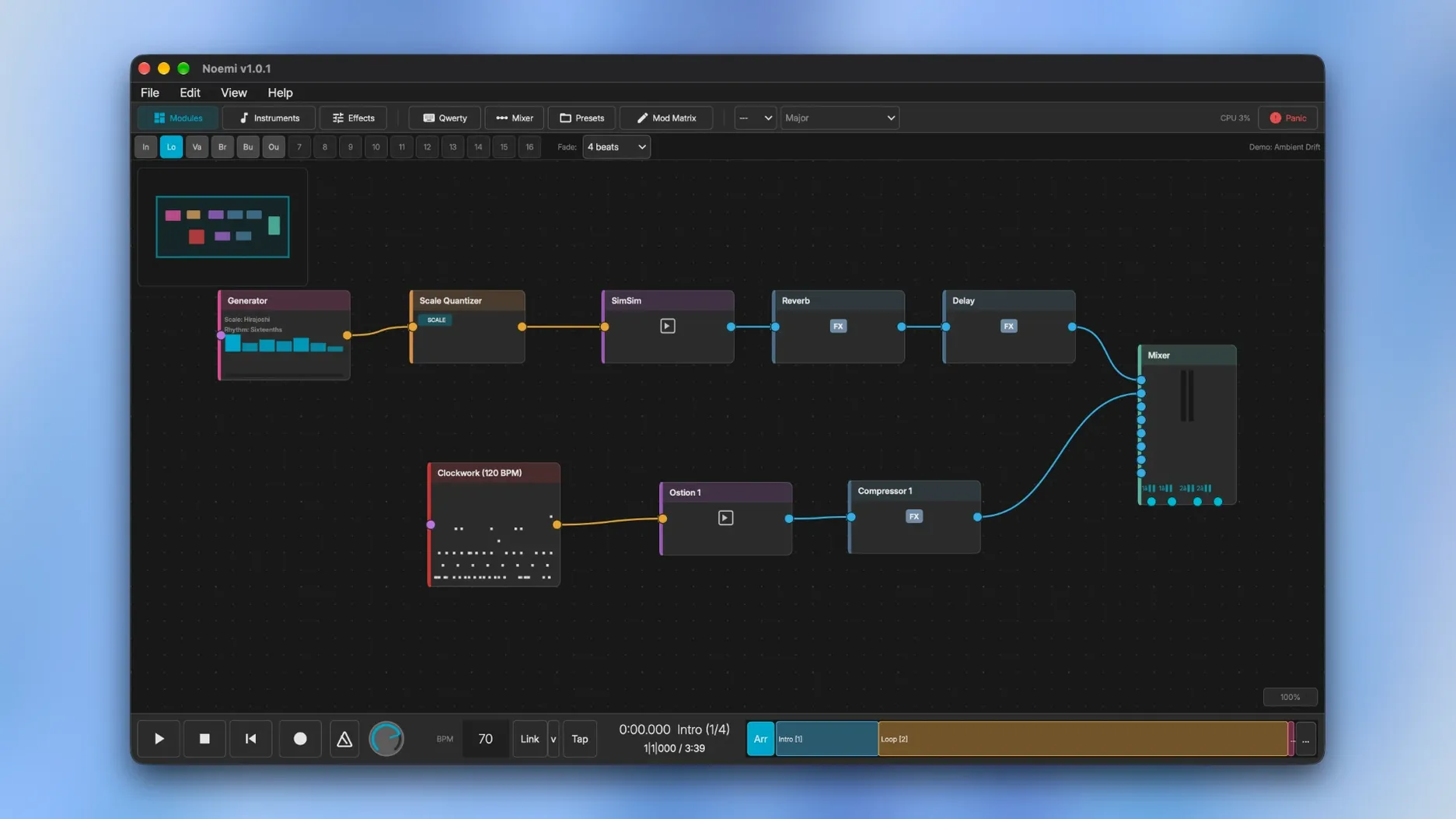
Most DAWs force you into a timeline. You place clips from left to right and call it a song. That works for linear arrangements, but it breaks down when you want music that evolves on its own or reacts to a live performance.
Tweakbench Noemi takes a different route. Instead of a track-based timeline, you wire together blocks — generators, instruments, transformers, effects — in a node graph. The signal flows however you connect it. That makes it a good fit for generative music, ambient soundscapes, or anything where change over time is the point.
For composers who want evolving, non-repeating arrangements
- Composers who want non-repeating, evolving arrangements
- Live performers switching scenes on the fly
- Anyone who prefers modular patching over linear editing
Node graph replaces timeline — no playhead scrubbing
- The node graph replaces the timeline — no traditional playhead scrubbing
- External plug-ins (VST3, AU, CLAP, LV2) are supported, but you wire them like everything else
- The built-in tools cover synth, vocal, and percussion sounds
- A scale quantizer, Euclidean rhythms, LFOs, and envelopes are available for shaping
- You can export a full mix or separate stems
Common beginner mistakes in the node graph
The biggest shift when moving from a linear DAW to Noemi is letting go of the timeline. New users often try to force patterns into a strict bar-by-bar structure, which fights against the generative nature of the tool. A better approach is to start with one generator block — a melody generator or a simple rhythm pattern — and add transformers gradually. Piling too many blocks at once makes it hard to tell what is producing which sound.
Another frequent snag is ignoring the scale quantizer. Without it, random generators can produce notes that clash. Beginners sometimes spend time tweaking modulation sources when the fix is simply routing the generator output through the quantizer first. Similarly, Euclidean rhythms can feel unfamiliar at first, but they are worth learning early. They give you percussive patterns that feel natural without needing a step-by-step sequencer.
Fix silent blocks and hot signals in the node graph
- No sound from a block: Check the node connections. A block with no input or output wired correctly will sit silent. The graph does not warn you about dangling wires.
- Unexpected volume spikes: Generators can produce hot signals. Insert a gain or limiter block between your generator and the master output until you know the level.
- External plug-ins not showing: Noemi scans for VST3, AU, CLAP, and LV2 plug-ins, but it does not auto-scan on every launch. Run a manual scan from the plug-in manager after installing new ones.
- Scene transitions feel abrupt: The tool supports smooth transitions, but you need to build them into the patch. Add a crossfade or modulation envelope that ramps between scenes rather than switching instantly.
Syncs with Ableton Live via Ableton Link for live sets
Can it work alongside Ableton Live? Yes, through Ableton Link. You can sync Noemi's tempo and transport with Ableton or other Link-compatible apps. That is useful for live sets where you want generative layers running in parallel with arranged tracks.
Does it replace a standard DAW for recording vocals or arranging a full band? Not really. Noemi is built for generative and modular workflows. If you need comping vocal takes, editing audio clips on a timeline, or mixing with a conventional mixer, you would still use Logic Pro, Cubase, or Reaper. Noemi works best as a companion — either standalone for generative pieces or as plug-ins inside your existing DAW.
Do I need to be a programmer to use the node graph? No. The blocks are visual and you connect them by dragging. There is no scripting required. That said, understanding basic signal flow — what feeds into what — helps a lot. If you have patched a modular synth or used Max for Live, the logic will feel familiar.
Can I export stems for mixing elsewhere? Yes. The app exports to WAV and MP3, and you can output a full mix or separate tracks. That means you can generate a bed of evolving texture in Noemi, export the stems, and mix them in your usual DAW alongside recorded instruments.
No release notes filed for 1.0.1. They are added here when a build changes how the program behaves.
| macOS | macOS 11 or later |
|---|---|
| Processor | Apple Silicon, Intel 64-bit |
| Download | 654 MB |
- macOS 11 or later
- Intel or Apple Silicon
- English interface
How to install, in order
- Open the included installation and activation instructions.
- Follow the included steps to install the app and activate it.
Comments and corrections 0
Sign in or open a free account to leave a comment.
No comments or corrections yet.