MacCleaner Pro 4.0.4 — download for Mac
Utilities Updated
Reclaims space by removing app leftovers, duplicates, and hidden junk.
Screenshot
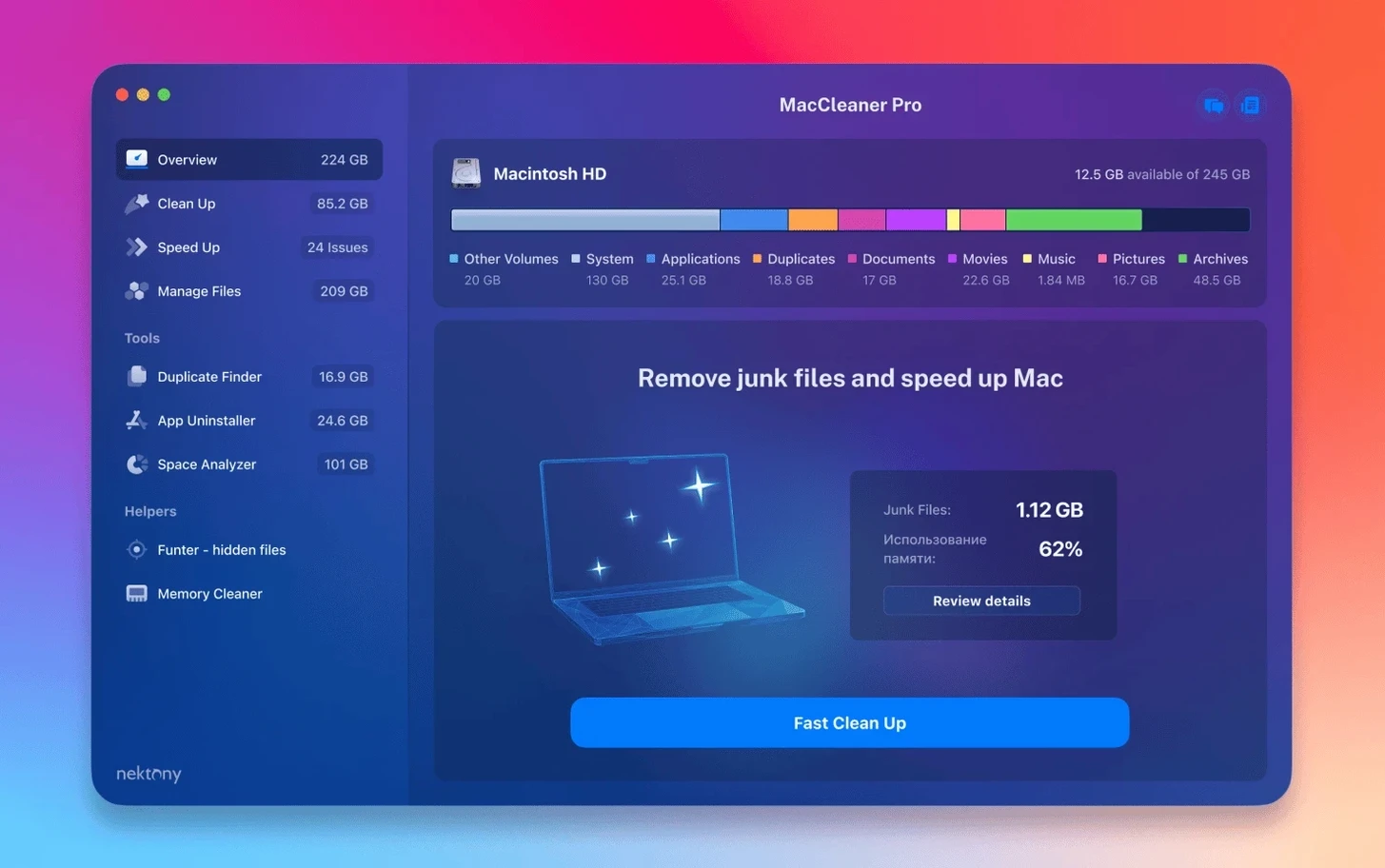
A Mac that has been in use for a couple of years tends to accumulate app leftovers, duplicate files, and hidden junk. MacCleaner Pro 4.0.2 bundles six Nektony tools into one suite for reclaiming that space and keeping the system responsive.
Scan Drive and Locate Old Downloads
Disk Space Analyzer 6.0 — Scans the drive and shows which folders hold the most data. A quick way to locate old downloads or forgotten caches.
App Cleaner & Uninstaller 9.0.3 — Removes applications and their leftover files, including browser extensions. Safer than dragging an app to Trash.
Duplicate File Finder 8.5.2 — Finds identical files by content or name. Useful before migrating to a new machine or cleaning a shared project folder.
Memory Cleaner 5.5 — Monitors RAM usage and clears inactive memory. Helpful when running a few heavy applications side by side.
Funter 7.1 — Reveals hidden files and folders that Finder normally hides. Good for locating configuration files or system-level clutter.
Ideal for Designers and IT Staff
The suite suits different Mac users for different reasons. Designers and video editors who save large project files across multiple folders will find Disk Space Analyzer and Duplicate File Finder especially useful. IT staff or power users who install and uninstall applications often will rely on App Cleaner & Uninstaller to catch the remnants that standard uninstall routines miss. Casual users who rarely open the Finder beyond Documents and Downloads will appreciate the one-stop approach: run a scan, see what can go, and free up space without reading forum guides.
Office workers who store files on a mix of local and cloud-synced folders should pay attention to the version 4.0.2 improvements for iCloud and custom Home folders. Those fixes mean the suite now catches items it might have skipped before, which matters when the Startup Disk Full warning appears at the worst moment.
Runs Entirely Offline With Preview Before Deletion
Does it need an internet connection to work?
No. The tools run entirely on your Mac. Scanning, cleaning, and memory management happen locally.
Will it delete something important by accident?
Each tool shows what it plans to remove before acting. Duplicate File Finder lists matches by content or name and lets you decide which copies to keep. App Cleaner & Uninstaller shows leftover files for each app. You can review everything before confirming.
Can it clean multiple user accounts on the same Mac?
The tools scan the drive, so they can find and manage files across accounts if you have the necessary permissions. Each account can also run its own scans separately.
Does it interfere with Time Machine or cloud sync services?
Not during normal use. Memory Cleaner only affects inactive RAM, not your storage. Disk Space Analyzer is read-only until you decide to delete. The suite does not modify system-level backup configurations.
Is it safe to run alongside other system utilities?
Yes. The tools do not conflict with common monitoring or antivirus apps. Running two disk analyzers at the same time would be redundant but harmless.
Check Size Column Before Deleting Files
First-time users sometimes delete files without checking the size column in Disk Space Analyzer. A folder full of small text files looks alarming when sorted by file count, but it might take up only a few megabytes. Sort by size first.
Another common slip is selecting every duplicate found by Duplicate File Finder without verifying which copy belongs in which folder. If you have a work file in both ~/Documents/Project A and ~/Documents/Project A (backup), decide which folder is the authoritative one before removing duplicates. The tool can help, but you need to know your own filing system.
Some people run App Cleaner & Uninstaller and select the first suggested items without checking the extension list. Browser extensions that still hold login tokens or saved sessions will vanish along with the app. Review the extension list separately before you confirm.
A few users close Memory Cleaner immediately after it clears RAM, thinking the job is done once. The tool runs in the background and can keep memory usage low over time. Let it stay active if you tend to keep many apps open during the day.
Two-Minute Scan Before a Deadline
Wednesday morning, before a deadline. I open MacCleaner Pro 4.0.2 and start with Disk Space Analyzer. It scans the internal drive in about two minutes. I delete both without touching anything else.
Next, I run Duplicate File Finder against the Documents directory. It returns a list of 300 identical PDFs that had been copied across subfolders by a backup script that ran twice. I keep one set and remove the rest. That frees another 4 GB.
I switch to App Cleaner & Uninstaller. I remove all three and let the tool scan for leftover files in ~/Library/Application Support and ~/Library/Preferences.
I clear the inactive portion. The machine feels noticeably quicker when I open the browser and the project file again.
The whole session takes under fifteen minutes. I close the suite and move on to the next task.
- Improved detection of items stored in an iCloud folder.
- Enhanced detection of items in a custom Home folder.
- Fixed several minor interface issues.
| macOS | macOS 10.13 or later |
|---|---|
| Processor | Apple Silicon, Intel 64-bit |
| Download | 132 MB |
- macOS 10.13 or later
- Intel 64-bit or Apple Silicon processor
How to install, in order
- Open the included installer package.
- Follow the included installation instructions.
- Complete activation using the instructions included in the package.
Comments and corrections 0
Sign in or open a free account to leave a comment.
No comments or corrections yet.