Cymatics QUAKE 1.0.0 — download for Mac
VST Plugins Updated
Shapes 808 and bass sounds with a focused processor for trap and hip-hop tracks.
Screenshot
Sound designers and music producers working on trap, hip-hop, or electronic tracks reach for a dedicated bass engine when the low end needs to land hard. Cymatics QUAKE is a plugin built for that job: a focused tool for shaping 808 and bass sounds without opening a chain of different processors.
| Item | Detail |
|---|---|
| Plugin type | Bass engine (VST) |
| Current version | 1.0.0 |
| macOS requirement | macOS 10.14 or later |
| Architecture | Intel and Apple Silicon (native) |
| Interface language | English |
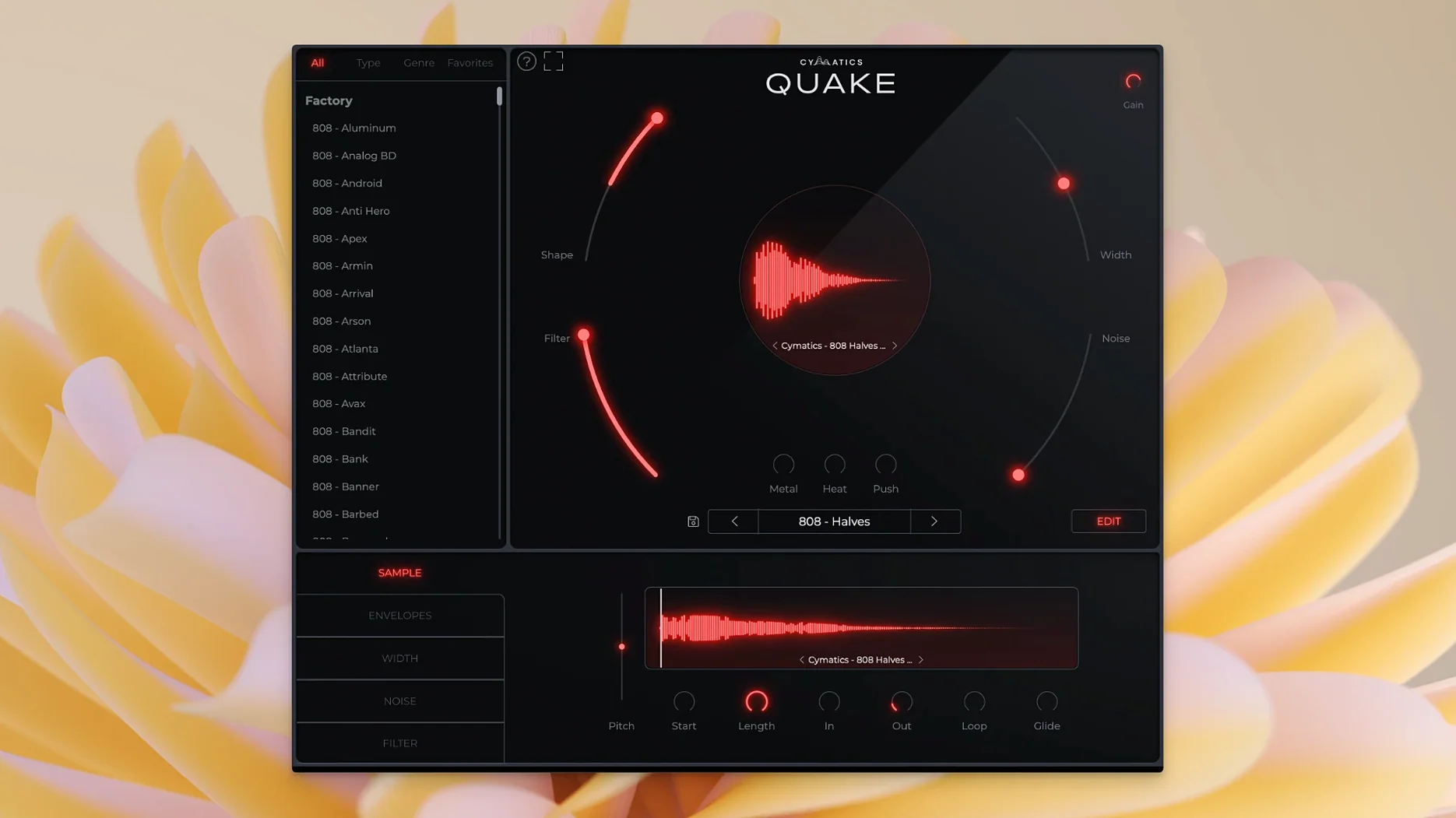
In a session, QUAKE sits directly on a mono or stereo bass track, not on a bus. The idea is speed: one window holds the tools you need — Width for stereo spread, Shape for harmonic content, Filter to clean up low rumble, plus Noise, Metal, Heat, and Push for texture and drive. The preset library covers 13+ genres and styles, and every preset is fully customizable. If you route a kick and a sub to the same track, the Filter and Push controls help the two sit together without clashing. It replaces the habit of stacking EQ, saturation, and stereo widener on separate inserts.
Fits Into Any Major DAW as a VST
QUAKE functions as a standard VST plugin, so it fits into any major DAW on macOS — Logic Pro, Ableton Live, FL Studio, Cubase, and Reaper handle it without special setup. Load it as an instrument track or as an effect insert depending on how your session routes bass. On Apple Silicon Macs, the native compatibility means it runs without Rosetta translation, which keeps plugin scanning fast when you open a new project.
For macOS users who run multiple screens, QUAKE's single-window interface is practical. It stays on a secondary monitor or in a floating window while your arrangement view or mixer is on the main screen. No tabbing through submenus or collapsed sections — the controls Width, Shape, Filter, Noise, Metal, Heat, and Push are all visible at once.
The plugin also works well with macOS system audio routing. If you use Audio Hijack or a similar utility to bounce stems or audition presets, QUAKE's output behaves like any other instrument channel. You can record its audio output in real time or freeze the track to save CPU during mixing.
Pick a Preset by Genre to Match Your Track
When you load QUAKE for the first time, the default preset may not match your track. Start by browsing the preset library by genre — Trap, House, R&B, EDM, Drill — and pick one close to the vibe you need. From there, adjust these controls in order:
- Shape: This tweaks the tone and envelope. Turn it first because it changes the character more than anything else. A small rotation can move a sub from round to aggressive.
- Filter: Pull this down if the bass bleeds into the kick's fundamental frequency. QUAKE's filter cleans up the low end without making the sound thin.
- Width: Use this early in your mix, not last. Setting width before adding saturation keeps the stereo field from collapsing when distortion hits.
Leave Metal, Heat, and Push for later, after the core tone is set. These three saturation controls add growl, harmonic bite, and output level, and they stack. Pushing too much saturation early makes it harder to balance the sub and the high harmonics.
Factory Presets Already Organized by Genre
Version 1.0.0 is the first release, so there is no change log from earlier builds. What matters for everyday work is that the plugin ships with a full set of factory presets already organized by genre. This means you do not need to download a separate preset pack or create your own starting points from scratch. The noise and saturation controls are built into the same panel, not as separate plugins you have to load and route. For a producer who used to stack a synthesizer, an EQ, a saturator, and a stereo widener on a single bass track, QUAKE eliminates four insert slots and the latency that comes with a chain of third-party plugins.
The workflow change is subtle: instead of designing a bass sound by auditioning samples or synthesizer patches, you now start from a preset and tweak. If you search for cymatics quake or cymatics quake torrent to find this release, the value is that the plugin provides a complete bass engine, not just a sample pack or a single preset.
Bass That Cuts Through a Busy Drill Mix
A beatmaker working on a drill track needs a bass that cuts through a busy mix of hi-hats, snares, and vocal chops. The kick hits on the downbeat, and the 808 needs to slide into the same pocket without mud. The beatmaker opens QUAKE on a new instrument track, selects the Drill category from the preset library, and picks a preset with a tight sub. Using Shape, they dial in a shorter decay so the 808 stops before the next kick. Filter removes the subsonic rumble below 30 Hz. A small amount of Heat adds presence without pushing the track into distortion. The whole setup takes under two minutes, and the bass sits cleanly against the kick without sidechain compression.
For a producer who does not want to spend time programming synthesizer patches or layering samples, QUAKE keeps the focus on arrangement and mix decisions instead of sound design rabbit holes.
No release notes filed for 1.0.0. They are added here when a build changes how the program behaves.
| macOS | macOS 10.14 or later |
|---|---|
| Processor | Apple Silicon, Intel 64-bit |
| Download | 1.6 GB |
- macOS 10.14 or later
- Intel or Apple Silicon processor
How to install, in order
- Follow the standard installation procedure for the plugin.
Comments and corrections 0
Sign in or open a free account to leave a comment.
No comments or corrections yet.