Blue Cat Audio Blue Cats PatchWork 2.7.5 — download for Mac
VST Plugins Updated
Hosts up to 64 plugins in one slot for parallel or serial effects chains.
Screenshot
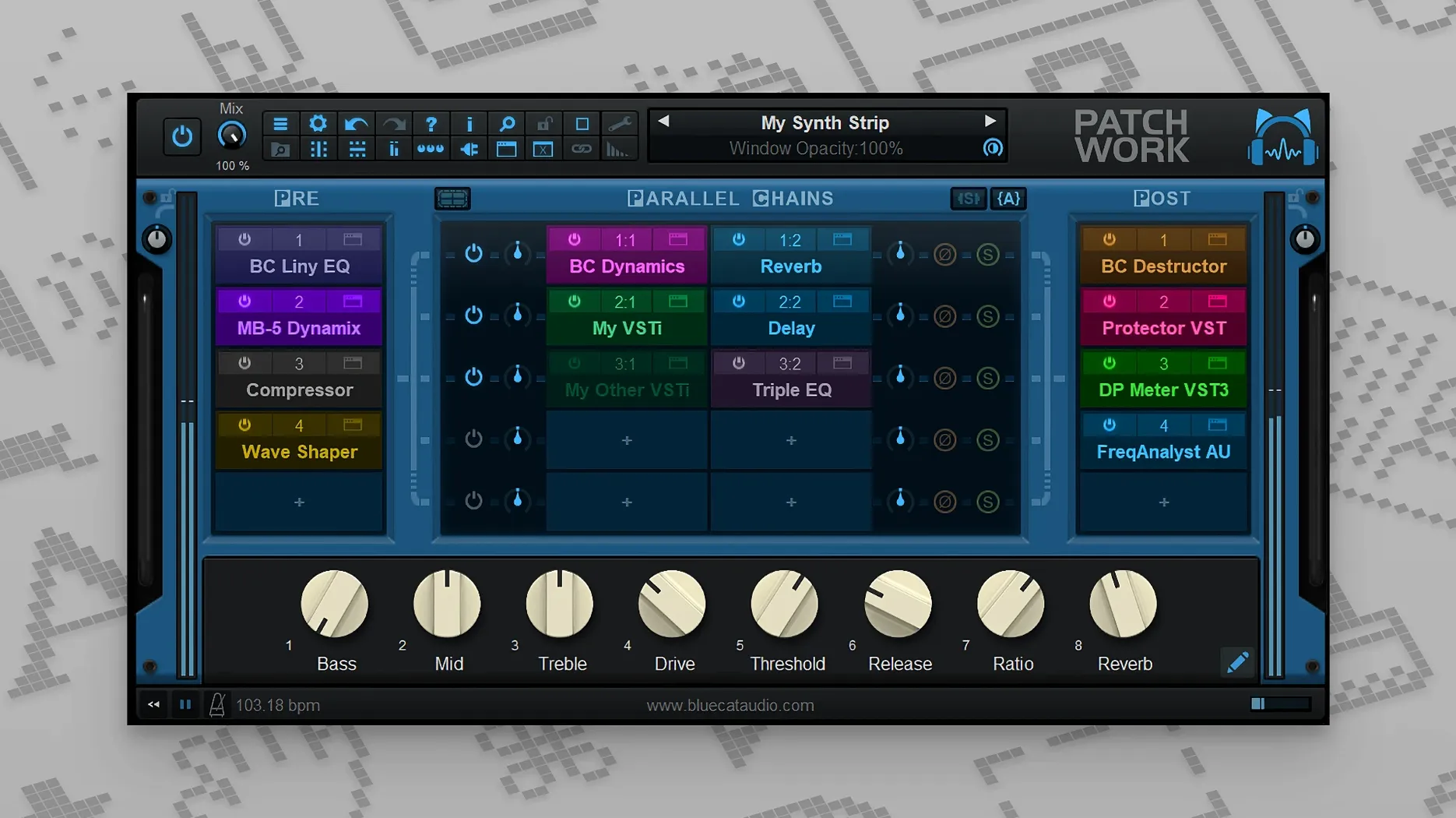
A single instance of PatchWork can host up to 64 plug-ins, turning one DAW slot into a full parallel or serial effects rack. That number defines how it saves screen real estate and keeps complex chains manageable. But the first question for any project manager is whether it will actually open on the machine in front of you. On Mac, PatchWork needs macOS 10.9 or later and runs on both Intel and Apple Silicon Macs — 64-bit only. No Rosetta ambiguity, no legacy 32-bit bridge to configure.
| Detail | Value |
|---|---|
| Current version | 2.7.5 |
| macOS minimum | 10.9 (64‑bit) |
| Architecture | Intel + Apple Silicon |
| Formats | VST, VST3, Audio Unit, Standalone |
| Plug‑ins per instance | Up to 64 |
Once it is running, the software acts as a patchbay and plugin host inside a DAW. You can load third-party VST, VST3 and Audio Unit effects or instruments alongside the built-in effects, then arrange them in series or parallel splits. A searchable plug-in browser keeps the list navigable, and the preset browser returns results while you type — practical when a template holds 30 slots and you need to audition chains quickly. Recent builds also handle more MIDI event types for parameter control, with MIDI mapping extended to individual plug-in bypass and UI open/close commands. Drag-and-drop installation from the file system works for plug-in interfaces. For an audio editor or sound designer building layered processing, the 64-slot ceiling removes the need for multiple aux tracks and keeps every routing decision visible in one window.
Building a Guitar Rack from Scratch — Start to Finish
Here is one way PatchWork fits into a typical mix session. Suppose you have a DI guitar track that needs amp simulation, cabinet IR, dynamic EQ, a compressor for sustain, a noise gate, and a stereo widener at the end. Without PatchWork, you might insert six separate plug-ins across three aux tracks, then route them manually. With PatchWork, you open one instance, load the plug-ins, and route them in one window.
- Insert PatchWork on the guitar track. Because it accepts VST, VST3, and Audio Unit formats, the same instance works whether your amp sim is VST3 and your IR loader is AU.
- Open the plug-in browser and search for the amp sim. Drag it into slot 1. Repeat for the cabinet IR into slot 2. Set the routing to serial so signal flows from slot 1 directly into slot 2.
- Add the dynamic EQ into slot 3, the compressor into slot 4, the noise gate into slot 5. Keep routing serial.
- Add the stereo widener into slot 6. Switch its routing to parallel, and adjust the wet/dry split so the original signal stays intact while the widened layer sits underneath.
- Save the whole chain as a preset. Name it “Electric Guitar — Clean Amp Rack.” Next time you track a similar guitar, you load that preset and swap the amp sim if needed.
- Copy the preset to other tracks by using the copy and paste chain commands added in version 2.75. No need to rebuild the rack for each take.
The built-in audio recorder, also from version 2.75, can capture the processed output directly from PatchWork. If you want to print the wet guitar to a new audio track without freezing the entire DAW project, you record up to 16 channels from the same instance.
PatchWork vs. Gig Performer and Element on Mac
PatchWork is not the only plugin host on Mac. Two other tools serve a similar role: Gig Performer and Element. Each takes a different approach to the same job.
- Gig Performer is optimized for live performance. It handles preset switching with low latency and supports MIDI mapping extensively, but its focus is stage use, not studio chain-building. Its routing is simpler than PatchWork’s serial-parallel layout, and it does not include a built-in audio recorder. For a mix engineer who never plays live, Gig Performer’s live-oriented features add complexity without benefit.
- Element is a modular plugin host that can load VST and Audio Unit formats. Its interface is minimal, with a focus on CPU efficiency. However, it lacks the full-text search inside presets and the enhanced preset browser that PatchWork offers. If you maintain a large library of saved chains, searching for a specific EQ setting inside a past preset is faster in PatchWork.
- PatchWork sits between them. It has the live-ready MIDI control of Gig Performer, but its routing depth and preset search belong in a studio context. The 64-slot limit and support for parallel splits make it more flexible for complex effects chains than Element, while the built-in plug-ins reduce the need for third-party tools.
For a project manager coordinating multiple producers or sound designers, PatchWork’s preset browser with real-time results saves time when a session file refers to a specific chain. You type part of the chain name, and it appears. That is not something Gig Performer or Element emphasize.
Standalone and DAW Integration via Core Audio
PatchWork runs as a standalone application or inside a DAW. In a typical macOS setup, it integrates with the operating system’s audio routing through Core Audio and ASIO on the Windows side, but on Mac, Core Audio handles input and output. No extra audio driver is needed.
It can sit alongside Blue Cat Audio’s other hosts, such as Axiom, Fader Hub, MB-7 Mixer, and Late Replies, but it does not require them. If you already use MB-7 Mixer for multiband processing, you can load it inside PatchWork, saving one insert slot in the DAW. The drag-and-drop installation from the file system means you can manage plug-in user interfaces without opening a separate installer — a small detail that matters when you are swapping IR files or UI skins mid-project.
On macOS, the VST3 editor loads only when the interface is shown. That is a system-level constraint, not a bug. If you hide the plug-in editor to save screen space, the VST3 editor window does not consume resources. On a project with 20 PatchWork instances, that behavior keeps the CPU free for the mix.
The search feature extends beyond plug-in names. Full-text search inside saved presets means you can find a chain by the name of a specific plug-in it contains, even if you saved the preset weeks ago. That works with any third-party VST or AU plug-in you have scanned. For a sound designer who reuses processing chains across multiple projects, this search turns a library of presets into a navigable database.
If you work with MIDI controllers, the ability to map bypass and UI open or close to specific MIDI events means you can build a hardware control surface for PatchWork. Map a footswitch to toggle a distortion plug-in on and off, or map a knob to open the UI of a compressor. That is practical for recording engineers who keep their hands on a controller rather than a mouse.
No release notes filed for 2.7.5. They are added here when a build changes how the program behaves.
| macOS | OS X 10.9 or later |
|---|---|
| Processor | Apple Silicon, Intel 64-bit |
| Download | 587 MB |
- macOS 10.9 or later
- Intel or Apple Silicon Mac (64‑bit only)
- VST, VST3 or Audio Unit host DAW (or use standalone mode)
How to install, in order
- Open the downloaded DMG file.
- Run the PKG installer inside.
- On Catalina or later, if macOS blocks the installer and the machine is offline, right-click the PKG and choose Open from the context menu.
Comments and corrections 0
Sign in or open a free account to leave a comment.
No comments or corrections yet.