Cableguys Snapback 1.1 — download for Mac
VST Plugins Updated
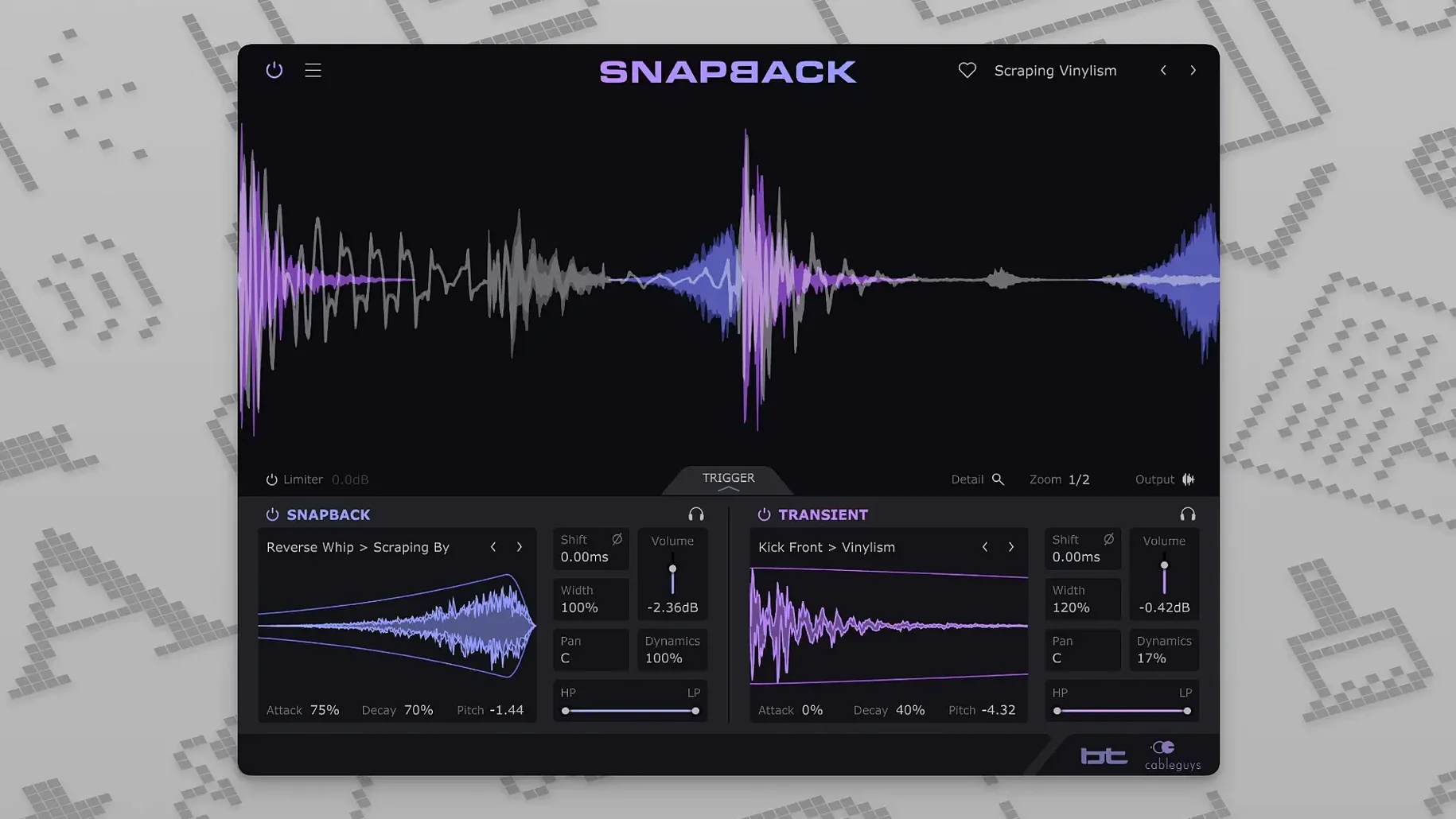
Triggers sample layers on drum hits with automatic transient detection.
Screenshot
Version 1.1 adds a Reverse button for instant backward playback and expands MIDI port support from 16 to 256 — useful when working with larger drum maps or multi-output setups.
Layer a Sample on a Kick
Drop Snapback on a drum track. It detects each hit and aligns the added sample to the transient automatically. No manual nudging. Import your own samples or pick from the 200+ included.
Tweak the Envelope
Once the sample is locked to the hit, shape its attack and release with the built-in envelope controls. That keeps the layer sitting right in the mix without extra compression or gating.
Route to 256 MIDI Ports
With version 1.1 you can send Snapback’s output to any of 256 MIDI ports. In a DAW like Cubase or Bitwig, that means triggering different layers across multiple drum racks from one instance.
Reverse Button Flips Snare Attack
The Reverse button is the kind of addition you don't know you need until it's there. Load a snare sample, flip it, and the attack becomes a backward swell that hits just before the transient. It changes the character of a rim shot or a percussion hit without touching the envelope or filter. For producers working on build-ups or transitional fills, it saves a trip to an external editor.
The MIDI port expansion from 16 to 256 matters less for a basic kick-snare setup and more for anyone running a full drum rack. In Logic Pro or Ableton Live, you can map Snapback across multiple pads, assign different samples to different MIDI notes, and still have room left for other instruments. It removes the old ceiling where you'd hit the port limit and have to duplicate instances.
808 Sub Layer Adds Low-End Punch
I start with a drum loop that needs more weight. The kick is there but it sounds thin — no real low-end punch. I insert Snapback on the kick channel and pick a sub-heavy 808 sample from the included library. The plugin detects the first hit and aligns the sample instantly. I don't adjust timing; it just locks.
Next, I open the waveform visualizer to see where the sample's transient lands. I drag the sample start slightly before the original hit — Snapback allows that — so the sub hits just ahead of the attack. That gives the kick a fuller, wider feel. I dial in the envelope to shorten the release so it doesn't bleed into the next hit.
For the snare, I load a crack sample from my own library. The transient detection works the same way: no manual lining up. I add a high-pass filter to remove mud, then use the pitch adjustment to tune the sample to the track's key. The phase adjustment helps when the snare is layered with another track — flip it until the low end firms up.
I route the output to a MIDI track in Cubase, assign it to port 32, and trigger a different layer on the chorus. The Reverse button gives me a backward snare swell for the pre-chorus fill. Total time from start to finished drum bus: maybe ten minutes.
Native Plugin Works in Any Mac DAW
Snapback loads as a standard plugin in any VST 2, VST 3, AU, or AAX host. That covers Ableton Live, Logic Pro, Pro Tools, Cubase, Bitwig Studio, FL Studio, and REAPER. On macOS, it runs natively on both Intel and Apple Silicon Macs with macOS 10.13 or later, so it works on older MacBook Pros and the newest M-series machines without compatibility layers.
Because it's a plugin and not a standalone app, you save it as part of your DAW project. That means your sample layers, envelope shapes, filter settings, and Reverse toggles are recalled every time you open the session. No re-patching, no re-importing.
The 256 MIDI ports integrate well with drum machines and hardware controllers mapped through your DAW. If you use a MIDI pad controller in Logic or Ableton, you can trigger different Snapback instances per pad, each with its own sample and processing chain. It's one instance doing the work of what used to be several.
For mix engineers who bounce stems, Snapback's output is just another audio track. Route it to a bus, process it further, or print the layer and disable the plugin to free CPU. The waveform visualizer and phase adjustment make it easy to check alignment before committing.
- Reverse button added for instant backward playback.
- MIDI port count expanded from 16 to 256.
| macOS | macOS 10.13 or later |
|---|---|
| Processor | Apple Silicon, Intel 64-bit |
| Download | 37 MB |
- macOS 10.13 or later
- Intel or Apple Silicon processor
- VST 2, VST 3, AU, or AAX host DAW
- Interface language: English
Questions about Cableguys Snapback
Which DAWs does Snapback work with?
It works with Ableton Live, Logic Pro, Pro Tools, Cubase, Bitwig Studio, FL Studio, and REAPER. It supports VST 2, VST 3, AU, and AAX formats.
What Macs and macOS versions are supported?
Snapback runs on macOS 10.13 or later, on both Intel and Apple Silicon Macs (native).
How to install, in order
- Run the standard installer.
Comments and corrections 0
Sign in or open a free account to leave a comment.
No comments or corrections yet.