EZbass 1.3.3 — download for Mac
VST Plugins Updated
Generates bass lines from MIDI or audio and plays sampled bass instruments.
Screenshot
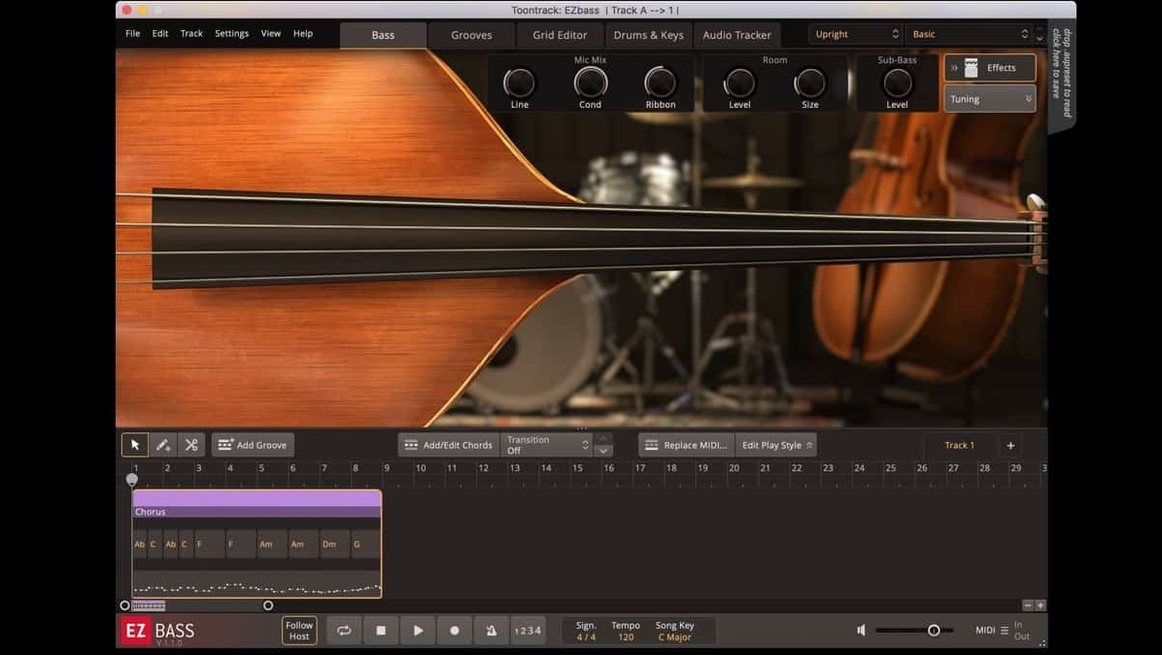
Recording a convincing bass line often means either hiring a session player or spending hours programming every note and articulation. EZbass 1.3.3 for Mac bridges that gap with sampled bass instruments, MIDI bassline generation, and audio-to-MIDI conversion that shares its core technology with Superior Drummer 3. It runs as a plugin in any major DAW or as a standalone application, so you can compose, edit, and rearrange bass parts entirely inside the software before committing them to your project.
| Detail | Spec |
|---|---|
| Version | 1.3.3 |
| Developer | Toontrack |
| Format | VST, AU, AAX (plugin + standalone) |
| macOS | 10.15 or later |
| Architecture | Intel & Apple Silicon |
| Language | English |
The sound library covers electric and acoustic basses with multiple articulations, including the newly added right-hand mute articulation from Rock Legend EBX. Version 1.3.3 also lets you remap keyboard shortcuts in Settings, updates the Mac icons to macOS Tahoe style, and fixes menu click response issues in newer Apple hosts. If you work with drum MIDI or keyboard MIDI, EZbass can analyze the rhythm and generate a complementary bass part automatically—saving time without sacrificing musical feel.
Sits Between Samplers and MIDI Libraries
EZbass sits in a specific slot: it is not a general-purpose sampler, nor is it a pure MIDI library that expects you to do all the programming. The two closest alternatives are Native Instruments’ Scarbee Pre-Bass and IK Multimedia’s MODO Bass. Scarbee Pre-Bass gives you a fine-sounding sampled bass with multiple articulations, but it relies entirely on your MIDI programming. There is no phrase generator, no audio-to-MIDI conversion, and no drum-MIDI analysis. MODO Bass takes the physical modeling route, which lets you control string position, pickup blend, and even the fingerstyle versus pick behavior in real time. That level of detail is powerful, but it also means you spend more time dialing in the sound before you write a note.
EZbass occupies the middle ground. Its sampled engines sound immediate, and the built-in MIDI tools let you sketch a bass line from a drum loop or a keyboard part without leaving the plugin. MODO Bass has no equivalent of EZbass’s audio-to-MIDI conversion. Scarbee Pre-Bass has no phrase library. If your work involves converting audio ideas into MIDI basslines or quickly generating parts that lock with existing drums, EZbass has a workflow advantage that the other two do not match.
Starting a Bass Line from an Audio Loop: A Workflow
Suppose you have a short drum loop in your DAW and you want a bass part that follows its groove. Drop EZbass on a new instrument track as a VST or AU plugin. Import or drag the drum loop onto the audio-to-MIDI converter within EZbass—the same conversion engine used in Superior Drummer 3. The software analyzes the transient pattern and creates a MIDI bassline that matches the kick and snare feel. You hear the result immediately, played by whichever bass patch you select (the vintage or the modern instrument).
From there, open the MIDI editor inside EZbass. The generated part is fully editable: you can shift notes, change their length, or swap articulations note by note. If the part feels too busy, select a few bars and use the variation controls to simplify the rhythm. If you prefer a different root motion, you can override the harmonization manually. When the line sounds right, export the MIDI or bounce the audio directly into your DAW timeline. The whole process, from loop import to a finished bass track, takes fewer steps than programming from scratch.
Runs on Intel and Apple Silicon Macs
EZbass 1.3.3 runs on macOS 10.15 and newer. It supports both Intel and Apple Silicon architectures, so it works on older MacBook Pros and current M-series machines alike. The plugin formats cover VST, AU, and AAX, which means compatibility with Logic Pro, Pro Tools, Cubase, Ableton Live, and most other DAWs. The standalone application opens without a host, useful for auditioning presets or writing bass lines before you open a session. The interface is in English only. Installation is straightforward: mount the downloaded disk image and run the standard installer. No extra license manager or dongle is required beyond the software itself.
The sample library loads into RAM, so the time it takes to switch presets depends on your machine’s memory and storage speed—nothing unusual for a sampled instrument. The audio-to-MIDI conversion processes in real time, so you hear results as soon as you drop audio onto the converter. The updated Mac icons use the macOS Tahoe style, so the application fits visually with the rest of your dock or toolbar.
Works Standalone or Inside a DAW
People often ask whether EZbass works as a standalone instrument or only inside a DAW. It does both. The standalone mode is useful for sketching ideas without launching a full session. Another frequent question is whether the generated MIDI can be edited. Yes—every note the software creates is editable inside its own MIDI editor. You are not stuck with what the generator produces.
Some wonder if the audio-to-MIDI conversion works with any audio file or only with drum loops. It handles any audio with a clear transient structure, but it is designed primarily for rhythmic content. A bass recording or a synth pad will not produce useful results. The conversion shines with drum and percussion loops. Finally, users ask if the right-hand mute articulation from the Rock Legend EBX expansion works with the core library. It does, but only if you have that EBX installed. The core library still includes multiple articulations—finger, pick, slap, muted—so you are not limited without the expansion.
- Added support for right-hand mute articulation used in Rock Legend EBX.
- Added support for changing some keyboard shortcuts in Settings.
- Updated Mac icons to macOS Tahoe style.
| macOS | macOS 10.15 or later |
|---|---|
| Processor | Apple Silicon, Intel 64-bit |
| Download | 81 MB |
- macOS 10.15 or later
- Intel or Apple Silicon
How to install, in order
- Mount the downloaded disk image.
- Run the standard installation procedure.
Comments and corrections 0
Sign in or open a free account to leave a comment.
No comments or corrections yet.