EZdrummer 3.1.2 — download for Mac
VST Plugins Updated
Creates drum tracks and supports songwriting from within your production workflow.
Screenshot
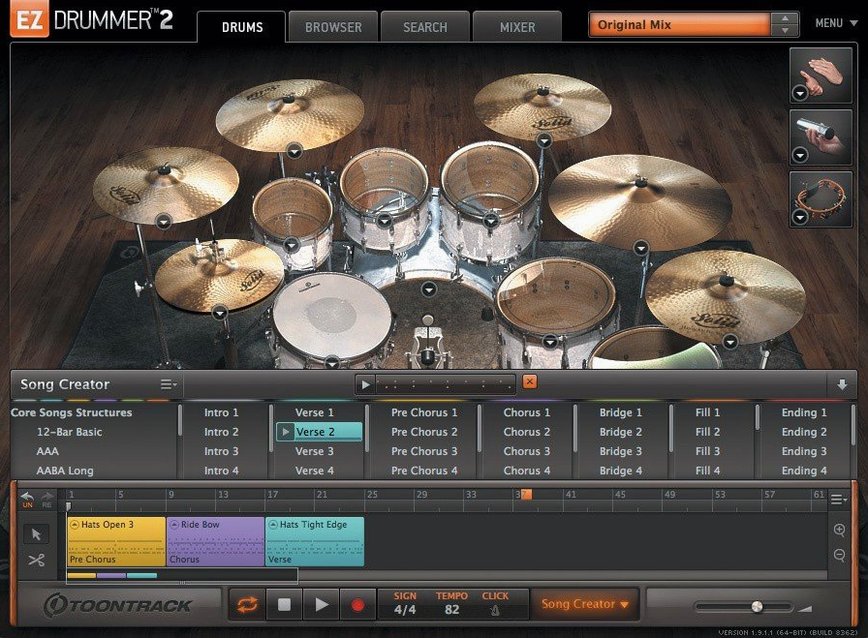
Songwriters, producers, and composers who build tracks around drums will find a practical tool in EZdrummer 3.1.2. This drum software focuses on songwriting and drum track creation, not just sound selection. It runs as a plugin (VST, AU, AAX) or standalone on macOS 10.15 and later, Intel or Apple Silicon.
Formats, Hosts, and Workflow
EZdrummer 3 works inside most major DAWs and can also run standalone. The Song Creator turns an idea into a full arrangement by cutting, rearranging, copying, and pasting groove parts. The Edit Play Style feature changes a base groove in real time, which saves time when you need variation. Bandmate suggests ideas from dragged audio or MIDI, making it useful for starting a track from a reference. The song track lets you edit by dragging grooves directly. You can star favorite grooves for quick access later.
Sound and Presets
The included MIDI groove library covers a wide range of styles. Mix-ready presets and percussion are part of the package. Version 3.1.2 includes internal improvements for Infinity Grid EZX and fixes for song-track CC recording and mixer Solo/Mute recall states. If you work with drum tracks and need a tool that combines sound selection with arrangement, this is worth looking at.
Building a Drum Track from Scratch: A Workflow
Start with an empty session. Open EZdrummer 3.1.2 standalone or inside your DAW. You have a blank song track and a library of MIDI grooves. The fastest way to begin is with the Tap2Find feature. Tap the rhythm you hear in your head on a key or pad, and the browser returns matching grooves from the library. No scrolling, no guessing.
Once you find a groove that fits, drag it onto the song track. The groove appears as a bar or a few bars. Now open the Grid Editor to write a fill or a variation for the next section. The Grid Editor lets you place hits note by note on a grid. You are not stuck with the library patterns — you can build a custom part here.
Use Edit Play Style to adjust the feel of the base groove. Lighten the velocity, change the timing, or shift the accent pattern. This happens in real time, so you hear the result immediately. Duplicate the groove across the track, then cut and rearrange sections in the song track. Copy a verse pattern, paste it to the chorus, and edit only the fills. Bandmate can suggest a complementary part from a piece of audio or MIDI you drag in. The whole arrangement comes together without leaving the program.
Focus on Feel, Not Fidelity
EZdrummer 3 sits alongside other drum tools for macOS, each with a different focus. Here is how it compares with two alternatives.
EZdrummer 3.1.2 vs. Superior Drummer 3
Superior Drummer 3 is Toontrack's deeper, more detailed drum platform. It offers deeper mic control, more articulations, and a sound engine built for mix engineers. EZdrummer 3 is lighter and faster for songwriters. You get seven kits, three rooms, and mix-ready presets out of the box. Superior Drummer requires more setup and a steeper learning curve. EZdrummer works when you want a drum track quickly without adjusting velocity curves or bleed levels.
EZdrummer 3.1.2 vs. BFD3
BFD3 is another full-featured drum sampler with extensive microphone routing and kit customization. It is powerful but heavy on disk and memory. EZdrummer 3 loads faster and stays simpler. The Song Creator and Bandmate features are unique to the EZdrummer line — BFD3 does not offer a songwriting assistant or a tap-to-search groove browser. If you need to write a song, not just mic a kit, EZdrummer is the more direct tool.
EZdrummer 3.1.2 vs. Logic Pro Drummer
Logic Pro includes a built-in drum pattern generator. It is convenient for Logic users but tied to that DAW. EZdrummer 3 works standalone and as a plugin in any host. The MIDI groove library is larger and browsable by genre, tempo, and feel. Tap2Find and Bandmate are not available in Logic's Drummer. EZdrummer also ships with percussion and multiple rooms, giving more variety in one package.
Tahoe Icons and Infinity Grid Tweaks
- Icons updated to macOS Tahoe style. The standalone app and project icons now match the rounded, clean look of macOS 10.15 and later. A small detail, but it keeps the software feeling current on your dock.
- Infinity Grid EZX improvements. The internal engine now handles this expansion more reliably. If you use Infinity Grid EZX for complex pattern generation, you will notice fewer glitches when editing or playing back.
- Song-track CC recording fix. Before 3.1.2, hi-hat pedal and other continuous controller data could be lost during recording on the song track. That is now fixed. If you record real-time MIDI CC from a controller or pedal, the data stays in the track.
- Mixer Solo/Mute recall fix. Toggling Solo or Mute could clear the opposite state before 3.1.2. If you soloed a channel and then muted another, the solo would drop. The fix keeps both states independent.
These changes are not headline features. They make the daily session more predictable, especially for users who record MIDI performance or rely on the mixer for quick previews.
ARM and x86 Compatibility
EZdrummer 3.1.2 requires macOS 10.15 or later and works on both ARM and x86 64-bit architectures. If your Mac is on macOS 10.15 or newer, it will run. The installer is a standard disk image — mount it and run the installation. No special permissions or workarounds are needed.
The included content — seven kits, three rooms, mix-ready presets, percussion, and the MIDI groove library — is stored locally. Plan for a few gigabytes of disk space for the full install. The program itself is light on system resources for a drum plugin. It loads quickly and stays responsive during playback and editing.
Tapping a Verse Rhythm at 120 BPM
Tuesday afternoon. I have a verse and a chorus written on guitar. I open EZdrummer 3.1.2 as a standalone session. No DAW yet — just the software and a tempo set to 120 BPM.
I tap the verse rhythm on my keyboard using Tap2Find. The browser shows a handful of grooves. I preview a few by clicking them. The second one fits. I drag it to the song track and copy it for four bars. For the chorus, I want more energy. I find a busier groove, drag it in, and use Edit Play Style to increase the velocity and tighten the timing. The chorus now hits harder.
The bridge needs a fill. I open the Grid Editor and draw a simple tom pattern across two bars. It sounds right. I star that groove so I can use it again. The song track shows the full arrangement now: verse, chorus, bridge, chorus. I cut a bar from the bridge and paste it after the first chorus. The change is instant.
Bandmate sits open. I drag a short audio clip of the guitar riff into it. It suggests a complementary groove that accents the offbeats. I preview it, decide it works, and drag it into the song track. The session took maybe ten minutes. I have a complete drum arrangement ready to export as MIDI or audio into my DAW.
Who in the office would use this? The songwriter who wants to test drum ideas without learning a full sampler. The producer who needs quick arrangements for demos. The composer who works to picture and needs drum tracks fast. EZdrummer 3.1.2 keeps the focus on the song, not the sampler settings.
| macOS | macOS 10.15 or later |
|---|---|
| Processor | Apple Silicon, Intel 64-bit |
| Download | 786 MB |
- macOS 10.15 or later
- Intel or Apple Silicon
- Standalone or plugin (VST, AU, AAX)
Questions about EZdrummer
What macOS version is required for EZdrummer 3.1.2?
macOS 10.15 or later is required. Both Intel and Apple Silicon Macs are supported.
What are the main songwriting tools in EZdrummer 3?
The Song Creator can turn an idea into a full song. The Bandmate suggests ideas from dragged audio or MIDI. Edit Play Style changes a base groove in real time.
How to install, in order
1. Mount the downloaded disk image. 2. Run the standard installation.Comments and corrections 0
Sign in or open a free account to leave a comment.
No comments or corrections yet.