iZotope Nectar 4.1.0 — download for Mac
VST Plugins Updated
Shapes a vocal track through a chain of focused processing modules.
Screenshot
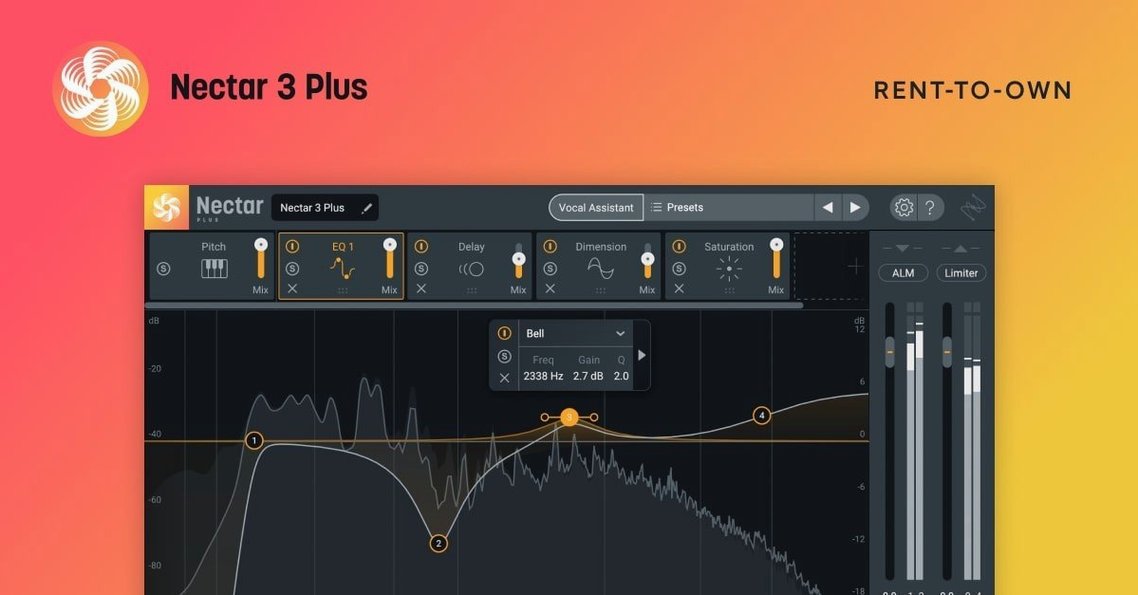
Nectar 4 is a vocal mixing plugin suite that shapes a voice through a chain of focused controls. Each module targets one job: Auto-Level evens out loudness, Voices adds layers, and Backer builds background vocal parts. The AI-powered Vocal Assistant analyzes a recording and sets the modules for you, which gets a rough mix up fast in a session.
Cleans breath noise before placing the vocal
- Cleaning up breath noise before a vocal sits in the track.
- Balancing levels so a verse doesn't jump when the chorus hits.
- Creating harmony or backing layers without tracking extra takes.
- Quick starting points via Vocal Assistant when the deadline is close.
64-bit only, requires macOS Ventura 13.7.4
- 64-bit only, so older hosts won't load it.
- Available in Elements, Standard, and Advanced editions.
- Runs on Apple Silicon and Intel Macs with macOS Ventura 13.7.4 or later.
- Version 4.1.0, released June 25, 2025.
How Nectar 4 compares with similar Mac vocal plugins
On a Mac in a mixing project, three alternatives come up often: Waves Tune, Antares Auto-Tune, and Celemony Melodyne. Each handles a different part of the vocal chain, but Nectar 4 is the only one that bundles a full chain as a single plugin, not a folder of inserts.
Waves Tune gives you pitch correction plus a simple formant shift, but no compression, EQ, or de-essing in the same window. You patch a chain yourself. Auto-Tune is pitch-focused; its vocal effects are strong, but you still reach for separate compressors and EQs for the rest of the track. Melodyne is the most precise for timing and pitch editing, but it runs as a standalone editor or a transfer plugin, not a real-time vocal mixer.
Nectar 4 puts Auto-Level, Voices, Backer, EQ, compression, de-esser, and reverb inside one plugin. You adjust the whole vocal treatment from one interface. The trade-off is that each module is less deep than a dedicated tool — Auto-Level won't replace a precise compressor, and the de-esser is straightforward. For a project manager's quick start, the trade-off saves routing time.
Windows HiDPI fix and iLok authorization repair
- Windows HiDPI support was added. If you collaborate with Windows users on the same session file, the plugin now displays correctly on high-resolution screens on that side.
- An authorization failure for Nectar Standard with iLok was fixed. After the update, Standard users no longer see the "not authorized" message mid-session when the plugin re-scans.
- Supported DAW and NLE versions were updated. If you run the latest Apple silicon-native builds of Logic Pro or Cubase, the plugin registers without a compatibility prompt.
- The minimum macOS version moved to Ventura 13.7.4. Earlier versions of macOS 13 no longer load the plugin, so a machine still on an older Ventura patch won't see Nectar 4.1.0 in the plugin list.
For daily work, the iLok fix is the one that matters most: Standard edition owners can now load a session without checking the authorization window first.
Activating every module overloads the vocal
New users often turn on every module. Auto-Level, EQ, compression, de-esser, Voices, Backer, and reverb all active at once usually overload the vocal. The Vocal Assistant sets sensible defaults, but beginners override them by pushing every slider, ending up with a thin, over-processed voice.
Another common error is leaving the Vocal Assistant on after it has set the initial chain. The assistant updates as you play the track, so if you keep tweaking while it is still active, the settings change under your hand. The workflow is: run the Assistant once, switch it off, then adjust manually.
Beginners also overlook the Voices module's mix fader. They add vocal layers, hear the dry signal plus three layers, and wonder why the main vocal has moved backward in the mix. Backing off the layer sends to 30–40 percent usually fixes it.
Finally, many skip the de-esser module because the compressor seems to do the same job. In Nectar 4, the de-esser handles sibilance before the compressor, so if you leave it off, the compressor reacts to the high-frequency spikes and pumps unevenly.
Fixing loud breaths and uneven syllables in two days
I open a Logic session with a raw vocal take that has a loud breath between lines and a few uneven syllables near the bridge. The deadline is two days out, so I am not recording new takes.
I insert Nectar 4 on the vocal track. The first thing I do is click the Vocal Assistant button. It listens for about three seconds, then sets the levels in Auto-Level, the threshold on the compressor, and a light de-esser curve. The output sounds balanced, but the breath noise is still there.
I open the de-esser module and set it to Breath Removal mode. The breath between verse lines disappears without cutting into the vocal. Then I check the Auto-Level module — it has evened most of the volume jumps, but the bridge's louder phrasing is still a little hot. I lower the threshold by 2 dB on Auto-Level instead of reaching for a separate compressor.
The track needs backing vocals on the chorus. I open the Voices module and add two harmony layers: a third up and a fifth up. I set the mix fader to 35 percent so the layers sit behind the main vocal. Then I open Backer and choose a "warm ooh" texture that fills the lower register. I turn off the Vocal Assistant before making these final adjustments so it does not reset my harmony settings.
The whole chain — breath removal, leveling, harmonics, backing texture — happened inside one plugin window. No routing, no extra inserts. I bounce the vocal track, paste it into the session timeline, and move on to the next project task.
- Windows HiDPI support added.
- Fixed iLok authorization failure for Nectar Standard.
- Supported DAW/NLE versions updated.
- Minimum macOS version raised to Ventura 13.7.4.
| macOS | macOS 10.15 or later |
|---|---|
| Processor | Apple Silicon, Intel 64-bit |
| Download | 545 MB |
- macOS Ventura 13.7.4 or later
- Apple Silicon or Intel Mac
- 64-bit host application
Questions about iZotope Nectar
What does the Vocal Assistant do?
It uses AI to analyze a recording and automatically sets the processing modules for improvement, giving you a starting point for the mix.
Which editions of Nectar 4 exist?
Nectar 4 is offered in Elements, Standard, and Advanced editions, each with a different set of modules and features.
How to install, in order
- Open the package and run the installer.
- Follow the included installation and activation guide to authorize the plugin.
Comments and corrections 0
Sign in or open a free account to leave a comment.
No comments or corrections yet.