KORG TRITON 1.4.7 — download for Mac
VST Plugins Updated
Layers three synth engines in one plugin for rich hybrid sounds.
Screenshot
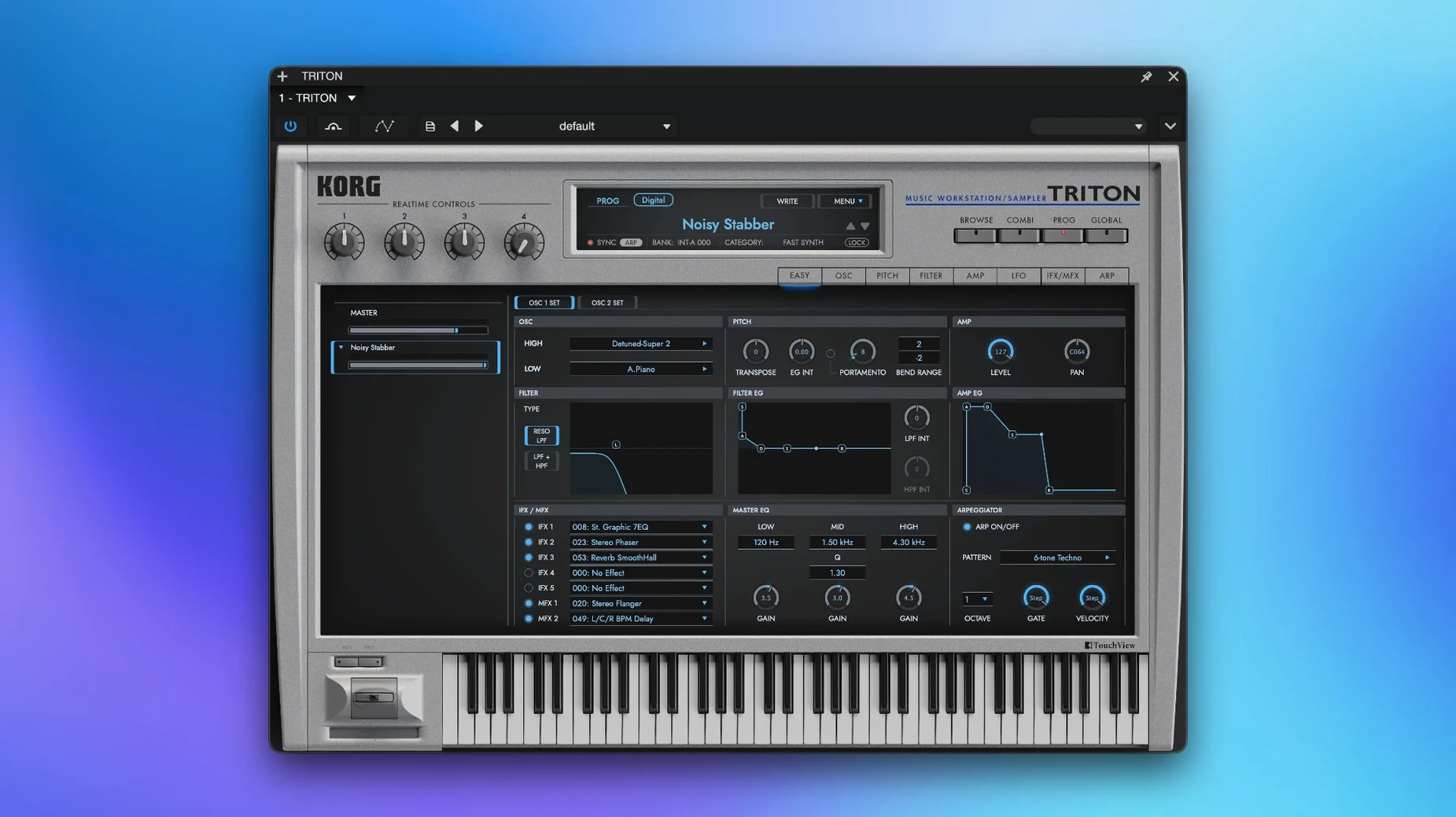
KORG TRITON version 1.4.7 runs on macOS 11 and later, supporting both Intel and Apple Silicon Macs natively. It works as a VST plugin or standalone, so it fits into any modern DAW session without extra translation layers.
Track Layer — Building a Sound
On a single track, TRITON’s combination mode layers up to eight sound parts. Start with a pad, add a stab, then a sub-bass — each part keeps its own filter and effects slot (two filters, five insert effects). It replaces three or four separate synth plugins in one instance.
Bus — Stereo Processing
Send grouped tracks — drums, strings, or synth stacks — to a bus with TRITON. The two main effects and master EQ treat the bus as one instrument, not a collection of channels. You get the workstation’s character without routing multiple plugins.
Master — Final Polish
On the master bus, TRITON acts as a color EQ and effects unit. The master EQ shapes the whole mix, and the two main effects add room or modulation before the limiter. It is the same engine that powered TRITON Extreme hardware, now in software form.
Set MIDI Channel First
Open the Preferences panel before loading any sounds. Two settings save the most time. First, set the MIDI channel assignment to match your controller — if you play from a keyboard, map channel 1 to the first combi part so you hear sound immediately. Second, switch the polyphony mode from "Auto" to "Maximum" if you layer five or more parts in combination mode.
Turn off the default reverb on the master effects bus. The factory preset applies a hall reverb to everything, which muddies percussive sounds. Set it to a short room or bypass it until you build your mix. Also set the master EQ to flat — it starts with a gentle low shelf boost that may not suit every project.
Fix Silent Combi Parts
No sound from a combi part. The most frequent cause is the part’s Volume parameter set below zero. Select the part and check the Volume slider in the Combi section. The second cause: the part’s MIDI channel does not match the incoming channel from your keyboard or sequencer. Set them to Omni mode or assign the same number on both ends.
Plug-in window closes when you click a filter. This happens when the window size is too small for the interface. Resize the window by dragging the bottom-right corner a few pixels — the controls scale correctly once the window meets minimum dimensions.
Presets load but sound thin. TRITON ships with init presets that disable all effects and EQ. Switch to a factory demo preset first to confirm the engine works, then build your patch from there. If the sound stays thin, enable the master compressor in the effects section. It adds weight without altering the PCM samples.
The VST does not show up in your DAW after installation. Run the standalone version once to register the plugin paths. Quit and relaunch your DAW — the plugin scan picks up TRITON on the next start. If it still does not appear, manually point your DAW to the /Library/Audio/Plug-Ins/VST3 folder where the installer places the .vst3 file.
Inside a DAW with TRITON for Pad and Lead
Tuesday afternoon, a cue needs a warm pad and a cutting lead. I open TRITON as a VST in my DAW on a blank track. The standalone launcher is useful for sound design first, but today I work inside the arrangement.
First, I pick a factory combi called "Analog Warmth" from the browser — it uses three parts: a saw pad, a soft string layer and a sub oscillator. I mute the sub part because the arrangement already has bass. Then I swap the string layer’s insert effect from a phaser to a light chorus. Both filters stay set to low-pass, but I open the cutoff on part one to let the pad breathe.
Next, I route the track to a bus with a second TRITON instance set to "Master" mode. This second instance adds a stereo delay from the main effects and a 2 dB high-shelf boost on the master EQ. The bus version receives the pad and a separate analog synth track. The EQ shapes both together so they sit behind the vocal without fighting.
I export a 30‑second loop to check how it translates on headphones. The pad fills the center, the lead sits slightly left, and the bus EQ keeps the low end controlled. Ten minutes total — no extra plugins, no routing multiple synths.
Don't Load All Eight Combi Slots at Once
Loading too many parts at once. New users activate all eight combi slots, then wonder why the sound gets muddy. Start with two or three parts and build up only when each part has a clear role. The four‑thousand‑sound library tempts you to layer everything — resist until you know the mix needs it.
Skipping the master EQ. Beginners adjust the filter on each part but ignore the global EQ. One cut at 300 Hz on the master EQ cleans the whole combi faster than editing each part’s filter individually.
Not saving custom patches. You tweak a preset, close the session, and the next day the settings are gone. Save every useful tweak as a user preset in the browser — TRITON writes user presets to a separate folder that survives updates.
Using the wrong effects slot. Insert effects process each part individually; master effects process the whole combi. Putting a compressor in an insert slot compresses one layer, not the sum. For glue, use the master effects section. For distortion on a single lead, use an insert.
Forgetting to set polyphony per part. Each combi part has its own polyphony setting (1 to 8 voices). Leaving all parts on 8 voices eats CPU for notes that never overlap. Set lead parts to 2 or 3 voices, pads to 4 or 5, and keep drums at 1. The difference is measurable on older Intel Macs.
No release notes filed for 1.4.7. They are added here when a build changes how the program behaves.
| macOS | macOS 11 or later |
|---|---|
| Processor | Apple Silicon, Intel 64-bit |
| Download | 586 MB |
- macOS 11 or later
- 64-bit Intel or Apple Silicon processor
- VST-compatible host or standalone operation
- Interface language: English
Questions about KORG TRITON
Does KORG TRITON support Apple Silicon Macs?
Yes, version 1.4.7 has native support for both Intel and Apple Silicon architectures.
How to install, in order
- Follow the included installation and activation instructions.
Comments and corrections 0
Sign in or open a free account to leave a comment.
No comments or corrections yet.