LFOTool 1.768 — download for Mac
VST Plugins Updated
Shapes LFOs and outputs MIDI for modulation anywhere in a session.
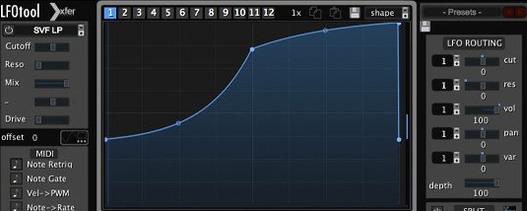
Screenshot
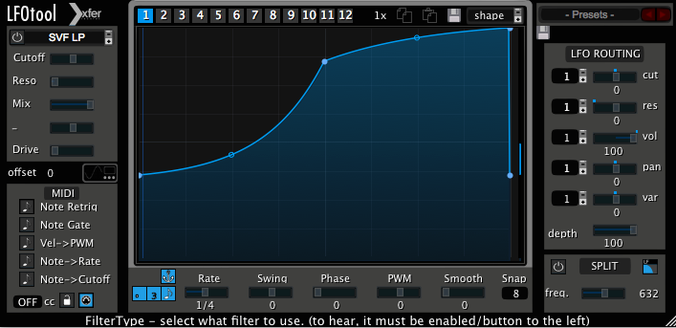
Most DAWs give you a basic LFO on a synth or a filter. LFOTool takes that idea and makes it a standalone tool you can drop anywhere in a session — on a track, a bus, or even the master. It's a plug-in that shapes LFOs and can output MIDI, so it works both as a modulation source and a controller.
Lock LFO to Grid on Synth Tracks
- On a synth track: Insert LFOTool before the instrument. Route its MIDI output to the synth's filter cutoff or amplitude. You get sample-accurate sync, so the LFO stays locked to your grid, even with swing.
- On an audio track: Use it to modulate a bus effect — a phaser, a tremolo, a delay's feedback. Set the rate in hertz or BPM, draw a custom curve, and the effect follows your shape, not a factory preset.
- On a return bus: LFOTool generates a MIDI stream that can control multiple instruments at once. Assign the same LFO to a pad's filter and a bass's pitch. One curve drives both.
It's written in C++ to keep CPU low, so you can run several instances without choking the session. Dozens of presets cover common shapes, and you can create your own curves when the standard sine or triangle isn't enough. For an engineer who spends the day nudging automation, LFOTool is a practical way to add movement without drawing a hundred points.
Point-and-Tension Curve Editor Saves Time
LFOTool has a few features that are easy to overlook but save time once you know them. The point-and-tension curve editor is one. Instead of dragging nodes and guessing at the curve shape, you place points and adjust the tension between them. The result is a clean, precise LFO shape without extra nodes fighting each other. It's the kind of control that matters when you're building a gate rhythm or a filter sweep that has to hit exactly on beat.
Each preset holds up to 12 graphs, and you can switch between them using MIDI notes or automation. That means one instance of LFOTool can carry a full set of modulation patterns for a track section — verse shape, chorus shape, bridge shape — all ready to swap without loading another plug-in. Up to four graphs run simultaneously, so you can modulate cutoff, resonance, pan, and volume from one window. No need for four separate LFO plug-ins.
The MIDI CC output is another detail that isn't obvious until you need it. LFOTool sends MIDI messages to other instruments, effects, or external hardware that responds to MIDI CC. If you have a hardware synth or a software instrument that accepts CC, you can drive its parameters from LFOTool's curves. The BPM-based rate control includes optional swing, so the LFO can feel looser than a straight division. Or switch to hertz for a fixed cycle that doesn't change tempo.
Fix Missing Modulation by Routing MIDI Out
The most frequent issue people hit is getting no modulation after inserting LFOTool. The plug-in needs a route for its MIDI output to reach a target. Check that your DAW is sending LFOTool's MIDI out to the instrument or effect you want to control. Some DAWs require you to create a MIDI track, route LFOTool's output there, then send it to the synth. It's not a fault in the plug-in, just a routing step that's easy to miss.
Another snag is trying to run more than four graphs at once. The limit is four simultaneous graphs per instance. If you need more modulation sources, duplicate LFOTool on another track or bus. The demo version runs for 15 minutes before it stops, so if you're evaluating it, plan your test sessions accordingly.
Sample-accurate sync works as long as your DAW supports it. If the LFO drifts off the grid, check that your project sample rate and your plug-in buffer settings are compatible with sample-accurate timing. Most modern DAWs handle it fine, but older hosts may not. In that case, switch to BPM-based rate control, which is more forgiving of buffer size.
Best for Electronic Producers and Sound Designers
Music producers working in electronic genres — techno, ambient, IDM, house — will find it useful for shaping filter movements and creating rhythmic gates that stay locked to the tempo. Sound designers who build patches for film or games can use it to create evolving textures without drawing automation by hand. Mix engineers who want a subtle auto-pan or a sidechain-pump effect without routing sidechain signals can set it up in a few clicks.
The plug-in also fits the workflow of anyone who uses external MIDI hardware in the studio. If you own a hardware synth that responds to MIDI CC, LFOTool can send it modulation patterns that would be tedious to program on the synth itself. The point-and-tension editor lets you design shapes that aren't available in most hardware LFOs.
For the project manager in me: it's a tool that replaces several manual steps. Instead of drawing automation lanes, you load a curve and let it run. Instead of layering multiple LFO plug-ins, you use four graphs in one instance. Instead of guessing at timing, you set sample-accurate sync. It's one of those plug-ins that does one thing and does it well enough that you stop thinking about the tool and focus on the sound.
No release notes filed for 1.768. They are added here when a build changes how the program behaves.
| macOS | OS X 10.11 or later |
|---|---|
| Processor | Apple Silicon, Intel 64-bit |
| Download | 7 MB |
- macOS 10.11 or later
- Intel or Apple Silicon
- VST or AudioUnit-compatible host
How to install, in order
- Read the included installation and activation instructions.
- Follow them to install and activate the plug-in.
Comments and corrections 0
Sign in or open a free account to leave a comment.
No comments or corrections yet.