Neural DSP Parallax X 1.0.0 — download for Mac
VST Plugins Updated
Splits bass into bands and adds drive for articulation and clarity.
Screenshot
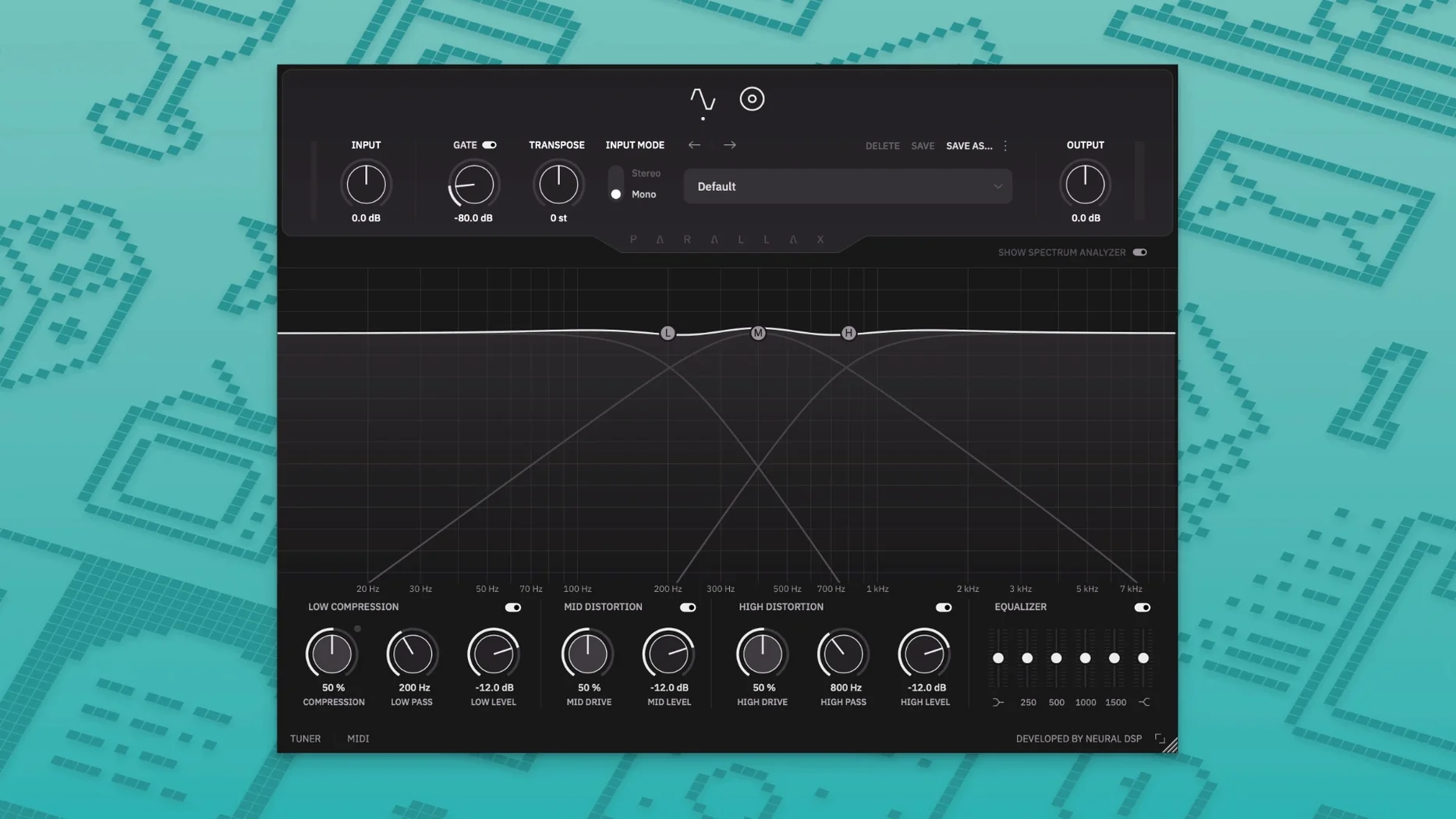
Parallax X’s mid-range distortion is where notes gain their articulation. Instead of one blanket distortion, the plugin splits your bass into low, mid, and high bands, each with its own drive. The mid band adds that pick-attack clarity; the treble band brings fuzz and edge when you need it. A low-frequency compressor keeps the bottom end tight, so the distorted layers don’t turn into mud.
Shaping the Tone
After the bands, you get a six-band graphic equalizer to carve the final balance. The cabinet section offers six virtual microphones, so you can place the sound in a room without leaving the plugin. It’s a separate version of the original Parallax, and the installer leaves the legacy plugin intact if you still use it.
Standalone and On the Go
Parallax X runs as a 64-bit VST2, VST3, AU, AAX, and standalone application. The standalone mode is useful for practicing or auditioning presets without a DAW. On a Mac, it supports native Apple Silicon and runs on macOS 11 or later. For version 1.0.0, Neural DSP added Transpose, a Live Tuner, Metronome, new factory presets, and a redesigned Spectrum Analyzer — enough to keep the plugin current for everyday tracking.
Before installing Parallax X, most users ask about compatibility with their existing setup. The plugin installs as a separate version from the original Parallax, so you don't lose your old presets — the installer imports them into the Parallax X user folder automatically. You can keep both versions on your system without conflicts. The Mac installer comes as a disk image, which you open and run through the standard installation process. It works on both Intel and Apple Silicon Macs, so whether you're on an older MacBook Pro or a newer M-series machine, the plugin runs natively.
First Days: Getting Oriented
After installation, spend a session just auditioning the new factory presets. They demonstrate the range of the parallel multiband processing — from clean, compressed low end to aggressive, distorted high frequencies. A practical first step is to load a familiar bass track and adjust the low, mid, and high bands individually. Start with the low-frequency compressor to lock in the bottom, then bring in mid distortion for articulation, and finally add treble drive for edge. The Spectrum Analyzer helps you see where each band sits, so you can avoid frequency buildup.
The standalone mode is worth exploring early. Open it without a DAW to test the transpose feature and the built-in tuner. The metronome includes time signature, accent, and note-length settings, which makes it useful for practicing or writing bass lines away from a full project. If you play live, the transpose function lets you adjust pitch up or down within one octave — handy for switching between songs without retuning or using a different instrument.
Transpose Opens Alternate Bass Voicings
Version 1.0.0 adds three features that change how you work with Parallax X. The transpose function is the most noticeable: you can shift the input pitch up or down by up to an octave, which opens up alternate voicings without leaving the plugin. The live tuner sits on the interface, so you can tune quickly during tracking or practice without a separate tuner app. The metronome in standalone mode means you don't need a DAW or another app for tempo-keeping during practice sessions.
New factory presets give you starting points for different genres — from clean pop bass to heavily distorted metal tones. The revamped interface is cleaner than the original Parallax, with clearer labeling on the bands and EQ. The redesigned Spectrum Analyzer updates in real time and works alongside the EQ adjustments, so you see the effect of each change immediately.
For Mac users specifically, searching for parallax x torrent or neural dsp mac torrent can lead to working installers that support both ARM and Intel architectures. Some users also look for neural dsp crack mac versions, though the FLARE activation system handles the licensing for this release.
Practical Tips for Studio and Live Work
In a mix session, use Parallax X as an insert on your bass track. Start with the low frequencies clean, using the compressor to even out dynamics. Add mid distortion sparingly — it affects note articulation, so a small amount goes a long way for clarity in a dense mix. The treble distortion works best when you want the bass to cut through guitars or synths, but dial it back if the high end becomes harsh.
The six-band graphic EQ is useful after you've set the distortion levels. Use it to tame any resonant peaks from the cabinet emulation, which only applies to the mid and high ranges. The low end stays unaffected by the cabinet, so you can shape it independently with the EQ. If you're running a session with multiple bass tracks, save each tone as a preset to recall later. The plugin imports legacy presets automatically, but new ones save to their own folder.
For live performance, the standalone mode works well as a bass processor between your instrument and the PA or interface. The transpose function helps when a song is in a different key but you want to keep your fingerings. The tuner and metronome are always available in the interface, so you don't need extra gear for quick tuning or tempo checks during rehearsal.
Native ARM and x86 Support on macOS 11+
Parallax X requires macOS 11 or newer. It runs as a 64-bit application and supports both ARM and x86 architectures natively. The installer is a disk image, and the process is the same whether you're on an Intel Mac or Apple Silicon. The plugin appears in your DAW as VST2, VST3, AU, or AAX, depending on your host application. The standalone version runs independently and includes the full interface with all controls visible. No additional software or background processes are needed — it's a straightforward install with no license manager running in the background.
- Adds Transpose, Live Tuner, and Metronome features.
- Adds new factory presets and a revamped interface.
- Adds a redesigned Spectrum Analyzer.
| macOS | macOS 10.15 or later |
|---|---|
| Processor | Apple Silicon, Intel 64-bit |
| Download | 179 MB |
- macOS 11 or later
- 64-bit
- Apple Silicon or Intel
How to install, in order
- Open the downloaded disk image.
- Run the standard installation process.
Comments and corrections 0
Sign in or open a free account to leave a comment.
No comments or corrections yet.