Scaler 3 3.3.2 — download for Mac
VST Plugins Updated
Provides chord palettes and detection to help you build progressions.
Screenshot
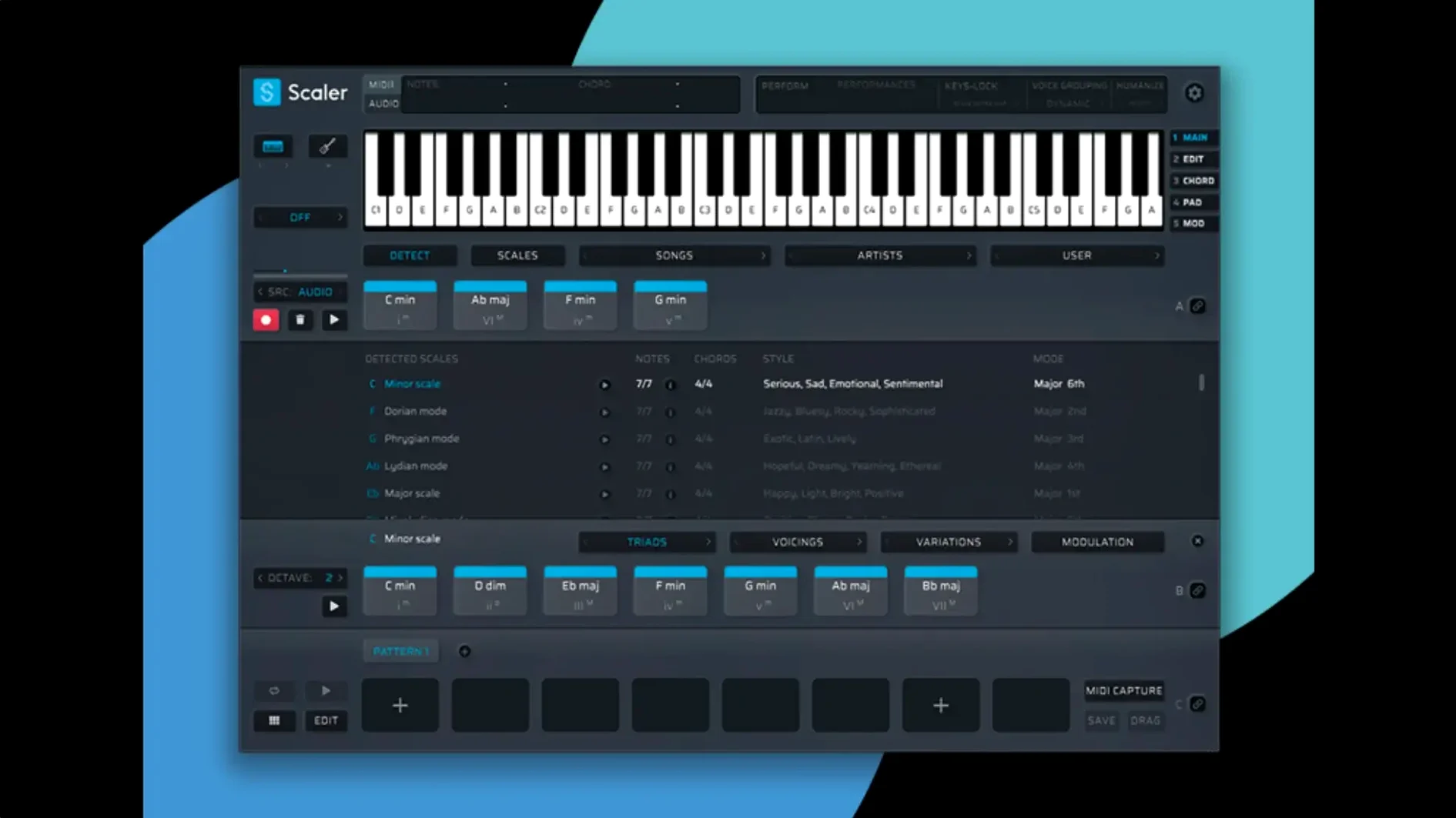
Composers, producers, and beat makers who want to move beyond guessing chord progressions reach for Scaler 3. It sits inside your DAW as a VST, VST3, AU, or AAX plugin and gives you a palette of chords, melodies, and patterns to work with.
How does the chord detection work?
You can play or drag in a MIDI clip, and Scaler 3 analyzes it, showing the matching scale and chord suggestions. The library of presets, grouped by artist and genre, gives you a starting point when you are stuck.
What does the Multi-Lane Timeline do to a track?
It splits your composition into four separate lanes: chords, melody, bass, and phrases. Each lane runs in the same key, so you can generate bass lines or arpeggios from the chord progression without worrying about wrong notes.
How does version 3.3.2 improve exported MIDI?
Exported MIDI sequences now crop empty space at the start automatically. The same update fixed MIDI Editor display problems that caused missing notes and incorrect chord representations.
Treating It Like a Chord Generator Only
The main error people commit is treating it like a chord generator and nothing else. They drop a progression in, copy the MIDI out, and close the plugin. That skips the Multi-Lane Timeline entirely, which is where the real time saving happens. A second common mistake is ignoring the key detection step. If you play a MIDI clip that is not quantized properly, Scaler 3 may guess the wrong root note. Always clean your MIDI data before you drag it into the analysis window.
Another one: beginners try to build progressions by selecting chords one at a time without using the preset library. That works, but you lose the genre-specific voicings that the library provides. If you are writing a pop track, pull up the pop presets first. It gets you closer to a finished sound faster than manual picking.
People also forget that Scaler 3 can host plugins on chord and MIDI sections. They treat it as a standalone brain when it can actually run synthesizers or samplers inside its own track lanes. That is a workflow step most users discover only after weeks of exporting and reimporting.
Multi-Bind for Linked Tracks Keeps Coherence
- Multi-Bind for linked tracks. You can bind multiple lanes so that changes in one reflect in the others. Move a chord in the chord lane, and the melody lane updates its pattern to match. It keeps your arrangement coherent without manual tweaking.
- Standalone mode. Scaler 3 runs outside a DAW. That matters when you want to sketch ideas at a desk without loading a full project. You can save the MIDI and open it later in your main environment.
- Plugin hosting inside lanes. Each track can load a VST or AU instrument. That means the bass lane can play a synth bass while the chord lane plays a pad, all within Scaler 3. You do not need to route MIDI to separate tracks in your DAW for early sketches.
How Scaler 3 Compares to Similar Mac Apps
There are a few music theory tools for macOS that do overlapping work. Captain Chords by Mixed In Key focuses on chord progression generation and scale filtering. It is simpler to get into but does not offer the Multi-Lane Timeline or plugin hosting. You generate chords and drag them out. For melody and bass generation, you need separate processing.
Hookpad (now Hooktheory) is another option. It uses a web-based approach and a physical keyboard overlay for building progressions. It is strong for learning theory visually, but it does not run as a plugin inside your DAW. You export MIDI and import it. Scaler 3 stays in your session as a plugin, which keeps the writing loop shorter.
Scaler 3 covers more ground: chord detection, generation, four-track arrangement, plugin hosting, and direct export without leaving the window. If you only need chord suggestions, Captain Chords does the job. If you want to arrange full sections in one place, Scaler 3 is the fuller tool.
Missing Notes Fixed in the Current Release
Missing notes in the MIDI Editor. Version 3.3.2 fixed this directly. If you still see gaps or wrong chord shapes, make sure you are running the current release. The update also crops empty space at the start of exported MIDI, which was another source of confusion. Users would export a sequence, load it into their DAW, and find a bar of silence before anything played. That is gone now.
Plugin not appearing in the DAW. Scaler 3 installs through a standard installer from a disk image. If your DAW does not see it, check that you mounted the image and ran the installer completely. Also confirm your DAW is scanning the correct plugin folder for VST3 or AU formats. Re-scanning the plugin list usually resolves it.
Chords not matching what you played. This is almost always a quantization issue. Scaler 3 relies on note start times to detect harmony. If your MIDI clip has loose timing, the analysis shifts. Quantize the clip to a grid before dragging it in, or play the part again with a metronome. The detection will lock onto the right chords.
- Fixed MIDI Editor display issues that could cause missing notes, incorrect chord representations, and unwanted blank space before chords.
- Exported MIDI now automatically crops empty space at the start of the sequence.
| macOS | macOS 10.15 or later |
|---|---|
| Processor | Apple Silicon, Intel 64-bit |
| Download | 1.4 GB |
- macOS 10.15 or later
- 64-bit only
- Supports Apple Silicon and Intel processors
Questions about Scaler 3
Does Scaler 3 work on Apple Silicon Macs?
Yes, Scaler 3 supports both ARM (Apple Silicon) and 64-bit x86 architectures. It requires macOS 10.15 or later.
What plugin formats does Scaler 3 support?
It supports VST, VST3, AU, and AAX formats, so it works in most major DAWs.
How to install, in order
- Mount the downloaded disk image.
- Run the standard installer.
Comments and corrections 0
Sign in or open a free account to leave a comment.
No comments or corrections yet.