Serato Hex FX 1.2.0 — download for Mac
VST Plugins Updated
Chains up to 50 effects with presets for live or studio use.
Screenshot
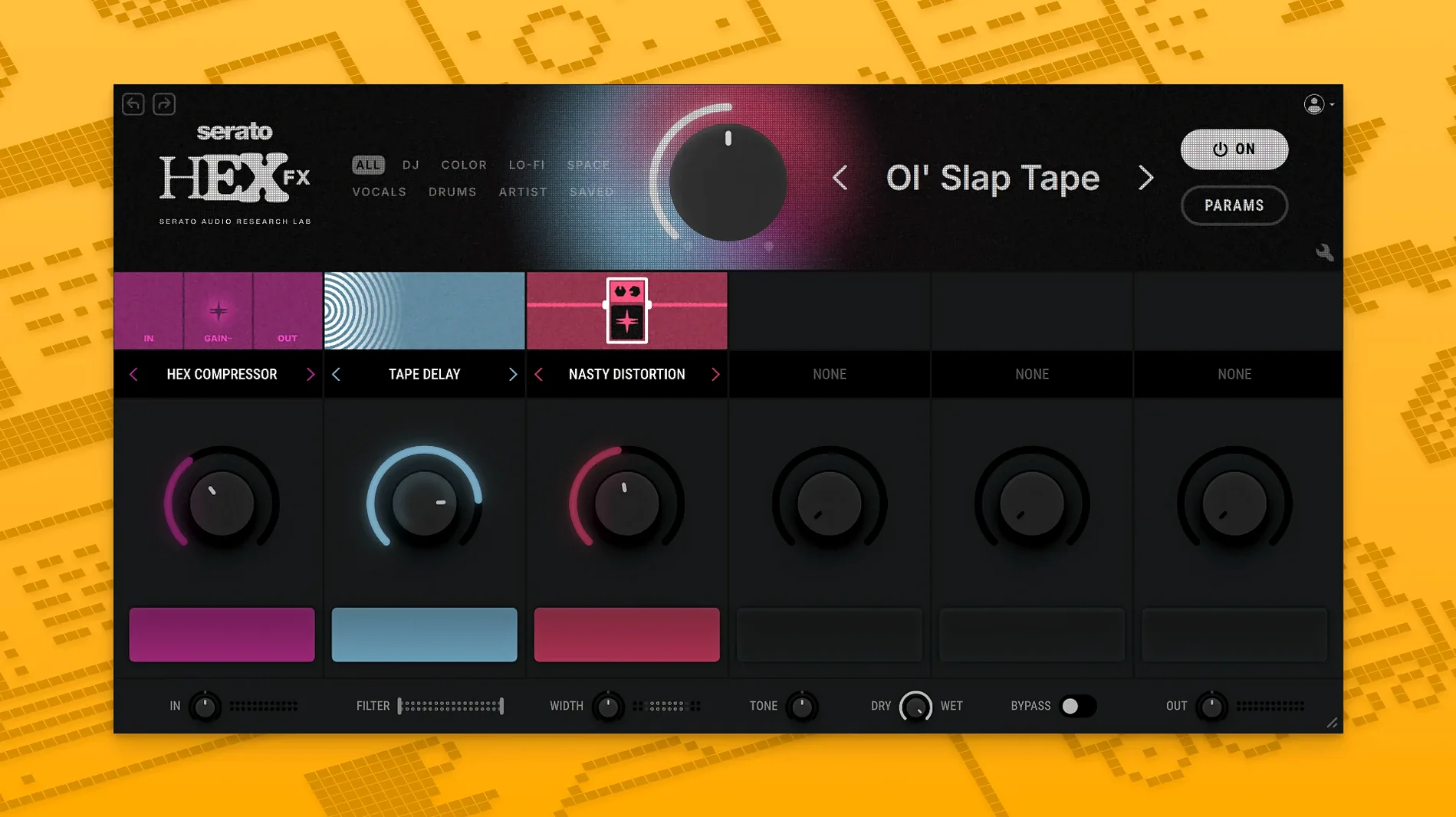
50 chainable effects. 200+ presets. Serato Hex FX 1.2.0 is a multi-FX plugin built for music production and live performance. It works as a VST, AU, or AAX plugin, so it fits inside most Mac DAWs, including Pro Tools now that version 1.2.0 adds AAX support.
Adds Color Without Automation
- Adding color, energy, or movement to a static track — the Performance FX like Halftime and Rollout change the feel without automation.
- Building custom effect chains from the 50 available modules. You pick the order, the plugin runs them in series.
- Browsing presets quickly when you need a starting point. 200+ is a lot, but they are organized well enough to find a flavor fast.
English-Only on macOS 10.15+
- The interface is English only. No multi-language option.
- Requires macOS 10.15 or later. Runs on both Intel and Apple Silicon Macs.
- Version 1.2.0 is primarily a compatibility update (AAX) plus bug fixes. If you do not need Pro Tools support, older versions still work.
Native 64-Bit for Intel and Apple Silicon
Serato Hex FX 1.2.0 is a 64-bit plugin, so it uses your Mac’s architecture natively. On Apple Silicon machines it runs without translation layers; on Intel Macs it works the same way. The installer comes as a disk image, which you open and run through the standard macOS setup. No extra drivers or background services are installed — it places the plugin files where your DAW expects them, and that is it.
Because it is a plugin rather than a standalone app, you do not get a desktop icon or a menu bar presence. The entire interface is inside your DAW’s plugin window. That keeps the Mac’s system resources focused on your project, not on a separate process running in the background. If you work with multiple instances of Hex FX across several tracks, the chainable design means each instance handles its own effects list without demanding additional plugin slots.
The plugin format options (VST, AU, AAX) match what most DAWs expect. You pick the one your host uses during installation. The AAX option is new in 1.2.0 and appears as a separate selection in the installer alongside the standard VST and AU choices. Pro Tools users can now treat Hex FX like any other AAX Native plugin.
Drag-and-Drop Chain Reordering
- Chain reordering. The 50 effects are chainable, and you can drag them into whatever order works. That means you can audition the same five effects in different sequences without building separate chains from scratch.
- Custom presets. Once you settle on a chain and its parameters, you save it as a preset. Your saved presets sit alongside the factory ones, so recall is a single click away. No need to recreate a chain later because you forgot the settings.
- Preset contributions from known producers. Guy Lawrence, Lord Finesse, DECAP, and others each contributed presets. If you know their work, you can start from a chain they built and adjust from there.
- Performance FX as chain components. Halftime and Rollout are not separate buttons — they sit inside the same chain list. You place them at the point where the effect makes sense, and they behave like any other module in the series.
Supported in Logic Pro and Pro Tools
Hex FX is officially supported in Serato Studio, Ableton Live, FL Studio, Logic Pro, Maschine, and now Pro Tools. That covers the DAWs most producers use on macOS. The plugin sits in your DAW’s mixer or instrument channel, and your host handles transport, automation, and routing as usual. Hex FX does not try to replace those — it just processes audio inside the chain.
On the macOS side, the plugin respects your system’s audio buffer and sample rate settings. No separate configuration panel exists because the plugin inherits those from the DAW. That keeps the workflow simple: insert the plugin, pick a preset or build a chain, and adjust parameters. If you use macOS’s native audio routing (like aggregate devices or the Audio MIDI Setup utility), Hex FX does not interfere — it only works within the DAW’s plugin sandbox.
For users who run multiple plugin instances, macOS’s memory management handles the load. The plugin does not install background processes or auto-updaters, so it does not add clutter to your system tray or startup items. If you remove it, you delete the plugin files from the usual macOS plugin folders — no uninstaller app required.
The English-only interface is consistent across all versions. If you work with a localized macOS, the plugin remains in English, which is common for audio plugins and rarely an issue in practice because the controls are mostly knobs, sliders, and dropdown menus where the label language is secondary to the visual layout.
- AAX support added.
- Bug fixes included.
- Installer now includes an AAX format option.
| macOS | macOS 10.15 or later |
|---|---|
| Processor | Apple Silicon, Intel 64-bit |
| Download | 105 MB |
- macOS 10.15 or later
- Apple Silicon or Intel processor
- Interface language: English
Questions about Serato Hex FX
Does Serato Hex FX work in Pro Tools?
Yes, version 1.2.0 added AAX support, so you can use it inside Pro Tools.
What formats does Serato Hex FX support?
It supports VST, AU, and AAX plugin formats.
How many presets and effects does it include?
It includes over 200 presets and 50 chainable effects.
How to install, in order
- Open the downloaded disk image and run the standard installation process.
- If the plugin crashes with an error, run the listed Terminal commands exactly as provided.
Comments and corrections 0
Sign in or open a free account to leave a comment.
No comments or corrections yet.