Serato Sample 2.2.0 — download for Mac
VST Plugins Updated
Chops, pitch-shifts, and separates stems from audio samples in your DAW.
Screenshots
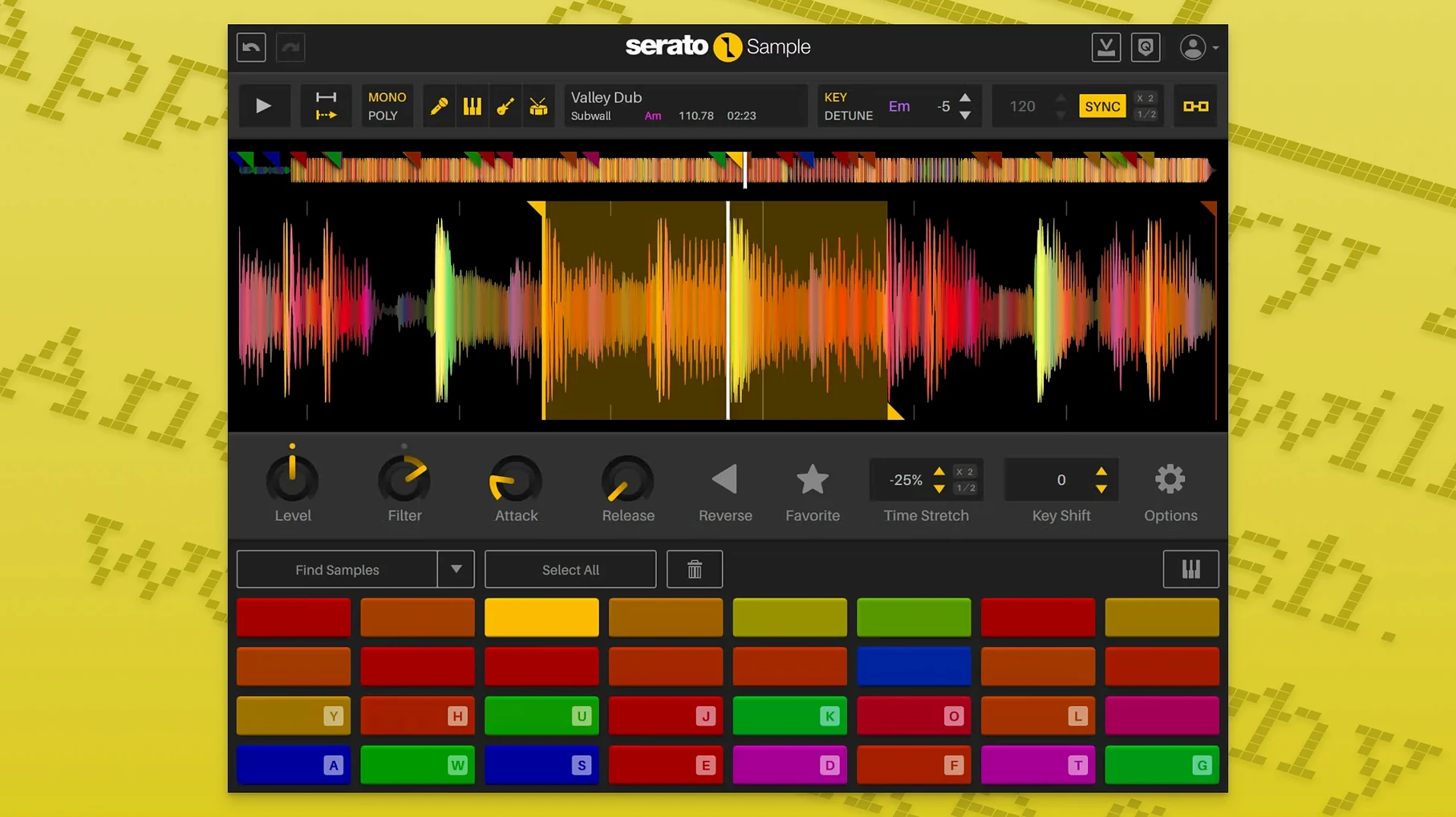
Serato Sample is an audio sampler plugin for DAW hosts that syncs, chops, pitch-shifts, time-stretches, and separates stems.
Stem On — A toggle that turns stem separation on or off for the loaded sample. When active, the plugin splits the audio into four parts.
Stem Levels — Individual volume controls for acapella, melody, bass, and drum stems. You can mute the drums, keep the bass, or isolate a vocal.
Beatgrid — A sync engine that locks even unquantized samples to your project tempo. Useful when the original recording was played live or loosely.
Keyboard Mode — Maps slices across your MIDI keyboard for playing chops melodically or as one-shots.
Host Automation — Stem On and Stem Levels are exposed as automation parameters, so you can ride stem volumes inside your DAW's arrange page.
Requires macOS 11 Big Sur or Later
Serato Sample 2.2.0 requires macOS 11 Big Sur or later and runs on both Intel and Apple Silicon machines. The installer is a standard disk image — you open it and run the setup. No hidden dependencies, no extra background services. It behaves like any other plugin in your VST, AU, AAX, or VST3 folder.
The 64-bit ARM and Intel builds are separate, so your DAW picks the right one automatically. If you are on an M-series Mac, there is no Rosetta overhead. If you are still on an Intel Mac, the x86 build works as expected. The interface is in English only, with no language options.
Because it is a plugin, not a standalone app, it does not appear in your dock. You load it inside your DAW's instrument or effects rack. The plugin window shows the sample waveform, controls for BPM and key, and the stem separation panel. It respects your DAW's window management — resizing, snapping, and multi-monitor setups work as your host handles them.
Installer Is a Standard Disk Image
Restart DAW and Rescan Plugin Folder
This is the most frequent issue. After installation, restart your DAW and rescan your plugin folder. If it still does not appear, check that your DAW is scanning the correct directory — some hosts have separate VST2 and VST3 folders. Serato Sample 2.2.0 includes VST3 support, so make sure that format is enabled in your DAW's plugin manager. On Apple Silicon, confirm you downloaded the ARM build, not the Intel one.
Stem Separation Not Working
Stem separation requires a sample loaded. If you hear the full mix when you expect only vocals, check that Stem On is enabled in the plugin. The toggle is visible in the main panel. Also verify that the individual Stem Levels are not turned all the way down. If the stem levels are at zero, nothing plays. Raise the level for the stem you want to hear. Some DAWs require you to automate these parameters before they update — toggle the automation off and on once if the levels seem stuck.
Beatgrid Not Syncing
Beatgrid works best when you have a clear transient or downbeat in the sample. If the grid snaps to wrong positions, try a sample with a stronger kick or snare. You can also adjust the grid manually by dragging the beat markers inside the plugin. Looser, unquantized recordings may need a few grid points moved before they lock to your project BPM.
MIDI Keyboard Not Triggering Slices
Keyboard Mode is on by default, but you need to assign a MIDI track to the plugin. Make sure your DAW's MIDI output is routed to the Serato Sample track. If you are using a computer keyboard instead of a MIDI controller, check that Keyboard Mode is selected and that the plugin window has focus. Click the plugin interface first, then press your keys.
Mouse Wheel Not Scrolling Parameters
Version 2.2.0 added mouse wheel scrolling for parameters when hovered. If it does not respond, hover directly over the knob or slider — not the label — and scroll. Some DAWs intercept the mouse wheel for zoom or scroll functions; try holding Shift or Ctrl while scrolling, or reduce the DAW's zoom sensitivity temporarily.
Individual Stem Level Controls Added
- Individual stem level controls — Before 2.2.0, you could toggle stems on or off but not adjust their volume independently. Now you can drop a bass stem by 6 dB while keeping the vocal at full level, all inside the plugin.
- Host automation for stems — Stem On and Stem Levels are exposed as automation parameters. You can draw automation lanes in your DAW to fade the drums in, bring the melody up at a bridge, or mute the acapella during a breakdown. This is a workflow change: instead of bouncing stems to separate tracks, you automate inside the plugin.
- Support for AlphaTheta SLAB — If you use SLAB hardware as a controller or performance surface, Serato Sample 2.2.0 recognizes it. Useful for live sampling or hands-on chop triggering.
- Support for macOS Tahoe — The plugin now runs on the latest macOS version in the Tahoe line. If you upgrade your OS, Serato Sample stays compatible.
- Mouse wheel scrolling — A small quality-of-life change. Hover over a parameter and scroll to adjust without clicking and dragging.
None of these changes break existing projects. Settings from earlier versions load correctly. The update is a refinement of the stem separation and automation tools that were already present.
Tempo Drift Fix for 70s Funk Recordings
Marco works in Porto, producing sample-based hip-hop for local artists. He regularly grabs old Portuguese funk records from flea markets and records them into his DAW. The problem: those recordings were played live in the 70s, so the tempo drifts. A drummer speeds up in the chorus, the bassist drags on the turnaround.
He loads a 16-bar loop into Serato Sample. The plugin detects the BPM at 94, but the beatgrid shows the second bar is slightly early. He drags the grid marker for bar two to align with the snare hit. Repeat for bar four and bar seven. Within two minutes, the entire loop is locked to his project tempo. The original feel is intact — it is not quantized to a grid — but the sample stays in time.
Next, he wants the vocal phrase from bars 5 through 8 without the guitar. He enables Stem On, adjusts the Stem Levels so only the acapella stem is audible, and mutes the melody and bass. The vocal sits clean. He routes the output to a sampler track and triggers it from his MIDI keyboard in Keyboard Mode, playing the phrase in different pitches across the chorus.
When the arrangement needs a drop, he automates Stem On to turn off for two bars, letting the full mix crash back in. He draws that automation in his DAW's arrange page. No stems to bounce, no extra audio tracks. The whole process stays inside the plugin.
The plugin runs as VST, AU, AAX, or VST3, in 64-bit ARM or Intel builds, on macOS 11 and later.
- Stem levels can be adjusted individually.
- Stem On and Stem Levels can be automated by the host DAW.
- Support for AlphaTheta SLAB added.
- Mouse wheel scrolling works on parameters when hovered.
- Support for macOS Tahoe added.
| macOS | macOS 11 or later |
|---|---|
| Processor | Apple Silicon, Intel 64-bit |
| Download | 612 MB |
- macOS 11 Big Sur or later
- 64-bit ARM or Intel processor
Questions about Serato Sample
Can I automate stem levels in my DAW?
Yes. Stem On and Stem Levels are available as host automation parameters, so you can automate them directly from your DAW's automation lanes.
What macOS versions does Serato Sample support?
It supports macOS 11 Big Sur and later, including the newest macOS Tahoe, on both Apple Silicon and Intel Macs.
How to install, in order
- Open the downloaded disk image.
- Run the standard installation procedure.
Comments and corrections 0
Sign in or open a free account to leave a comment.
No comments or corrections yet.