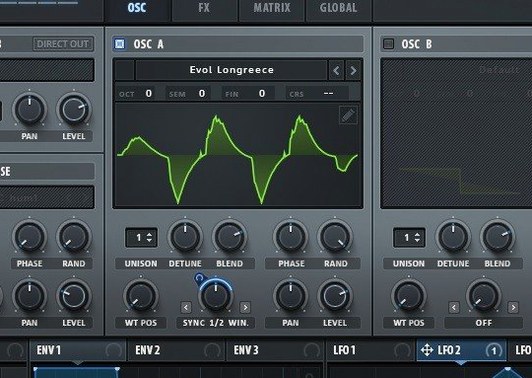
Serum 2.1.5 — download for Mac
VST Plugins Updated
Generates sounds with wavetable, additive, and FM synthesis with deep modulation.
Screenshot
Beat makers and sound designers who build tracks in the box know the value of a synth that handles both the heavy lifting and the fine detail. Serum 2 for Mac is that instrument: a wavetable synthesizer that combines additive, wavetable, and FM sound generation with a modulation system that rewards experimentation.
Stack 16 Voices for Thicker Leads
Say you want a lead sound with more body than a single oscillator can give you. In Serum 2, you stack one oscillator and set it to use up to 16 voices. Then you enable Unison WT Pos, which assigns a different wavetable position to each unison voice — so instead of a chorus effect, you get a spread of slightly different timbres. Dial in the dual filter section (the same filters from LFOTool plus new ones) and sweep between them. The result is a thick, evolving lead that sounds like several synths playing at once, but you only routed one instance.
Why This Matters in a Session
The modulation system lets you automate almost any parameter without opening a separate LFO tab. Patch a slow envelope to the filter cutoff, add a second envelope to pitch, and the sound moves on its own. That leaves you free to focus on arrangement, not menu-diving. For producers who work fast, that’s the difference between finishing a track and leaving it in a folder.
Works on Intel and Apple Silicon Macs
The plugin supports macOS 10.13 and later, and it works on both ARM and x86 64-bit Macs. That covers Intel and Apple Silicon machines, so whether you’re on an older MacBook Pro or a recent MacBook Air, it should load without issues. The installer is a standard macOS package — run it, apply the patch using the included instructions, and check the VR.nfo file for the exact activation steps. The whole process takes a few minutes if you follow the order.
Another common question is whether Serum 2 works as a standalone app or only inside a DAW. It is a plugin, so you need a host — Logic Pro, Ableton Live, FL Studio, Cubase, or any VST-compatible DAW. Once installed, it appears in your plugin list like any other instrument. The interface is in English only, so no language switching is available.
People also ask if Serum 2 can import their own wavetables. Yes. You can create, edit, import, and transform wavetables in real time. That means you are not locked into the factory library — drop in samples or synthesized waveforms and work with them directly inside the synth.
Evolving Bass Hit Over Four Bars Without Loops
Ana works on sound design for video game trailers. She needs a bass hit that evolves over four bars without looping the same sample. She opens Serum 2, loads a single oscillator, and stacks it to eight voices. She then assigns a different wavetable waveform to each voice using Unison WT Pos, and tweaks the Unison Warp setting so the unison voices also vary in pitch offset. The result is a bass that shifts texture on every note without needing automation lanes or multiple MIDI clips. She routes the output through the dual filter section and switches between a low-pass and a comb filter that tracks the played note. The whole patch takes under two minutes to dial in, and she exports it as a new wavetable for later use.
Flangers and Phasers Track Your Note Pitch
- The flangers, phasers, and comb filters can track the note you play. That means the effect shifts its frequency with the pitch, which keeps the sound consistent across the keyboard instead of staying static.
- Sample-rate reduction is available as a filter process. You can degrade the sound in stages without adding a separate bit-crusher plugin to the chain.
- Stacking an oscillator to 16 voices and using the unison parameters means you can build layered patches from a single instance. No need to duplicate tracks or route multiple synths.
- The dual filter section lets you switch between two filter types or morph between them. You can set one filter to low-pass and the other to band-pass, then sweep between them for movement.
Workflow: Building a Pad from a Single Wavetable
Start with a new Serum 2 instance. Load a basic saw wave into oscillator A. Stack the oscillator to eight voices and enable Unison WT Pos so each voice picks a different position along the wavetable. That alone gives you a spread that sounds wider than a single detuned saw.
Next, set the dual filter section. Choose a low-pass filter for filter 1 and a band-pass for filter 2. Assign an envelope to the filter blend so it starts brighter and darkens over time. Now add a comb filter that tracks the note — this adds a metallic resonance that shifts with the melody.
Route the modulation to the Unison Warp parameter so the unison voices slowly drift apart in pitch over a few seconds. That creates movement without LFO wobble. Finally, apply a subtle amount of sample-rate reduction to the filter section to add grit. The pad now evolves over several bars without any automation clips or extra plugins. One instance, one wavetable, and a handful of parameters.
No release notes filed for 2.1.5. They are added here when a build changes how the program behaves.
| macOS | macOS 10.13 or later |
|---|---|
| Processor | Apple Silicon, Intel 64-bit |
| Download | 1.2 GB |
- macOS 10.13 or later
- Supports Intel and Apple Silicon
- Interface language: English
Questions about Serum
Does Serum 2 work on Apple Silicon Macs?
Yes, Serum 2 supports both ARM (Apple Silicon) and x86 64-bit Intel Macs.
What filter types does Serum 2 include?
It includes the filter types found in LFOTool plus additional new filters, and supports dual filter types that you can switch between.
How to install, in order
- Perform the standard installation procedure.
- Apply the patch.
- Use the included installation and activation instructions file.
- Open the included VR.nfo file for instructions.
Comments and corrections 0
Sign in or open a free account to leave a comment.
No comments or corrections yet.