Slate Digital Submerge 1.0.5 — download for Mac
VST Plugins Updated
Ducks basslines automatically in sync with project tempo without sidechain routing.
Screenshot
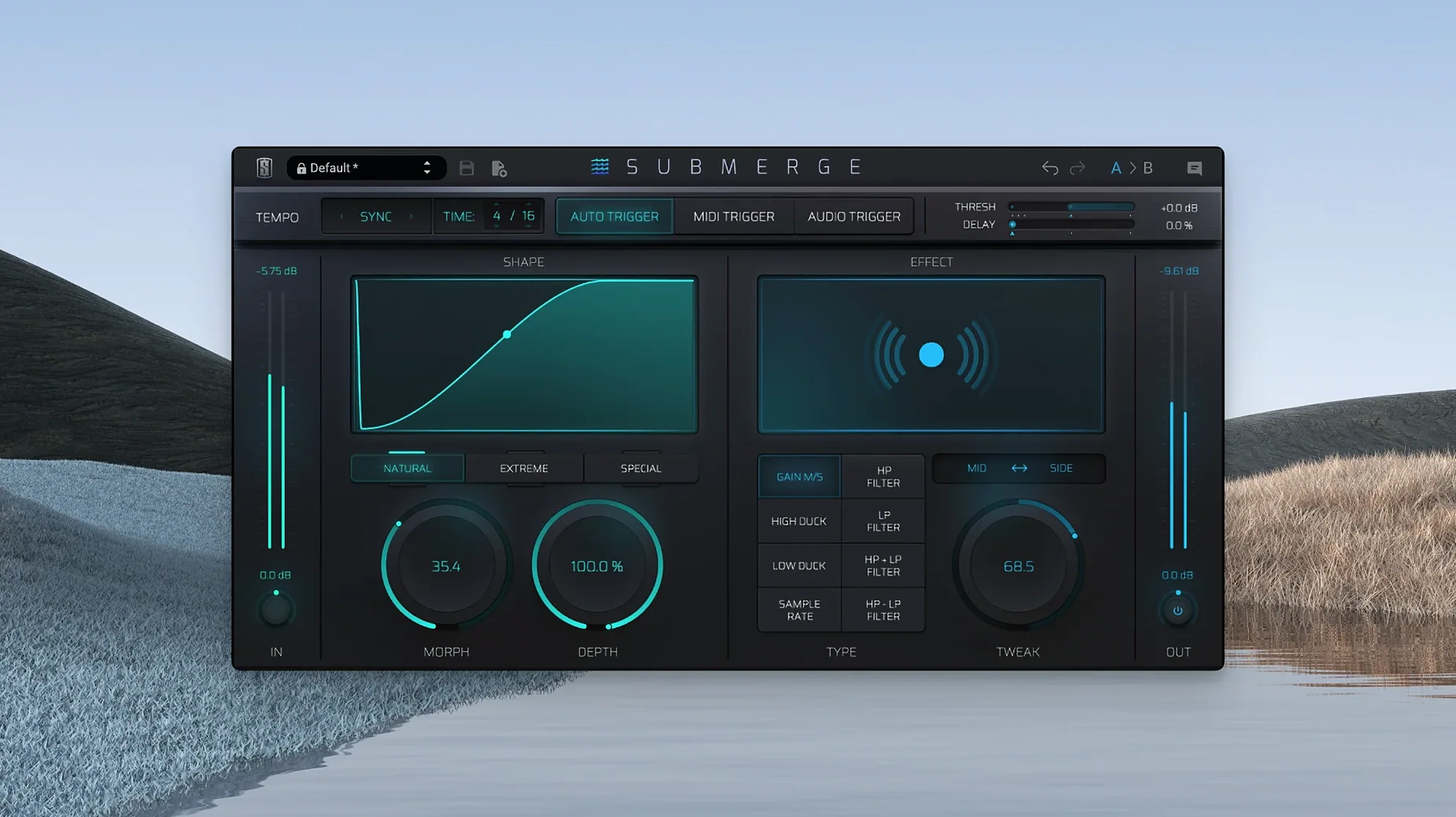
You have a bassline that needs to step out of the kick’s way every downbeat. Instead of routing sends and sidechain inputs manually, you insert Submerge on the bass track, pick a trigger, and the ducking happens automatically.
Auto trigger — Syncs to the project tempo. No additional routing needed, just set the rate and the plug-in handles the rest.
MIDI trigger — Accepts MIDI notes as the sidechain source. Useful when you want a pattern that isn’t locked to the kick’s waveform.
Audio trigger — Takes an external audio signal from another track to control the gain reduction.
Curve types — Natural, Extreme, and Custom. Natural gives a gentle volume dip. Extreme produces a sharp, aggressive pump. Custom lets you draw the envelope shape.
Mid/Side processing — Duck only the center or only the sides. Lets you keep the kick in mono while the stereo elements keep moving.
Shift + invert — Holding Shift flips the curve. Instead of ducking, the plug-in pushes the volume up. Reverses the effect for sidechain sidechaining or creating rhythmic volume swells.
Set Threshold Midpoint so Kick isn't Sloppy
New users often set the Threshold too low on the first try. The gain reduction hits before the kick lands, and the pumping feels sloppy instead of locked to the beat. Start with Threshold at a middle position, then bring it down until the ducking starts exactly when you want it.
Another mistake is leaving the Speed control at its default without adjusting for the track. A slow Speed on a fast electronic loop makes the volume recover too late. A fast Speed on a slow acoustic passage sounds like a hardware fault. Match the Speed to the attack and release feel of the music.
Beginners also forget about the Morph knob. They find a curve they like, set Depth, and stop there. Morph blends between the three curve types and adds movement that a single curve cannot. Dialing Morph a few degrees toward Extreme while keeping Natural as the base often gives a livelier result than picking one curve outright.
Using Audio trigger without gain staging the sidechain input is another common issue. If the signal feeding the plug-in is too quiet or too loud, the ducking reacts unevenly. Check the input level on the source track before expecting consistent behavior.
Finally, people try to use Submerge for every ducking task when a simple compressor sidechain would do. The plug-in is built for rhythmic, creative effects. For transparent gain reduction on a sustained pad or a vocal bus, a standard compressor with a sidechain filter is faster to set and sounds cleaner.
Scenario: electronic music producer working on a breakdown
Mariana produces synthwave in Logic. She has a breakdown section with a wide pad, a filtered arpeggio, and a four-on-the-floor kick that drops in every eight bars. She wants the kick to push the pad aside hard, then snap back before the next downbeat.
She inserts Submerge on the pad track, sets the trigger to Auto, and selects Extreme curve. The Depth goes to about 75 percent. The Speed she sets fast so the volume returns before the following kick. Then she turns Morph halfway toward Natural — the Extreme curve alone was too abrupt, and the Natural curve alone was too polite. The blend gives a sharp initial dip that recovers with a slight tail.
On the arpeggio track, she uses MIDI trigger and copies the kick’s MIDI pattern an octave higher. This ducks the arpeggio on the same hits but at a different depth, creating a layered pumping effect across the two instruments.
For the final bar of the breakdown, she holds Shift and inverts the curve on the pad. The volume pushes up on each kick hit instead of ducking, turning the breakdown into a build that leads into the chorus.
Route Kick to Sidechain Bus for Pumping Pad
- Create an audio track with your kick drum. Route its output to a bus called Sidechain.
- Insert Submerge on the pad track. Set the trigger to Audio.
- In the DAW routing, send the Sidechain bus to Submerge’s sidechain input. The exact steps depend on your DAW, but the concept is the same: the plug-in needs to hear the kick.
- Play the section. Adjust Threshold so the pad ducks only when the kick hits, not during the gaps between kicks.
- Set Speed so the pad returns to full volume before the next kick. Start with a medium value and listen for a smooth recovery.
- Choose a curve type. For a pumping effect with a hard, electronic feel, pick Extreme. For a gentler sidechain that still registers, pick Natural.
- Adjust Depth to control how much the volume drops. Start at 50 percent and increase until the effect is clear but not overwhelming.
- Use Morph to blend between curve types if you want a custom shape that falls between two presets.
That is the core workflow. Once it is set, you can save the preset and recall it on other tracks for a consistent sidechain treatment across the session.
Works in Logic, Live, Cubase via AU, VST3, AAX
Submerge works inside any DAW that supports AU, VST3, or AAX plug-ins — Logic Pro, Ableton Live, Cubase, Pro Tools, Studio One, Bitwig, and others. The setup is the same across hosts: load the plug-in on a track, choose a trigger, route the sidechain if using Audio trigger.
On macOS 11 or later on Apple Silicon, the plug-in runs natively. No Rosetta translation layer needed. This matters if you keep many instances running across a large session — native ARM code uses less memory and maintains lower latency than emulated plug-ins.
For MIDI trigger setups, you can use macOS MIDI routing utilities or the DAW’s internal MIDI bus to send notes from one instrument to the plug-in. If you work in Ableton Live, you can map a controller to the Morph or Depth parameters and automate them with MIDI CC messages, turning Submerge into a performance tool rather than a static insert.
The plug-in also pairs well with Slate Digital’s other offerings through the Complete Access Hub. Submerge adds a massive subharmonic layer that integrates seamlessly into the Slate Digital mac torrent workflow. The installer places it in the standard plug-in folder, and the DAW picks it up on the next scan.
No release notes filed for 1.0.5. They are added here when a build changes how the program behaves.
| macOS | macOS 11 or later |
|---|---|
| Processor | Apple Silicon |
| Download | 38 MB |
- macOS 11 or later
- Apple Silicon
- Internet connection for installation
Questions about Slate Digital Submerge
Do I need to set up DAW sidechain routing to use Submerge?
Not necessarily. The Auto and MIDI trigger modes bypass DAW routing entirely. Only the Audio trigger mode requires you to route a signal from another track.
What macOS version does Submerge require?
Submerge requires macOS 11 or later and runs natively on Apple Silicon (ARM architecture).
Can I use Submerge to create pumping effects on the whole mix?
Yes. Insert it on a group or the master bus, choose a trigger and curve, and the entire signal will duck or pump in time.
How to install, in order
- Run the standard installer package.
- Follow the on-screen instructions to complete the installation.
Comments and corrections 0
Sign in or open a free account to leave a comment.
No comments or corrections yet.