Superior Drummer 3.4.4 — download for Mac
VST Plugins Updated
Routes each drum through a built-in mixer and tweaks compression and eq for a present kit.
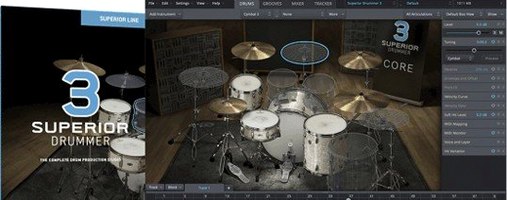
Screenshot
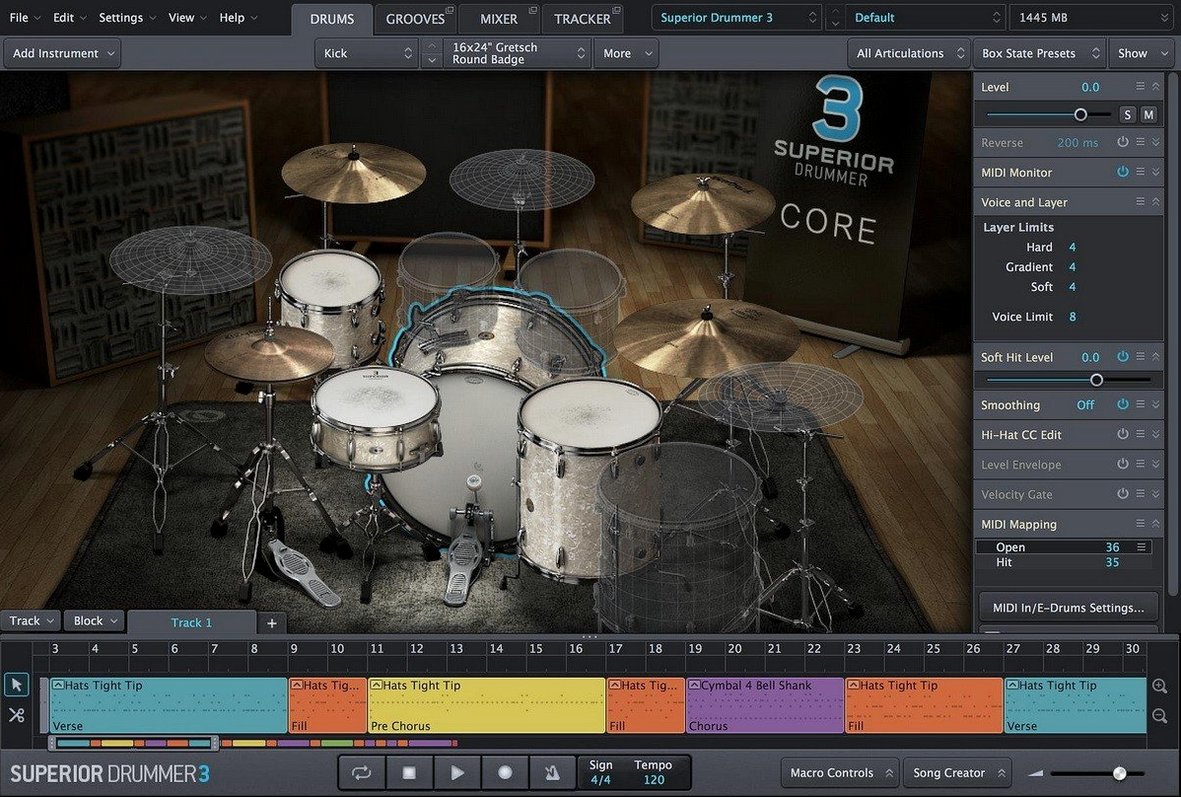
You finish a rhythm track, but the kick sits too far back and the snare lacks body. Opening Superior Drummer 3 on a MacBook Air M2, you route each drum through its built-in mixer, tweak compression on the room mics, and nudge the overhead eq until the kit feels present without fighting the bass. That is the workflow this sampler was built for — a virtual studio where every component of a drum performance can be shaped before it ever hits a DAW fader.
35 Mixer Effects Per Channel or Bus
- 35 mixer effects — compressors, EQs, reverbs, and saturation — applied per channel or to the drum bus.
- Per-drum tuning, damping, and bleed control let you adjust how the kit responds to velocity and cross-talk.
- MIDI drag-and-drop from audio tracks: convert recorded drum audio into editable MIDI patterns.
- Seven factory kits, each with multiple mic positions, so you can blend close, overhead, and room signals to taste.
Treat the Mixer as a DAW Extension
Superior Drummer 3 is not a plugin you load and leave. You treat the mixer as an extension of your DAW — route individual drums to separate tracks, automate the built-in effects, and save your processed kit as a preset. The library covers rock, metal, jazz, and pop, but the real value is in the control surface: every mic, every effect slot, every velocity curve is exposed. Version 3.4.4 runs on macOS 10.13 and later, Intel and Apple Silicon alike.
3.4.4 Fixes macOS and Preset Recall
Version 3.4.4 itself is a maintenance release — it fixes how the plugin communicates with newer macOS builds and ensures preset recall behaves predictably when you reopen a project. The more significant change arrived with 3.4.0: starting from that version, Superior Drummer 3 recognizes sound libraries released from Q2 2025 onward. If you plan to buy expansion packs (The Metal Foundry, The Jazz EZX, or any future SDX titles), version 3.4.4 or later is required for them to mount correctly. In daily use, this means no "library not found" dialog when you load a project that uses a recently released kit. The architecture support did not change — both Intel and Apple Silicon machines run the same installer.
Map One Core Library Kit First
- Start with one kit, not seven. Load the standard Core Library kit (Library A) and spend an hour mapping the pads to your controller. Superior Drummer 3 ships with so many articulations per drum that jumping between presets too early makes it hard to tell whether the sound or the mapping is wrong.
- Set your buffer at 512 samples. The 230 GB of samples stream from disk; a low buffer causes pops on slower drives, especially on the first play-through. Once the library loads into RAM cache, you can lower it in your DAW.
- Save a default mixer setup. Tweak the overhead eq, add a touch of room compression, and save the mixer chain as "My Start." Every new project begins from a recognizable place instead of from scratch.
- Test the audio-to-MIDI conversion on a real loop. Drag a recording of a live drum performance onto the built-in tracker. The result is never perfect, but adjusting the sensitivity slider immediately teaches you how the engine reads transients — a lesson that applies to every future conversion.
Route 16+ Channels, Not One Stereo Track
- Loading the full kit into a single stereo track. Superior Drummer 3 outputs 16 or more individual drum channels. Beginners route the whole plugin into one stereo input, then wonder why the kick and snare share reverb tails. Route each drum to its own DAW track from the start — the mixer effects are per-channel for a reason.
- Ignoring bleed control. The default bleed levels are high because the samples were captured in a live room. For electronic-influenced or tight pop productions, reducing overhead bleed from the toms tightens the low end without touching an EQ plugin.
- Over-processing the built-in effects. The 35 mixer effects include three compressor models and four reverb types. New users often apply all of them, then export and wonder why the kit sounds boxy. Dial in one effect per drum group first — a single compressor on the drum bus and a hall reverb on the overheads — before layering more.
- Not saving presets after changes. Spent fifteen minutes tuning the snare? Save the kit as a preset immediately. Superior Drummer 3 does not autosave mixer or drum adjustments. A crash or a DAW freeze means starting over unless you saved.
Works on macOS 10.13+, 64-Bit DAWs
Does it work with Logic Pro, Ableton, Cubase, and Pro Tools? Superior Drummer 3 loads as a 64-bit VST3, AU, or AAX plugin. If your DAW is 64-bit and runs on macOS 10.13 or later, the plugin appears in the instrument list after installation. The disk image includes all three formats, so there is no extra download for compatibility.
How much disk space does it actually need? The full library occupies approximately 230 GB. The installer lets you choose which mic positions and kit pieces to install. You can add the room and ambient mics later from the same installer without re-downloading the entire library.
Can I use my own drum samples alongside the built-in ones? No — Superior Drummer 3 is a closed sampler. You cannot drag your own WAV files into it. The library is the library. What you can do is route individual drum outputs to separate DAW tracks and blend them with your own sampled or recorded hits outside the plugin. The built-in mixer effects remain available for every routed channel.
No demo limitations, no time bombs, and no "nag" screens. Everything described — the 35 mixer effects, the seven kits, the audio-to-MIDI engine — runs from the first load.
- Version 3.4.4 is now available.
- Version 3.4.0 is required to support Superior Drummer 3 products released from Q2 2025 onward.
| macOS | macOS 10.13 or later |
|---|---|
| Processor | Apple Silicon, Intel 64-bit |
| Download | 625 MB |
- macOS 10.13 or later
- Intel or Apple Silicon
- 64-bit host support required
Questions about Superior Drummer
What is included in the Superior Drummer 3 library?
It includes seven kits, an extensive drum library, and 35 mixer effects.
Can Superior Drummer 3 convert audio to MIDI?
Yes, it can convert recorded drum audio into MIDI data for editing.
What are the macOS requirements for Superior Drummer 3?
It requires macOS 10.13 or later and runs on both Intel and Apple Silicon Macs. A 64-bit host is required.
How to install, in order
- Open the downloaded disk image.
- Run the standard installer in sequence.
Comments and corrections 0
Sign in or open a free account to leave a comment.
No comments or corrections yet.