QLab 5.6.5 — download for Mac
Mac Apps Updated
Triggers audio, video, and lighting cues for live theatre and events from a Mac.
Screenshots
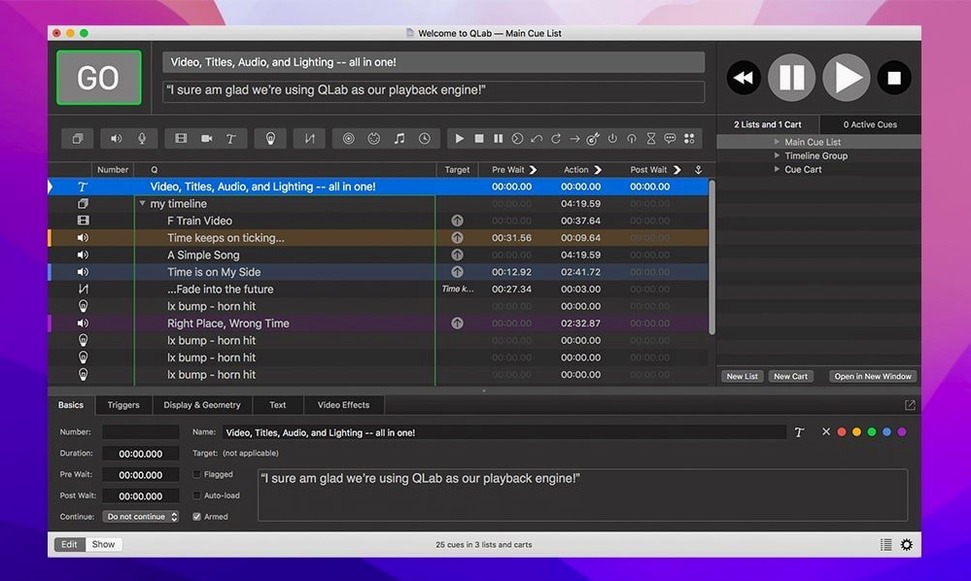
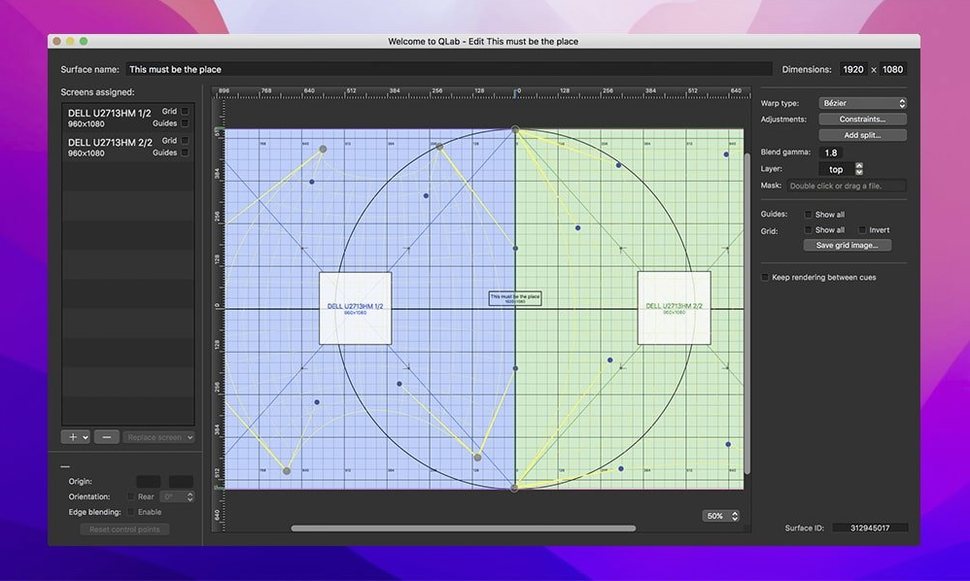
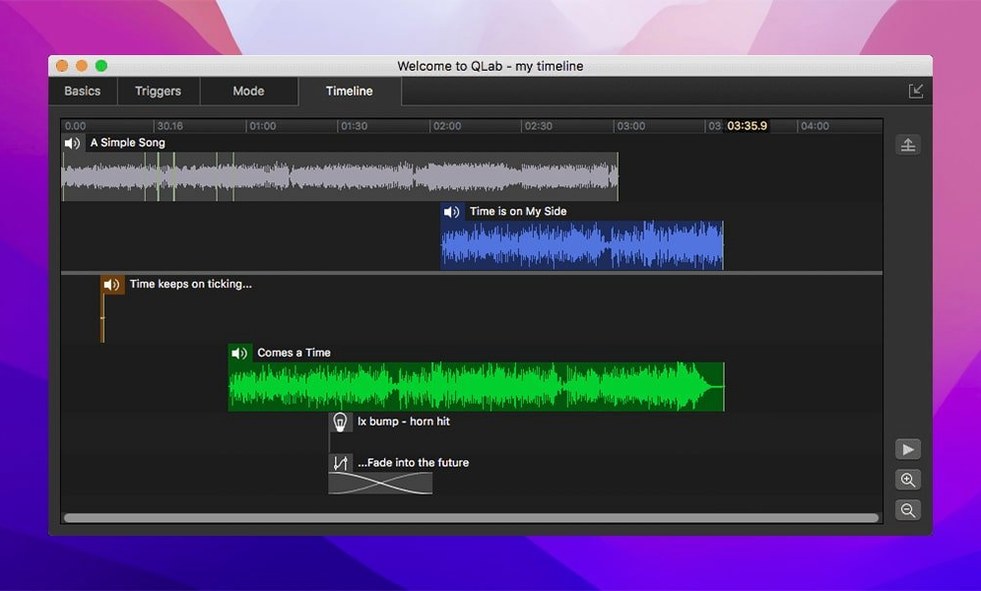
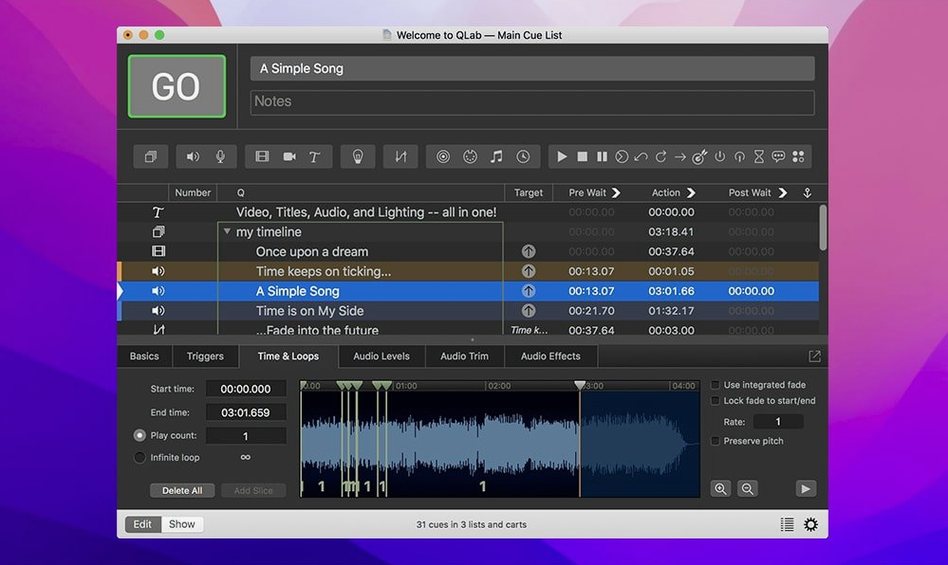
QLab 5.6.3 runs on any Mac with macOS 11 (Big Sur) or later, supporting both Intel and Apple Silicon machines. That covers most Macs from 2020 onward, including the MacBook Air M2 I use daily. Before downloading, confirm your OS version under About This Mac — the app won’t install on older systems.
| Detail | Info |
|---|---|
| Version | 5.6.3 |
| Developer | Figure 53 LLC |
| macOS | 11+ (Intel & Apple Silicon) |
| Language | English |
QLab is a single workspace for audio, video, MIDI, and OSC cues, built for live performances and installations. You can reverse and center video on a projector, overlay titles, and trim audio tracks with the built-in editor. The 5.6.3 update fixes a rare crash when stopping video playback and adds row color changes in the Light Library editor when an instrument definition is misconfigured. Undo support covers most changes, so you can experiment without worry.
Lisbon 200-Seat Theater Prep
A friend of mine runs sound for a 200-seat black box theater in Lisbon. He works alone most nights, running three wireless mics, two QLab tracks for intermission music, and a video projection that fades in before the second act. Before QLab, he used separate apps for audio playback and video — one crash during a show meant scrambling to restart and re-sync. With QLab 5.6.3, he builds one workspace with the sound cues in order, the video file on a separate timeline, and a single OSC command that triggers the house lights to dim. He sets the video fader to fade in over three seconds on a single GO press. The built-in audio editor lets him trim the track start to exactly where the music begins, so he doesn't need a separate DAW. On tech days, he adjusts the keystone correction for the projector once, and it stays. The show runs from one file, one Mac, one operator. That's the point.
Crash Fix in Video Cue Stops
The 5.6.3 update didn't overhaul the interface — small fixes that matter when you're between shows. The crash fix for stopping video playback is the one most operators will notice first. If you've ever hit Stop on a video cue during a rehearsal and had the app drop out, that's the scenario they addressed. It's a rare crash, but once you've seen it, you trust the app less. Now it's gone.
The lighting side got two practical changes. Rows in the Light Library or Light Definition editor now change color when an instrument definition is misconfigured. That might sound minor, but when you're scanning a list of 40 fixtures before a load-in, a colored row tells you instantly which one needs attention. The Light Patch editor also shows a Broken status for a misconfigured instrument definition. If you've ever patched a fixture only to find it silent during a cue check, you'll appreciate this. The app flags the problem before you run the cue.
There's also a migration step for workspaces created in 5.6.2 and earlier — they now use the built-in network device definition for Right On Cue Services Stage|Tracks. That means older projects update automatically without you editing network settings by hand.
OSC and MIDI Cue Sends to Lights
QLab connects to other software mainly through OSC and MIDI. I use it alongside a lighting console that listens for OSC messages — when QLab fires a cue, it sends a note to the console, and the lights change without a second operator. That same OSC path can trigger a timecode generator in Ableton Live or start a video server on another Mac. For sound-only shows, you can route QLab's 48 outputs through an interface and use the built-in audio faders to ride levels without extra hardware.
On macOS itself, QLab respects the system's audio routing well. You can assign outputs per cue, send a click track to headphones, and push house mix to the main pair. The Syphon integration lets you send the video output to other apps that accept Syphon input — useful for projection mapping or multi-screen setups where one Mac feeds the content and another handles edge blending. The video engine also works with Blackmagic capture devices, so live camera feed can appear as a cue source. That's how some installations run real-time feeds through keystone-corrected projections.
If you use macOS's built-in screen recording or OBS Studio for livestreams, QLab's video output appears as a capture source. For documentation sessions or test runs, you can record exactly what the audience sees without filming the projector.
Theater Technicians and Installation Artists
The obvious group is theater technicians — sound operators, video programmers, lighting designers who build cue stacks and run shows. But the app also suits installation artists who need a timed sequence of audio and video that loops for hours. Museum AV managers, church tech directors, and event production companies all have the same need: one timeline that triggers audio, video, and lighting reliably.
It also works for corporate AV teams running multi-presentation events. You can load a keynote speaker's slides as video cues, add a backing track for walk-on music, and trigger it all from one laptop. The title overlay feature lets you add speaker names or sponsor logos without leaving the app.
Smaller production companies that operate with two or three people benefit most — they can't afford a dedicated light board operator, a video op, and a sound engineer. With QLab, one person at a Mac handles all three. That changes how you schedule a load-in and how much you charge for a show.
Set Outputs and Stereo Pairs First
Before your first show with a fresh install, here are the adjustments I'd make. Start with audio preferences: set the number of outputs to match your interface (up to 48). If your venue uses stereo outputs, assign a pair to the main speakers and another to a monitor feed. Then go to the Video Engine settings and turn on hardware acceleration if you're on Apple Silicon — it helps with smooth playback. Under Cue Defaults, set the fade time for audio fades to something like three seconds unless your show needs instant cuts. That way every new cue gets a gentle fade by default, and you only override the ones that need a hard stop.
For lighting users, open the Light Library and check that all instrument definitions are green — colored rows mean something is wrong. Fix those before building cue lists. Also enable automatic output mapping if your fixtures are addressed sequentially. That saves you patching each one individually.
If you use OSC or MIDI to talk to other gear, set up the network device definitions early. The workspace migration in 5.6.3 handles the Right On Cue Services device, but you'll still want to add your own console or software targets. Name them clearly — "Main Console" and "Backup Rig" — so you don't have to guess during a tech rehearsal.
- Rows in the Light Library or Light Definition editor now change color when an instrument definition in the row is misconfigured.
- Workspaces from 5.6.2 and earlier now migrate to the built-in network device definition for Right On Cue Services Stage|Tracks.
| macOS | macOS 11 or later |
|---|---|
| Processor | Apple Silicon, Intel 64-bit |
| Download | 34 MB |
- macOS 11 or later
- Intel or Apple Silicon
- English interface language
Questions about QLab
What’s new in QLab 5.6.3?
Rows in the Light Library or Light Definition editor change color when an instrument definition is misconfigured. It also fixes a rare crash that could happen when stopping video playback.
How to install, in order
- Mount the disk image and run Open Gatekeeper friendly.
- Press Enter in Terminal to bypass Gatekeeper.
- Drag the app into the Applications folder.
- Launch the app.
Comments and corrections 0
Sign in or open a free account to leave a comment.
No comments or corrections yet.