Carbon Copy Cloner 7.1.6 — download for Mac
Utilities Updated
Clones and backs up drives with a single universal binary.
Screenshots
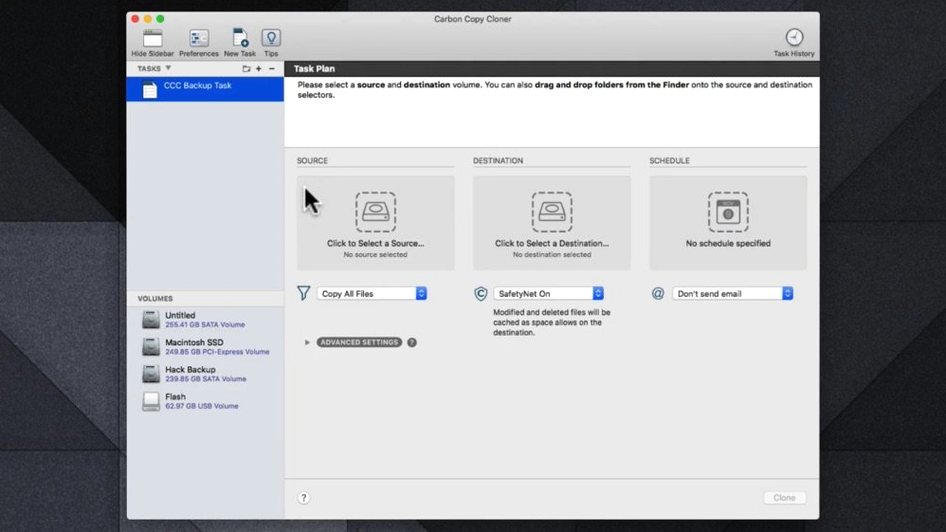
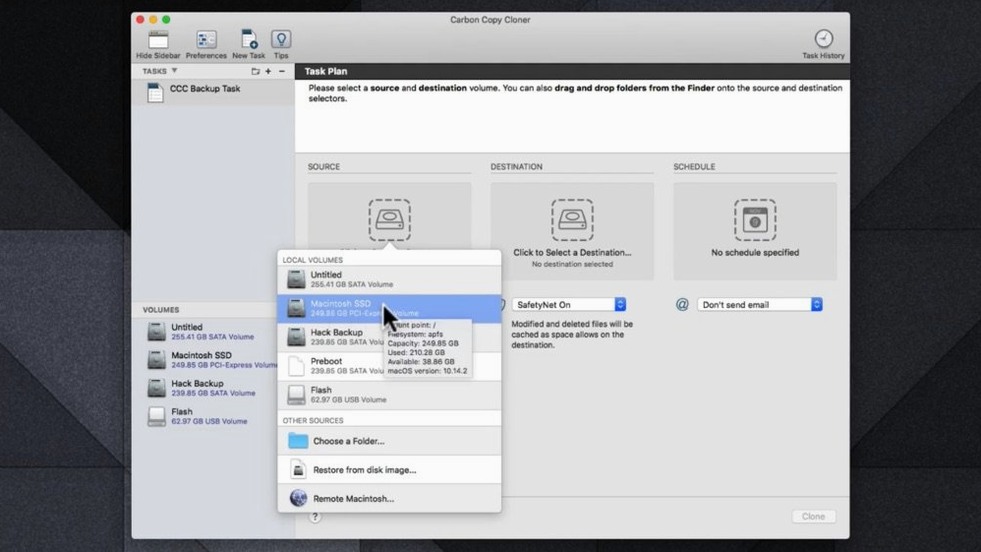
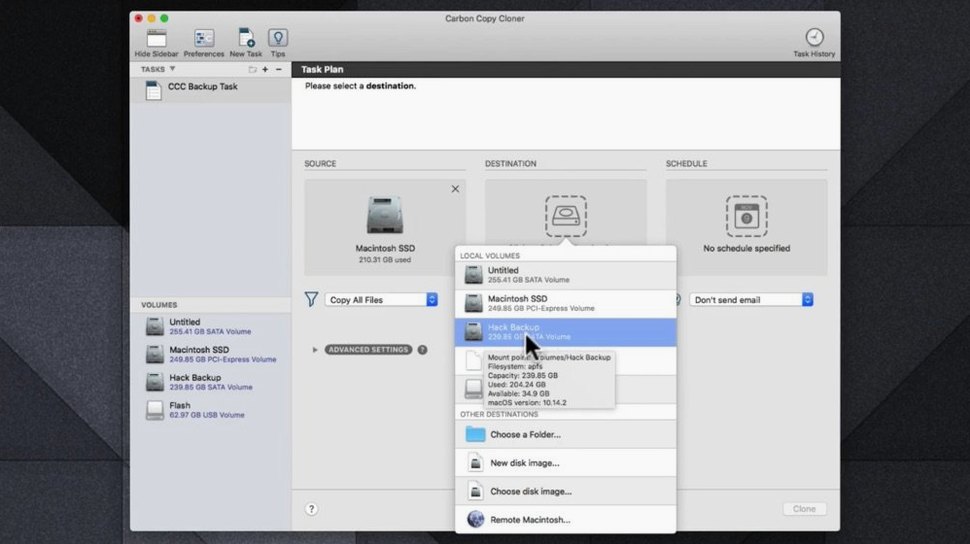
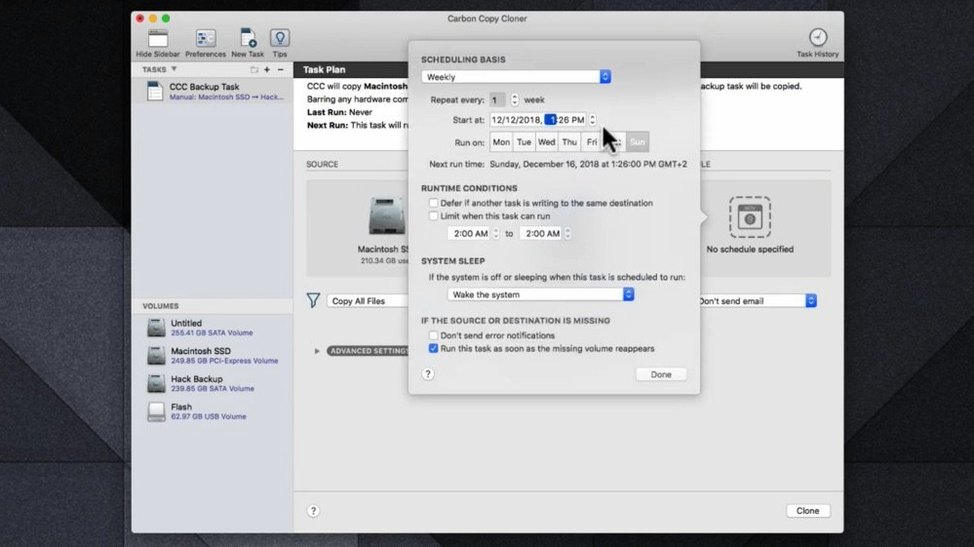
CCC 7 ships as a single Universal binary — one application that runs natively on both Intel processors and Apple Silicon. That build decision means you install the same file on a 2019 MacBook Pro or an M2 MacBook Air, and the system picks the right code path without Rosetta translation.
1. Verify your macOS release
Open About This Mac. The version number must be 10.15 Catalina or newer. Golden Gate (the latest macOS) is fully qualified, so a current machine is covered.
2. Choose a destination disk
The interface presents a straightforward picker: select a source volume, then a destination. That destination can be an external drive, a network share, or another internal partition. CCC handles the block-level copy from there.
3. Run the task
Once the source and destination are set, the utility copies files or creates a bootable clone, depending on the task configuration. Scheduling options let you repeat the job hourly, daily, or weekly.
The tool works as a file copier and a full-disk cloner in one package. For a project manager who keeps weekly snapshots of a work machine, the Universal build removes any question about architecture support — one installer fits every Mac in the office that still runs Catalina or later.
Before you start cloning critical volumes, it helps to know what CCC looks like once installed and what it expects from your hardware. The software is a native application — no emulation layer, no Rosetta overhead — and it runs identically on Intel and Apple Silicon Macs so long as they meet the same single requirement: macOS 10.15 Catalina or later. Anything older than that is not supported in CCC 7, and Bombich Software dropped support for Big Sur and Monterey in this version, meaning a machine stuck on one of those releases will need to stay on an earlier CCC build.
What the interface shows at first launch
The main window is a straightforward source/destination panel. Beginners sometimes overlook the fact that the destination disk must be at least as large as the source when creating a full clone. The utility does not compress data on the fly — it copies blocks — so a smaller target drive will fail partway through. Check the capacity labels in the picker before you confirm the task.
A second detail that trips new users: CCC can clone a system volume, but the destination drive must be properly partitioned beforehand for a bootable result. The tool does not automatically repartition a blank disk. If you attach a brand-new external SSD and expect to boot from the clone, you need to prepare the partitions yourself or use CCC’s built-in disk‑imaging mode, which many people miss on the first go.
Drill to the specific directory in the source dropdown
- Selecting the wrong source. When backing up a single folder, users often choose the whole volume by accident. The folder picker is nested inside the source dropdown — take the extra second to drill down to the specific directory you want.
- Forgetting to unlock the scheduling schedule. The automation panel lets you pick a day of the week and a time, but the task will not run unless the destination drive is connected and mounted before the trigger time. Scheduled backups fail silently if the target is missing.
- Assuming incremental backups are automatic. CCC copies everything each time unless you configure it for differential or incremental mode. A weekly full backup to the same destination will overwrite old data unless you set it otherwise — read the destination options carefully.
- Not verifying permissions on network destinations. If you back up to a network share, the account used must have write access. A permissions error on the target stops the entire job midway, and the error log is easy to miss if you walk away from the machine.
Race condition fix in the job queue
The current release, 7.1.6, is a maintenance update that refines the job queue and fixes edge cases in scheduling overlap. If you previously saw a second backup start before the first one finished, that race condition is resolved — tasks now wait their turn. The release also tightened error handling for network destinations that disconnect mid-copy, so a temporary glitch on your NAS no longer invalidates the whole session. For anyone who runs CCC on a schedule as part of a weekly office routine, the difference is fewer interrupted tasks and less time spent checking logs.
The Universal build itself has not changed — it still detects the architecture at launch and runs the correct code path. On a mixed‑architecture office fleet (some Intel iMacs, some M2 laptops), you deploy the same installer and get consistent behavior across the board.
Activation and first run
Install and activation instructions are included with the download. After the installer runs, you will be asked to enter a license key. The process is standard: copy the provided key, paste it into the activation dialog, and restart the application. No online account is required beyond that initial step. Once activated, CCC remembers the license and does not phone home on every backup run.
The tool works best for the person in an office who manages backups for others — the IT generalist or the senior project lead who wants a reliable snapshot of their own machine without learning a command line. You set it once, pick a day and a time, and the rest happens automatically as long as the destination disk stays connected.
No release notes filed for 7.1.6. They are added here when a build changes how the program behaves.
| macOS | macOS 10.15 or later |
|---|---|
| Processor | Apple Silicon, Intel 64-bit |
| Download | 38 MB |
- macOS 10.15 Catalina or newer
- Apple Silicon or Intel processor (Universal build)
Questions about Carbon Copy Cloner
Does Carbon Copy Cloner 7 work on Apple Silicon Macs?
Yes, CCC 7 is a Universal application, so it runs natively on both Apple Silicon and Intel-based Macs without emulation.
How to install, in order
- Open the disk image and drag the Carbon Copy Cloner icon into your Applications folder.
- Launch the app, then follow the included activation instructions to complete the setup.
Comments and corrections 0
Sign in or open a free account to leave a comment.
No comments or corrections yet.