Arturia Analog Lab V 5.12.6 — download for Mac
VST Plugins Updated
Reshapes analog synth presets with a few controls.
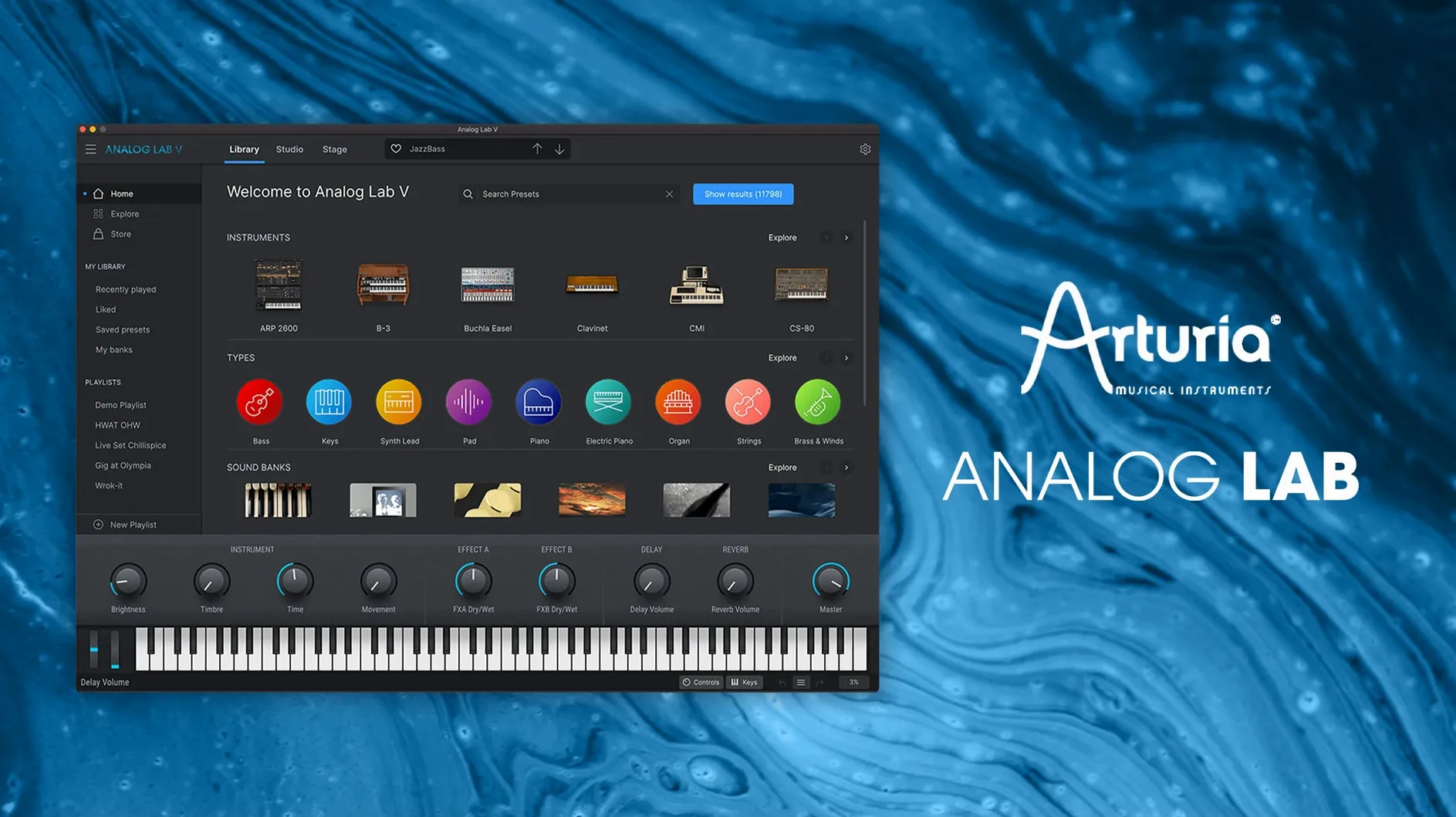
Screenshot
Project managers who sketch musical ideas after hours, and producers who need a finished sound without building it from scratch, reach for Analog Lab V. It treats presets as starting points that you can reshape with a few controls.
How does the browser cut down search time?
An intelligent filter sorts presets by instrument type, style, and sonic character. Type a word like “warm” or “brass,” and the list narrows before you finish typing, pulling from vintage emulations and modern patches in one place.
What do the macro controls actually change?
Four knobs and a set of sliders map to the key parameters inside the original instrument — filter cutoff, envelope shape, effects mix. Turning one knob often alters two or three hidden settings, so a pad gets darker and shorter at once.
Stage-Ready Output Levels in a Dense Mix
Presets load with a stage-ready output level that sits above a rhythm section without burying vocals. The effects chain, which includes reverb and delay, can be dialed back from the main panel when the arrangement gets dense.
Before you start browsing presets, a few settings in the standalone app or plugin host make the first sessions smoother.
Buffer Size for Click-Free Playback
- Audio buffer size. If you hear clicks during playback, raise the buffer in your DAW or in the standalone application’s audio preferences. A setting of 512 samples works for most pop and electronic arrangements; lower it to 128 for live playing.
- MIDI channel assignment. Analog Lab V listens on all MIDI channels by default. If you are layering multiple instances, assign each one a dedicated channel — this avoids double triggering when you play a keyboard controller.
- Output level. The default patch volume is mix-ready, but your interface or master bus may be quieter. Open the utility page (the gear icon) and adjust the master volume by a few decibels so you do not have to ride the fader on every track.
- Full instrument view. If you own a V Collection license, the “Open Instrument” button reveals the original synthesizer or keyboard interface. This setting is per-session: once you open it, the detailed view stays until you close it.
Reliable Preset Switching During Playback
Version 5.12.0 (build 6227) addressed a few everyday points that matter when you are in the middle of a project:
- Preset loading is more reliable when switching between patch banks during playback. Earlier builds could drop the audio engine for a split second; that gap is gone.
- The intelligent filter now remembers your last search term across sessions. If you were looking at “lead” presets yesterday, the browser opens to that view today.
- Standalone mode on macOS 11 and later no longer asks for audio device confirmation every restart. The selected interface and sample rate are saved.
- Side-chain input routing works with more DAW configurations. AAX and VST3 hosts that previously required manual routing now detect the input automatically.
Editable Preset Names in the Browser Header
These features do not appear in marketing screenshots but save time once you know they exist:
- The preset name is editable directly in the browser header. Double-click it, type a new name, and press Enter — no secondary rename dialog.
- Hovering over any macro knob shows the underlying parameter names and their current values in a tooltip. You can see exactly which filter cutoff and envelope settings are linked to that knob.
- A quick double-click on any slider or knob returns it to the saved preset value, not to zero. This lets you experiment freely without losing the starting sound.
- The effects section can be bypassed per-effect, not only as a group. Turn off the delay while keeping reverb active by clicking the power icon on the delay module alone.
Fast Workflows for Cycle-Driven Producers
Analog Lab V suits three types of users the most:
- Producers who work fast. If you build arrangements by cycling through sounds, the intelligent filter and macro controls cut the time between finding a patch and fitting it into the mix. There is no need to open separate instrument editors for every sound.
- Keyboard players who perform live. The standalone mode means you can load it on a MacBook Pro or Air and run it as a sound module without a DAW. Set up a few presets on different MIDI channels and switch with a keyboard controller or a tap on the screen.
- Sound designers who layer textures. Being able to open the full instrument view (with a V Collection license) unlocks the original synthesis engine behind each preset. You can start from a vintage analog patch and reshape it radically using the original oscillators and modulators.
Users who only need a handful of sounds and never tweak them will get less value — the strength here is the combination of browsing and quick shaping.
Explore Five Preset Categories in Your First Session
- Load five presets from different categories (bass, pad, lead, keys, effects) and play each one for a minute. Note which macro knob behavior you adjust most often — the filter cutoff or the envelope attack — so you know which control to reach for later.
- Save two or three of your tuned presets as user favorites using the star icon in the browser. These appear at the top of the list on every subsequent launch.
- Test the plugin in your main DAW and in the standalone application on the first day. Some hosts handle the AAX or VST3 version differently; confirm that your usual workflow works before you start a real session.
- If you use Arturia Analog Lab V alongside other Arturia instruments, keep the plugin window at a consistent size. Resizing it every session wastes time — set it once and the next instance remembers.
- Browse the “vintage” preset category for a few minutes. The older patches often have less compression and wider stereo spread, which can be a useful reference when your modern presets feel too dense.
For producers searching for arturia analog lab v torrent or arturia v collection mac torrent, this plug-in is the quickest way to audition and shape the sounds those collections provide — no separate instrument loader required.
No release notes filed for 5.12.6 REV3. They are added here when a build changes how the program behaves.
| macOS | macOS 11 or later |
|---|---|
| Processor | Apple Silicon, Intel 64-bit |
| Download | 2 GB |
- macOS 11 or later
- Intel and Apple Silicon supported
- VST, AU, or AAX host for plugin use
- English interface
Questions about Arturia Analog Lab V
Does Analog Lab V work as a standalone application?
Yes. It runs as both a standalone instrument and a plugin inside any DAW that supports VST, AU, or AAX formats on macOS 11 and later.
Which instruments does it cover?
It includes presets from Arturia's V Collection — synthesizers, organs, pianos, and string machines — along with newer hybrid sounds added through updates.
What changed with the Analog Lab Pro naming?
Arturia markets the product as Analog Lab Pro, while the software and plugin retain the Analog Lab V name in menus and file paths.
How to install, in order
- Download the disk image and open it.
- Run the standard installer and follow the on-screen prompts.
- Launch Analog Lab V from your Applications folder or inside your DAW.
Comments and corrections 0
Sign in or open a free account to leave a comment.
No comments or corrections yet.