Ample Guitar M 4.1.0 — download for Mac
VST Plugins Updated
Plays a deeply sampled Martin D-41 acoustic guitar from within a DAW instrument track.
Screenshot
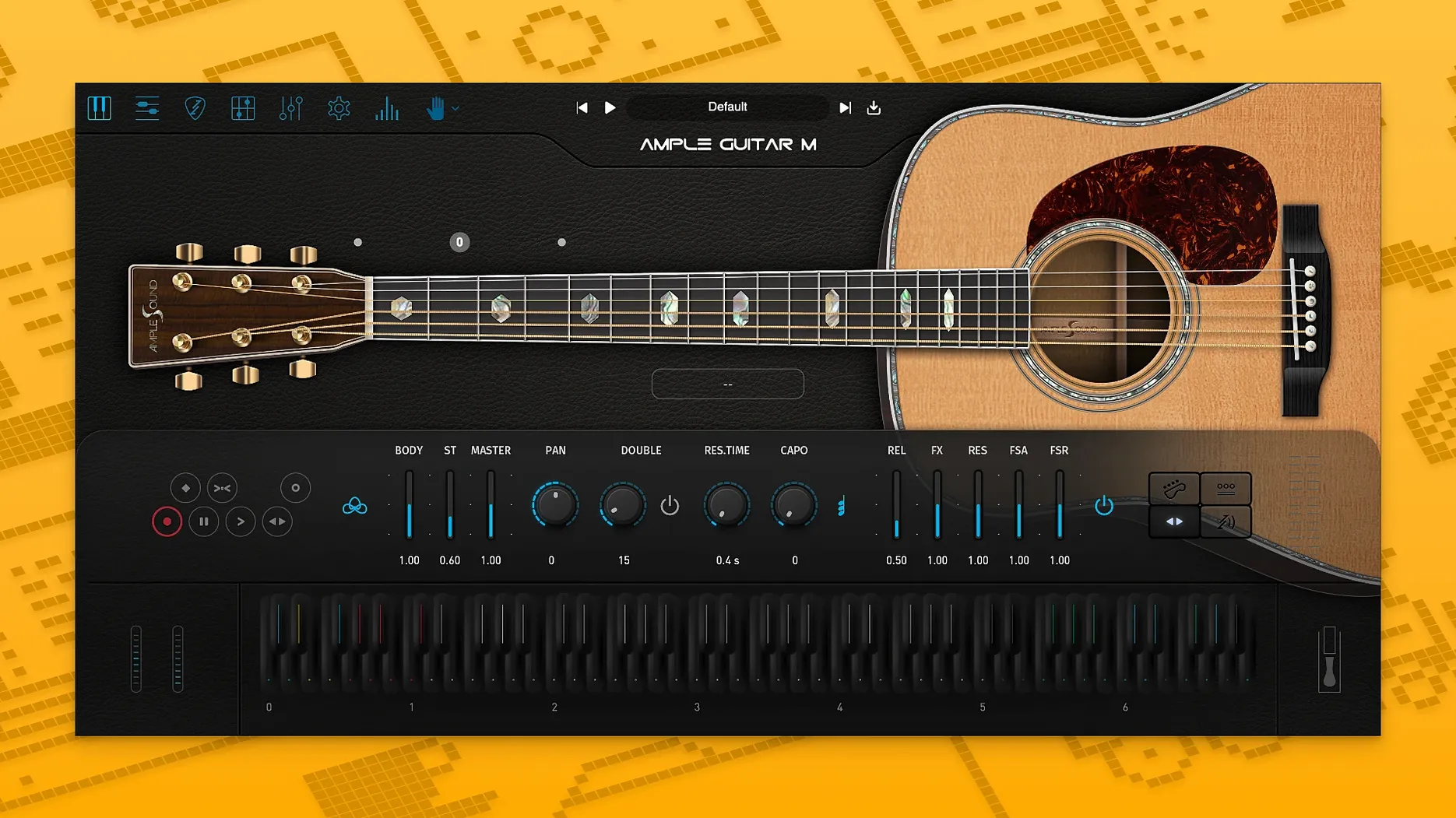
Recording a convincing acoustic guitar part without an instrument, a good room and a capable player often means settling for rigid MIDI patterns that fool nobody. Ample Guitar M removes that bottleneck by putting a deeply sampled Martin D-41 steel-string acoustic inside your Mac, ready to follow picking, strumming or a detailed tablature score.
Guitar parts from strums to tab
Two systems do the heavy lifting. The Strummer builds rhythm tracks from chord progressions and user-defined stroke patterns, so a full eight-bar verse locks in without painting a single automation lane. When a part needs a lead line or fingerpicked passage, the built-in tab player reads standard tablature and drives the sample engine note by note, keeping slides, hammer-ons and pull-offs intact. You stay in one plugin instead of hopping between a MIDI editor and a notation app.
Sample engine that works like hardware
Under the hood, version 4.1.0 brings a faster sampler backbone that loads articulations with less waiting and plays them back with tighter timing. The update also adds Auto Vibrato Curve and Swing Quantization to the Riffer, giving short sequenced phrases a more natural push and pull. Running native on Apple Silicon and Intel Macs from macOS 10.13 onward, the plugin slots into any production setup without translation overhead. A project manager tracking a tight deadline will appreciate that the instrument sounds finished straight out of the box, needing little more than a level check and a touch of room reverb to sit in a mix.
Sample library path issue produces no sound
The most frequent issue people run into after downloading Ample Guitar M is that the plugin loads but produces no sound. This almost always means the sample library has not been placed where the plugin expects it. The download page supplies a separate library installer, so running that first is the fix. If the sounds still do not appear, check that the library folder is not inside a nested zip archive — the plugin needs direct access to the files.
A second common snag happens when the tablature player refuses to load a Guitar Pro file. The file format must be standard GP5, GP6 or GP7; older or corrupted files may fail silently. When that occurs, reopen the file in Guitar Pro, re-save it, and try again. For files that still stall, dragging the notes into the plugin by hand via the tab editor is a reliable fallback that also lets you adjust fingering per the part.
Strummer timing issues are the third complaint. If the strum pattern sounds rushed or drags against your DAW tempo, confirm that the plugin is receiving MIDI clock. Some hosts send start/stop messages but not continuous clock — the Strummer expects the latter to stay locked. A quick test: change the tempo in your DAW and see if the pattern follows. If not, enable MIDI clock output in your host's sync settings.
Works inside any DAW with VST3, AU or AAX
Ample Guitar M works inside any DAW that loads VST3, AU or AAX plugins — Logic Pro, Cubase, Pro Tools and Studio One among them. On macOS, it also cooperates with the system's audio routing. You can run the plugin in standalone mode if your interface is set up through the macOS sound panel, which is useful for sketching parts without opening a full session.
The iLok activation system, while separate from day-to-day use, integrates with macOS keychain and works across multiple machines as long as you deactivate before moving to a new computer. For team workflows, a producer could set up the library on a shared drive and point each instance to the same samples, saving disk space across an office.
For arranging acoustic parts alongside other Ample Sound instruments, the tab player and Strummer share a similar layout, so switching between Ample Guitar M and, say, an electric guitar or bass plugin requires no relearning. This consistency matters when you are layering parts for a demo and want the articulation to match across tracks.
Match sample buffer to DAW buffer to avoid clicks
Before you play a single note, open the plugin's preferences and set the sample buffer to match your DAW's buffer size. A mismatch here causes clicks or delayed response, especially on larger sessions. If you are working on a laptop without a dedicated audio interface, increasing the buffer to 512 samples often cleans up playback without noticeable lag for MIDI parts.
Next, adjust the velocity curve in the Strummer. The default sensitivity works for general use, but lowering it by a few percent gives a softer attack that blends better in a dense mix. For exposed fingerpicking passages, raise the curve so the nuance of your MIDI velocity data comes through clearly.
Finally, turn on the Auto Vibrato Curve in the Riffer if you plan to use short phrases. It adds controlled pitch movement that saves you from programming vibrato manually note by note. Pair it with a modest amount of Swing Quantization — 30 to 50 percent is usually enough to loosen rigid timing without losing the groove.
- Sampler engine loads faster and plays back with improved performance.
- Riffer gains Auto Vibrato Curve and Swing Quantization for more natural phrase timing.
| macOS | macOS 10.13 or later |
|---|---|
| Processor | Apple Silicon, Intel 64-bit |
| Download | 5.2 GB |
- macOS 10.13 or later
- Apple Silicon or Intel 64-bit processor
- Separate sample library download required
Questions about Ample Guitar M
What guitar does Ample Guitar M model?
It is a sample-based virtual instrument built from a Martin D-41 acoustic guitar with steel strings.
How to install, in order
- Extract the downloaded archive or mount the DMG file.
- Launch the PKG installer and follow the on-screen steps.
- Apply the included activation instructions.
Comments and corrections 0
Sign in or open a free account to leave a comment.
No comments or corrections yet.