Melodyne 5.4.2 — download for Mac
VST Plugins Updated
Lets you drag pitch, timing, and duration of individual notes directly on a grid.
Screenshot
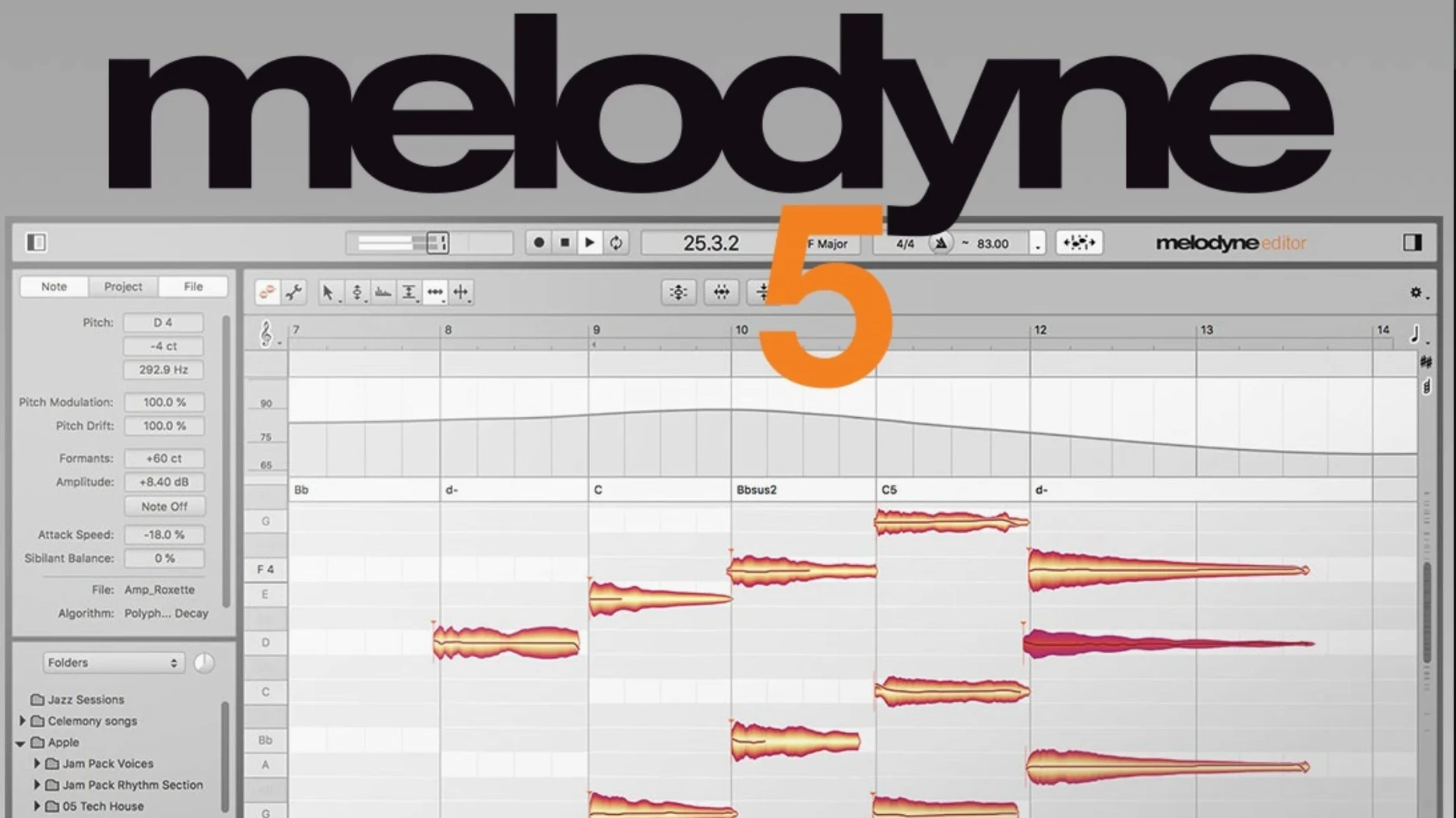
Open the Note Assignment tool on a vocal track and you see what Melodyne does: every note is a separate blob on a grid. Drag a blob up to correct pitch, pull it left or right to shift timing, or shorten it with the edge handle. That direct manipulation is the core of it — no menus, just click and move.
- Note-based volume control — adjust the level of individual notes or syllables manually without touching the DAW fader.
- Fade Tool and Leveling Macro — add fades to single notes or smooth out dynamic inconsistencies across a phrase.
- ARA mode — the plug-in transfers audio data to the DAW automatically, so edits appear in real time without rendering.
- Formant and sibilant editing — tweak the character of a vowel or soften an S without affecting the rest of the note.
- Vibrato and pitch drift — grab the modulation handle to slow down a wobble or straighten a slide.
Version 5.4.2 runs as a Universal Binary on Intel and Apple Silicon Macs, with improved trackpad scrolling and fixes for a startup crash in ARA and plug-in use. It works as a plug-in inside any compatible DAW or as a standalone editor. For anyone mixing vocals, samples, or monophonic instruments, it is a direct way to fix what the performance left behind.
ARA Mode Not Showing Edits? Three Culprits to Check
Most issues with Melodyne 5 come down to three things: audio routing, note detection, and plug-in integration. Here is what to check when something does not behave.
- ARA mode not showing edits. If you are using Melodyne as an ARA plug-in and edits are not reflected in your DAW timeline, quit your DAW and restart it. The ARA handshake between Melodyne and the host sometimes needs a fresh session. Also confirm your DAW supports ARA — not every host does yet.
- Notes detected as one long blob. When Melodyne cannot separate a vocal phrase into individual notes, open the algorithm menu and try the Percussive Pitched algorithm. It handles material where pitch and attack blur together, like fast rap or spoken word. If Percussive Pitched still gives you a single blob, increase the sensitivity from the detection settings.
- Crash when opening Melodyne in a DAW. Version 5.4.2 specifically fixed a crash that could occur when opening Melodyne in ARA and plug-in use cases. If you still hit it, remove any older versions from your plug-in folders before reinstalling. Redundant system files can cause the conflict the 5.4.2 update was designed to fix.
- Trackpad scrolling feels slow or jumpy. The 5.4.2 update revised trackpad scrolling. If it still behaves oddly, check that you are not running an older macOS trackpad driver or third-party tool that intercepts scrolling gestures. Try scrolling in a different app to isolate whether it is Melodyne or the system.
- No sound after editing. Verify Melodyne is receiving audio from the correct track. In plug-in mode, the host must send a signal to the Melodyne insert. In standalone mode, check your audio interface routing. Melodyne does not generate sound — it edits what is already there.
Native on Apple Silicon with macOS 10.12 or Later
Melodyne 5.4.2 requires macOS 10.12 or later. The installer is a Universal Binary, so it runs on both Intel/AMD and Apple Silicon processors natively — no emulation layer. The interface is English only. The standard installation procedure is straightforward: mount the downloaded disk image and run the installer. Activation is handled by the included patch from MORiA, and no additional online connection is needed during setup.
Because it is a Universal Binary, expect the same feature set and performance profile across architectures. The 5.4.2 update includes optimizations and bug fixes specifically for macOS Sequoia, so if you are on that version, you are covered. The trackpad scrolling improvement in 5.4.2 applies to all supported Macs.
Set Default Algorithm to Melodic for Vocal Editing
Before you start editing a project, adjust these settings to avoid surprises later.
- Default algorithm. If you mostly edit vocals, set the default algorithm to Melodic or Percussive Pitched depending on the material. This saves you switching it per track.
- Note detection sensitivity. Increase it for dense, fast material so Melodyne catches every syllable. Decrease it for slower, sustained notes to avoid splitting a held note into fragments.
- Display zoom and grid snap. Set the grid snap to a value that matches your work — 1/16 note for tight edits, 1/8 for broader timing shifts. Adjust the vertical zoom so the note blobs are large enough to grab without accidental selections.
- Keyboard shortcut layout. Melodyne lets you assign common actions like the Fade Tool or Leveling Macro to keys. Do this early; reaching for a tool with the mouse every time slows your flow.
Universal Binary Works on Intel and Apple Silicon Natively
Does Melodyne 5 work with Apple Silicon Macs? Yes. Version 5.4.2 is a Universal Binary and runs natively on Intel and Apple Silicon processors. No Rosetta or emulation is required.
Can I use it in any DAW? It works as a plug-in in any DAW that supports ARA or standard plug-in formats. Standalone mode is also available for editing files outside a DAW session. Check your DAW’s ARA compatibility list — most modern hosts support it.
Is the interface only in English? Yes. The current version has an English interface only. No other language options are available in this build.
What kind of audio can it edit? Melodyne analyzes audio note by note. It works on vocals, monophonic instruments, samples, and recordings where individual notes can be distinguished. It can also detect sounds in chords and edit them, which is useful for tuning a vocal track to the key of a composition or adjusting a sample to match a session’s tempo.
Do I need special hardware? No. A standard audio interface and macOS 10.12 or later are all that is needed. No specific DSP cards or external processors are required.
Leveling Macro Evens Out Volume Jumps Between Notes
- Leveling Macro. Select a phrase and apply the Leveling Macro. It evens out volume jumps between notes without drawing individual automation. Good for taming one loud syllable in an otherwise even take.
- Note-based fades with the Fade Tool. You can add a fade to an individual note’s start or end. This is independent from your DAW’s clip fades and lets you soften an attack on a single word without splitting the audio region.
- Percussive Pitched algorithm. This algorithm is specifically for material where pitch and rhythm are equally important but a standard melodic detection produces too few notes. It is included as an additional option in the algorithm menu.
- Chord and key detection. Melodyne analyzes the audio and can recognize the chords, key, tuning, and tempo of a track. You can use this info to tune a vocal to the correct key without manually matching every note.
- Trackpad scrolling revision in 5.4.2. Scrolling through a long vocal take with the trackpad is noticeably more precise in this update. It reduces overshoot when zoomed in on a phrase.
- Optimizations and bug fixes for macOS Sequoia.
- Improved trackpad scrolling.
- Fixed a crash that could occur when opening Melodyne in ARA and plug-in use cases.
| macOS | macOS 10.12 or later |
|---|---|
| Processor | Apple Silicon, Intel 64-bit |
| Download | 97 MB |
- macOS 10.12 or later
- Intel or Apple Silicon processor
- English interface
Questions about Melodyne
Is Melodyne 5 compatible with Apple Silicon (M1, M2, M3) Macs?
Yes, version 5.4.2 is supplied as a Universal Binary and runs natively on both Intel and Apple Silicon processors.
Does Melodyne work as a plug-in inside a DAW?
Yes, it can be used as a plug-in directly in a DAW, and it supports ARA mode for automatic audio transfer.
How to install, in order
- Mount the downloaded disk image.
- Run the standard installation procedure.
Comments and corrections 0
Sign in or open a free account to leave a comment.
No comments or corrections yet.