Native Instruments Massive X 1.7.2 — download for Mac
VST Plugins Updated
Draws modulation patterns on a grid to shape sound over time.
Screenshot
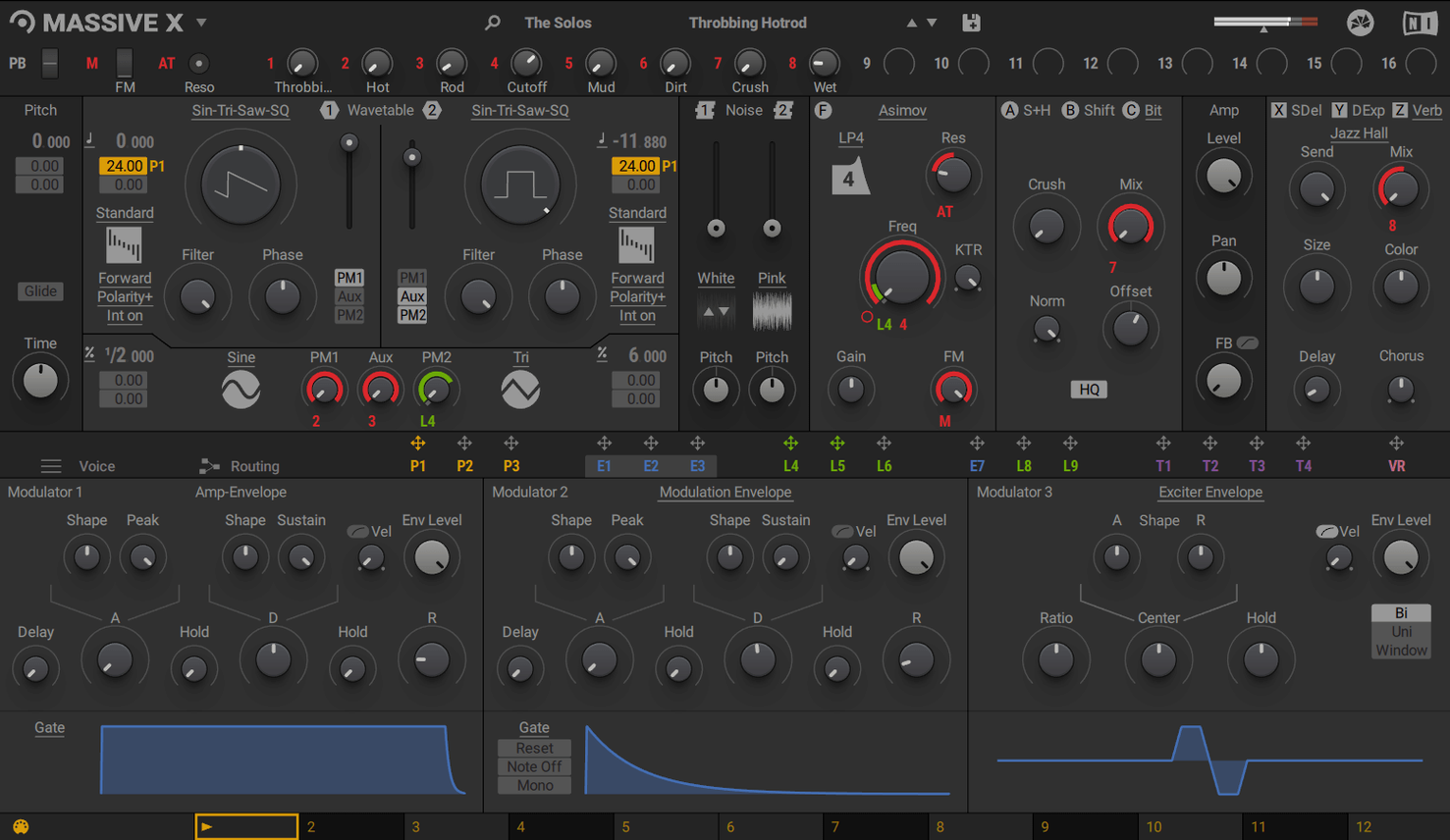
The Performer section is where Massive X stops being a preset browser and starts acting like a modulation workstation. You draw a pattern directly on the grid, assign it to any parameter — filter cutoff, wavetable position, phase modulation depth — and the sound changes shape over time without touching a knob.
What runs under the hood
- More than 170 wavetable options in the oscillator section
- Two phase modulation generators for frequency-domain movement
- Routing system that lets any output connect to any input
- Coexists with the original Massive for projects that need those older sounds
How it changes a mix
Massive X doesn't sit in a track the same way its predecessor did. The new oscillator section and the phase modulation give you metallic harmonics and inharmonic textures that cut through a dense arrangement without extra EQ. The Performer patterns keep the sound moving, so a held chord evolves across a bar — useful for pads that need to breathe or basslines that shouldn't stay static. It is a VST, VST3, AU, and AAX instrument on Mac, and it requires macOS 13 with either Apple Silicon or an Intel processor that supports AVX.
No standalone mode: requires a DAW
Does it work as a standalone app? No. Massive X loads inside a host — your DAW, notation software, or any environment that supports VST, VST3, AU, or AAX. It has no standalone mode, so you need Logic, Cubase, Ableton Live, Digital Performer, or similar to use it.
Will it run on an Intel Mac from 2018? That depends on the CPU. The Intel requirement includes AVX support, which most chips from the Haswell generation onward have. If your processor predates 2013 or is a low-power model without AVX, the installer will block the plugin. Apple Silicon Macs face no such restriction.
How much disk space does the factory library take? The 780 presets plus the wavetable collection and impulse responses add up to roughly 4 GB. The installer unpacks everything, so you want that free before you start.
Can I keep the original Massive installed alongside it? Yes, and it is the intended setup. The two synths share no files and appear as separate instruments in your DAW. Old projects that reference Massive load correctly, and new projects can use either — or both — on separate tracks. Native Instruments designed them to coexist.
What about the graphics requirement? OpenGL 2.1 or higher is the stated minimum. Macs with integrated Intel graphics from 2016 onward or any discrete GPU meet that. If the interface fails to render, check your display driver first.
Faster preset browser navigation
The latest update refines how the plugin behaves inside a session. A few points that matter when you work day to day:
- Preset browser navigation is faster. The library list and tag filters respond without lag, which shaves time off the browsing loop when you audition multiple sounds.
- The Performer grid accepts finer drawing input. Small gestures — a quick curve, a narrow spike — register more precisely, so modulation patterns match what you had in mind on the first try.
- Phase modulation engine stability improved during heavy routing. If you run a complex patch with both PM generators and multiple destinations, the plugin no longer drops voices or introduces clicks under load.
- Wavetable playback across the 10 modes stays consistent when switching oscillator types mid-project. No need to reload the patch after swapping from Spectral to Sync to Formant.
- Remote Octave control, which lets you trigger Performer patterns from the keyboard, now maps correctly across octave ranges above and below middle C. The note-to-pattern relation holds regardless of the transposition.
None of these are headline features. They are the kind of polish that makes a synth you open every day less annoying to use.
Scenario: a media composer building tension cues
A composer scoring a documentary needs a cue that starts sparse and tightens over thirty seconds. The director wants a low drone that gradually turns metallic, then cuts to silence. The composer opens Massive X in Logic, picks a basic sine wave from the wavetable list, and draws a slow ramp in the Performer grid — mapped to wavetable position. Over four bars the sine morphs into a glassy harmonic texture as the position index moves toward the upper tables. Phase modulation is added on a second Performer lane, modulating at a rate that matches the on-screen clock: one slow cycle per bar. The Remote Octave control maps a held C2 to start the pattern and a C3 to reset it, so the conductor can trigger changes live if needed. No automation lanes, no extra MIDI clips. The cue is a two-bar loop with one synth and two drawn lines. That kind of work is where Massive X replaces three separate plugins.
Direct routing without modulation matrix
The routing system lets you connect any modulation source to any destination without opening a modulation matrix. It is a single pull-down per output: pick a source, and the destination reads it. No daisy-chaining.
The 170 wavetable options are not static snapshots. Each wavetable can be scanned across its length via the playback modes, so a single selection yields dozens of timbral variations depending on how the oscillator sweeps. You do not need to hunt for a new table every time the sound needs to shift.
Presets load without a gap. When you click a new sound, the synth switches immediately — no loading bar, no silent period. This matters during a live arrangement session when you are flipping through fifty sounds in sixty seconds.
The factory presets are organized by genre and role, but also by modulation complexity. If you want a patch that moves, you can filter for presets that use the Performer section. If you want a static layer, you skip those. The tagging system is consistent across KOMPLETE instruments, so the logic carries over if you also use Kontakt or Reaktor.
Massive X reaches 1.7.2 with a handful of stability and licensing refinements. A crash during plug-in scanning and validation in Komplete Kontrol, Maschine, and Cubase has been resolved. The update also introduces an upgrade prompt pointing toward Massive XL, revised screens for demo mode and trial expiration, and a new dialog that handles subscription expiry and license status. One note for Maschine users: if Massive X disappears after the update, a manual rescan from the Maschine edit menu brings it back.
Massive XL 2.0.1 ships in parallel. The macOS build is confirmed, though a granular change log for this point release hasn't been published yet.
| macOS | macOS 13 or later |
|---|---|
| Processor | Apple Silicon, Intel 64-bit |
| Download | 1.6 GB |
- macOS 13 or later
- Apple Silicon or Intel 64-bit processor
Questions about Native Instruments Massive X
Can I use Massive X alongside the original Massive?
Yes. Massive X coexists with the original Massive, so you can keep existing DAW projects with Massive sounds while building new ones in Massive X.
What are the system requirements for Massive X on Mac?
macOS 13, Apple Silicon or Intel with AVX support, 4 GB RAM (6 GB recommended), and a graphics card with OpenGL 2.1 or higher.
How to install, in order
- Open the downloaded disk image.
- Run the standard installer.
Comments and corrections 0
Sign in or open a free account to leave a comment.
No comments or corrections yet.