Addictive Drums 2 2.9.1 — download for Mac
VST Plugins Updated
Runs a stable drum engine on Apple Silicon and Intel hardware, ready for any mid-session project.
Screenshot
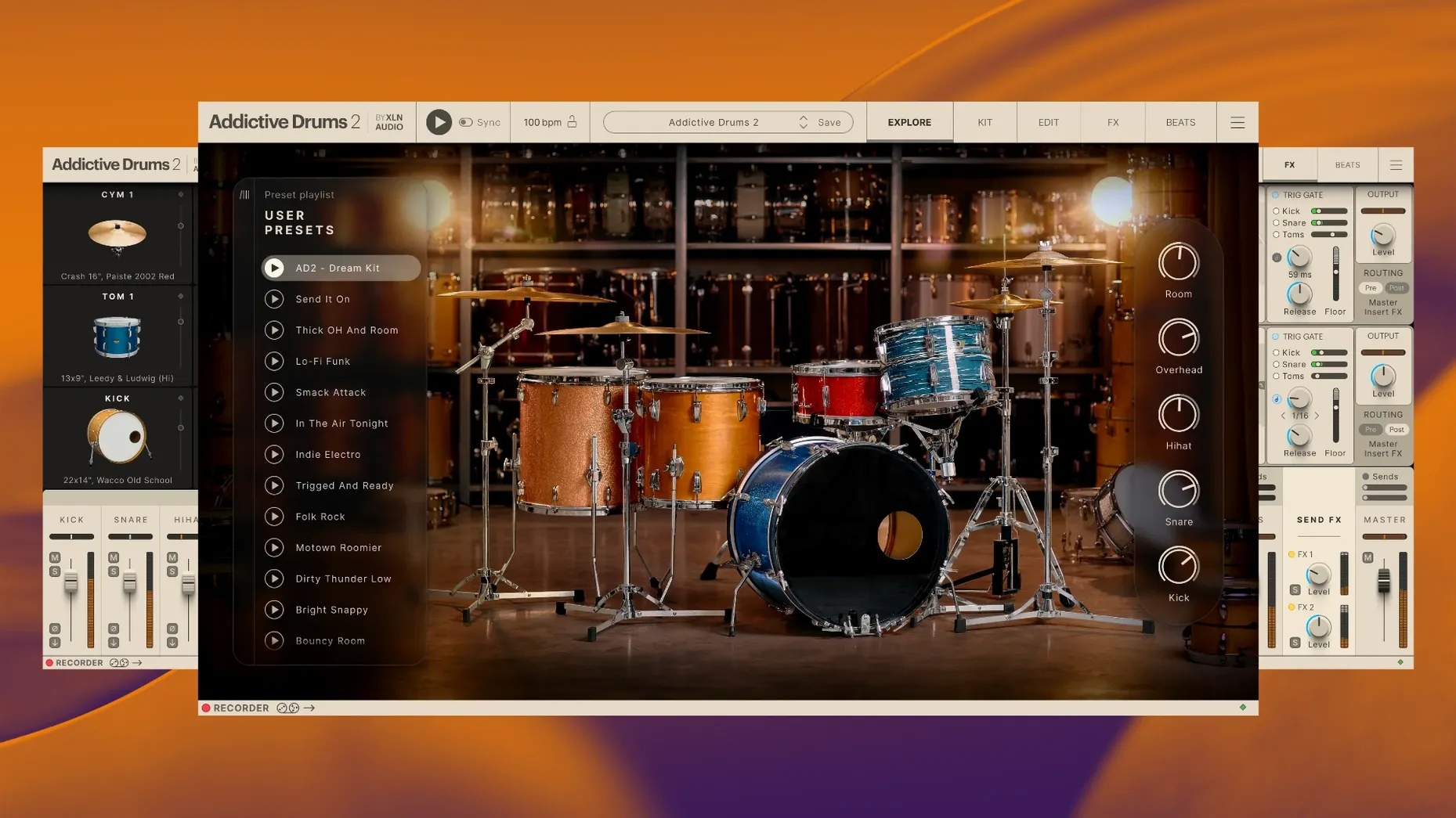
Version 2.9.1 keeps the engine stable, with no feature additions — a maintenance release that matters when a project is mid-session and an update breaks nothing. The plugin runs on Apple Silicon and Intel hardware under macOS 10.13 or later, so it slots into most studios without a compatibility pause.
In a session, Addictive Drums sits on an instrument track, fed by MIDI from your editor or a controller. You pick a kit from the collection, load a preset, then drag a groove from the browser straight into the DAW timeline. The beats and fills are recorded performances, not grid-constructed patterns, which makes the track cut in a busier mix without extra humanizing work.
Routing is where it earns its keep. Each drum and room mic has its own channel inside the plugin, so you can send kick and snare to separate buses for compression and EQ while leaving overheads cleaner. The internal mixer handles level, bleed, and envelope shaping before the signal ever hits your DAW faders.
For a project manager who only occasionally builds guide tracks, the preset kits and searchable groove library cut a half-day task to under an hour. Engineers who mix drums daily will lean on the multichannel routing to treat it like a recorded kit.
Dragging a Single Groove Across an Entire Section
New users of Addictive Drums 2 often treat it like a drum machine rather than a performance tool. The most frequent error is dragging a single groove to fill an entire song section without variation. The groove browser holds hundreds of patterns, but each one is a recorded human performance, not a loop designed to repeat unchanged for sixteen bars. Repeating the same two-bar pattern makes a track sound mechanical — the opposite of what the plugin is built for.
Another mistake is ignoring the bleed controls. Every drum in a real kit leaks into the other microphones, and Addictive Drums 2 models that bleed. Beginners sometimes turn bleed off entirely, thinking it will sound cleaner. What they get is a dry, separated kit that sits unnaturally in a mix. Leaving bleed at moderate levels and adjusting the room microphone fader gives the kit space and depth without mud.
A third misstep is loading every MIDIpak at once. The library is large, and browsing through thousands of grooves slows the workflow. Searching by style or time signature in the groove browser is faster than scrolling through an unsorted list. New users also tend to over-process the internal mixer. The plugin's built-in compression and envelope controls are useful, but stacking them with heavy DAW processing on top of the same channels can thin out the sound. A lighter touch inside the plugin usually works better.
Finally, beginners rarely use the velocity mapping correctly. Addictive Drums 2 responds to MIDI velocity across multiple layers per drum, but some users feed it flat velocities from a step sequencer. The result sounds stiff. Programming hits with natural velocity variation — even a simple rise and fall across a fill — makes the difference between a passable drum track and one that feels played.
Composers Scoring to Picture on Tight Deadlines
Addictive Drums 2 suits three kinds of Mac users especially well.
- Composers working to picture benefit from speed. When a scoring deadline is tight, auditioning grooves by style and tempo and dropping them into a timeline is faster than programming each hit. The recorded performance quality means the drums hold up in a mix without hours of editing.
- Drummers who cannot mic a kit at home use Addictive Drums 2 to produce demo tracks or song ideas. For a drummer, the velocity layers and articulation feel familiar through a MIDI controller. Routing each drum to its own output lets them set up a template that mimics their live monitor mix.
- Mix engineers who receive MIDI drum parts from clients get the most out of the multichannel routing and the internal mixer. They can swap kits, adjust ambience, and process each drum individually without asking the client to re-record anything. A mix engineer might keep two or three template sessions with Addictive Drums 2 loaded, each using a different kit for different genres.
No comparison section text provided
Superior Drummer 3
Superior Drummer 3 has a deeper sound engine with more articulations per drum, which matters for metal and hard rock where every snare hit has to sound distinct. The trade-off is a steeper learning curve and heavier processing load. Addictive Drums 2 loads faster and its groove browser is more immediate for composers who need results quickly. Superior Drummer also requires more manual routing out of the box, while Addictive Drums 2 has a simpler output setup that matches most DAW templates with less patching.
EZdrummer 2
EZdrummer 2 is the stripped-down sibling in the same family from Toontrack. It has fewer kits and fewer mixer controls, but it loads in seconds and works well for songwriters sketching ideas. Addictive Drums 2 offers more flexibility for mixing — the multichannel routing alone is reason to choose it over EZdrummer if the track moves beyond a demo. For a quick guide track, EZdrummer is fine. For a finished production, Addictive Drums 2 gives the engineer room to work.
BFD3
BFD3 has a different architecture — it relies on a large library of recorded hits with multiple microphone positions, and its mixer is extensive. The library size is comparable, but BFD3 has not been updated as frequently on macOS, and some users report compatibility gaps on Apple Silicon through Rosetta 2. Addictive Drums 2 has official ARM support and a more consistent experience across recent macOS versions. BFD3's sound is excellent for jazz and acoustic styles, but for general production work, Addictive Drums 2 is more predictable on a modern Mac.
Marina Scores a Short Documentary from Load to Mix
Marina is a composer in Porto who scores short documentaries. She opens her DAW and creates an instrument track. In the plugin browser, she selects Addictive Drums 2 and waits for the interface to load — a few seconds on an M2 MacBook Air.
She needs a tense, sparse rhythm for a scene about early morning fog. She clicks the Kit tab and chooses the Brush Jazz kit from the default collection. The kit loads with a preset called "Tight Room" that keeps the ambience close. She can hear the kick and snare are present but not boomy.
Next, she opens the Groove browser. She filters by time signature — 4/4 — and by style tag "Ambient." Two results appear. She clicks the first one, a simple kick-hat pattern at 90 BPM. The groove plays in the browser preview. It is close to what she needs, but she wants the snare to land a little later. She drags the groove into her DAW timeline and opens the MIDI editor. There, she nudges two snare hits back by a sixteenth note and adds a soft tom hit on the fourth bar.
Back in the Addictive Drums interface, she opens the Mixer tab. She wants the kick to cut through without extra compression. She turns the kick channel's envelope attack up slightly and reduces the sustain. The room mic fader is at 30 percent — enough to glue the kit without washing out the snare. She leaves bleed at the default setting.
She routes the kick output to its own bus in her DAW for later sidechain compression on the bass track. The snare and overheads go to a stereo bus she treats as a drum subgroup. She records a few takes of the MIDI part, then duplicates the groove for the next section, adjusting two hits to mark the scene transition. If she had programmed the same part from scratch with samples, it would have taken twice as long.
Real-World Scenario: A Mix Engineer Receiving MIDI Drums
Rui is a mix engineer in Lisbon. He works remotely with bands who record their own parts. A client sends him a Logic project with a MIDI drum track and asks for a mix rough. The client used a generic drum sampler with one kit and no output routing — everything comes in on one stereo track.
Rui opens the project and replaces the drum plugin with Addictive Drums 2. He loads the same generic kit sound to start, then uses the groove browser to match the feel of the client's original MIDI. The client's part uses a straight eighth-note pattern with a fill every four bars. Rui finds a matching groove, drags it in, and tunes the velocity curve so the fill hits harder.
He routes the kick, snare, and toms to separate outputs. Now he can compress the kick with a slower attack, eq the snare to cut through the guitar, and add a short reverb to the overheads without touching the close mics. The room microphone gives the kit a recorded feel that the client's original lacked. He sends the client a rough mix with a note: "If you want a different kit sound, I can swap the ADpak without rebuilding the MIDI." The client approves the first version. The session stays open, the drums stay on their own buses, and Rui moves on to the vocal treatment without touching the drum processing again.
That kind of workflow works because Addictive Drums 2 is built as a studio instrument, not just a sound module. The routing and the groove library let an engineer treat MIDI drums like a recorded performance, and that saves a day of editing on a busy mix schedule.
No release notes filed for 2.9.1. They are added here when a build changes how the program behaves.
| macOS | macOS 10.13 or later |
|---|---|
| Processor | Apple Silicon, Intel 64-bit |
| Download | 14.5 GB |
- macOS 10.13 or later
- Apple Silicon or Intel, 64-bit only
Questions about Addictive Drums 2
Does Addictive Drums 2 work as a standalone application?
Yes, XLN Audio provides a standalone application for both Windows and macOS alongside the plugin formats.
How to install, in order
- Place the main archive and all split archive parts together in one folder.
- Install an archive utility like Keka if you don't already have one.
- Right-click the
.zip.001file, choose Open With, and select Keka to extract the contents. - Run the standard installer once extraction completes.
Comments and corrections 0
Sign in or open a free account to leave a comment.
No comments or corrections yet.